🖨️ Computer Hardware & Output Devices
CPU, ALU, registers, motherboard, printers (laser, inkjet, dot-matrix), PostScript, PCL, monitor types, plotter for UPSSSC AGTA.
Input Devices — Quick Reference
An input device sends data and instructions INTO the computer for processing.
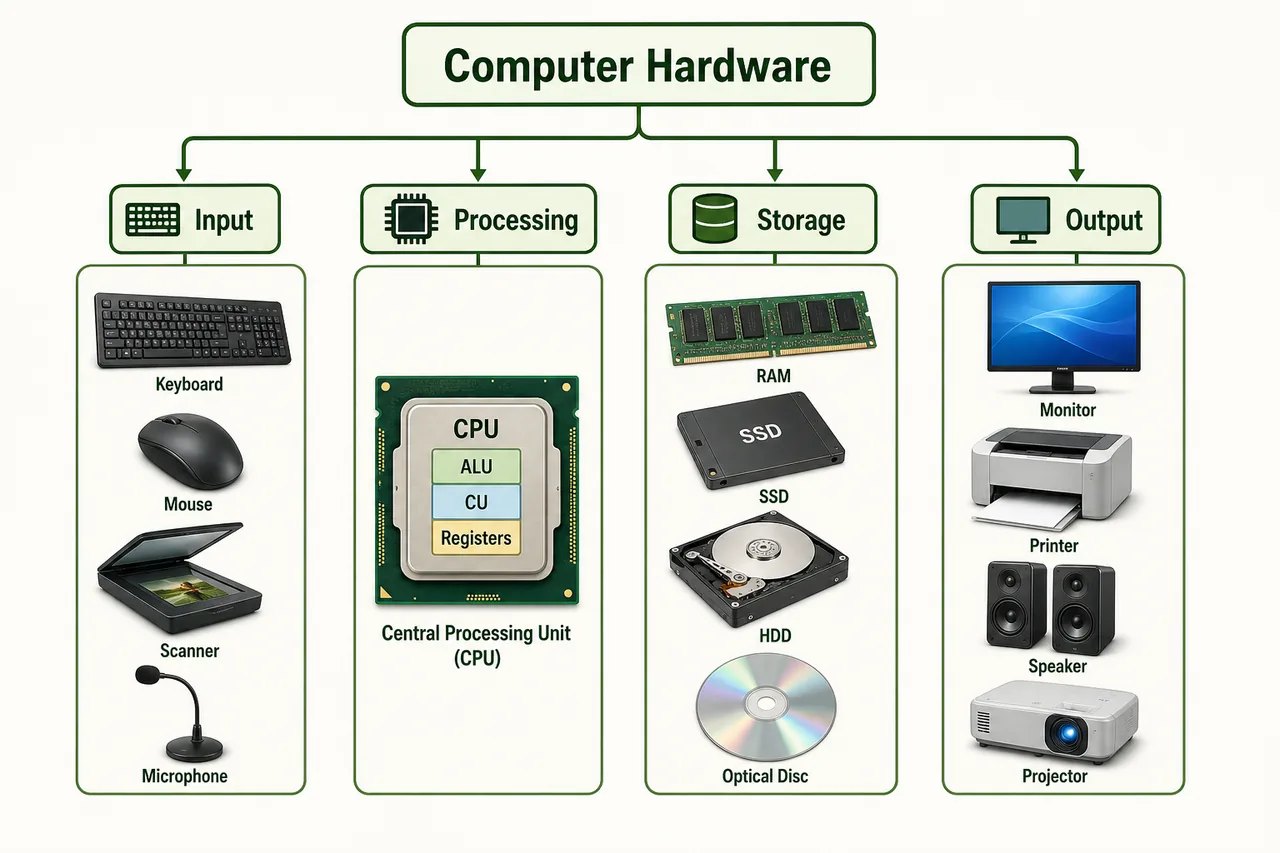
| Device | Type | How It Works |
|---|---|---|
| Keyboard | Manual | Keys pressed to enter characters |
| Mouse | Pointing | Click, drag, scroll to interact with GUI |
| Scanner | Optical | Converts physical documents to digital images |
| Microphone | Audio | Converts sound waves to digital audio |
| Webcam | Video | Captures video input for calls/recording |
| Touchscreen | Direct | Touch-based input (phones, ATMs, kiosks) |
| Barcode Reader | Optical | Reads printed barcodes (shops, warehouses) |
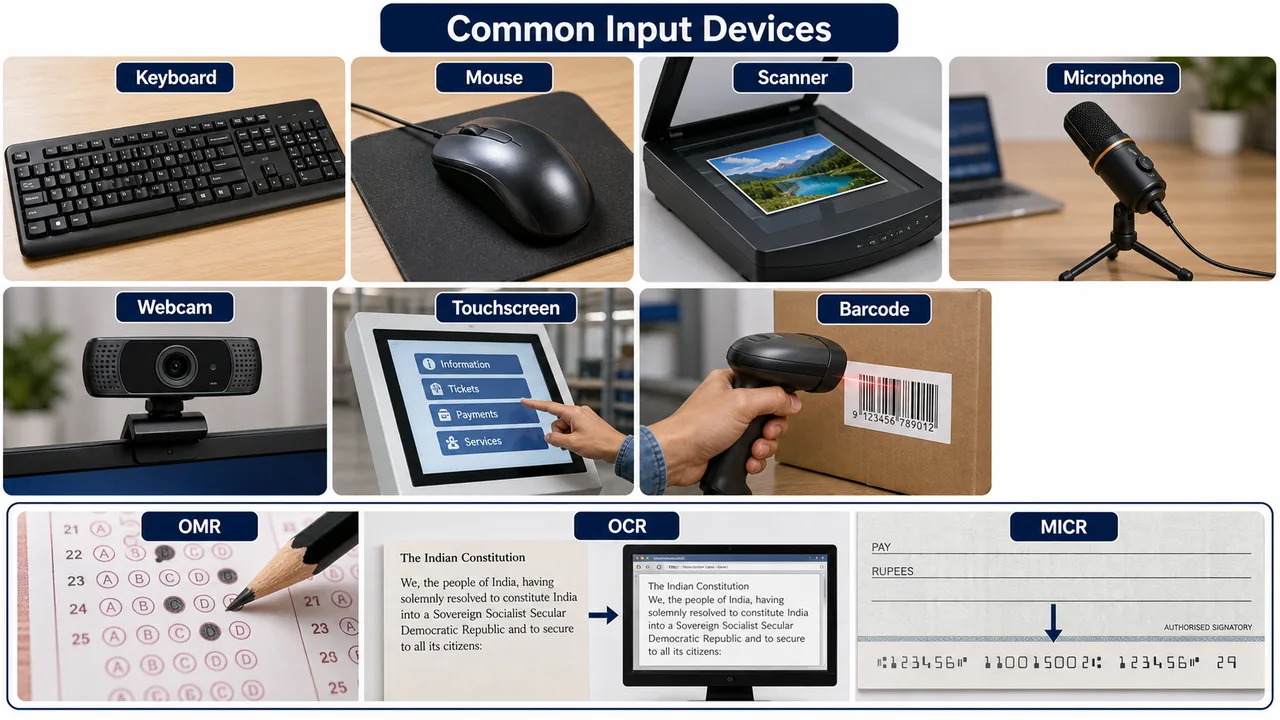
| OMR | Optical | Optical Mark Recognition — reads pencil marks (exam sheets) |
| OCR | Optical | Optical Character Recognition — reads printed/handwritten text |
| MICR | Magnetic | Magnetic Ink Character Recognition — reads cheque numbers |
| Light Pen | Pointing | Pen-shaped device to select on screen (old CRT monitors) |
| Joystick | Pointing | Gaming/control device with stick movement |
| Trackball | Pointing | Stationary ball rotated by fingers (like inverted mouse) |
Keep the usage difference clear: OMR is used for marked answer sheets, OCR turns printed text into editable digital text, and MICR is used in cheque processing.
The most common keyboard layout in personal computers is QWERTY, named after the first six letters of the top alphabet row. Examiners sometimes ask this as a direct one-line fact.
CPU — Central Processing Unit
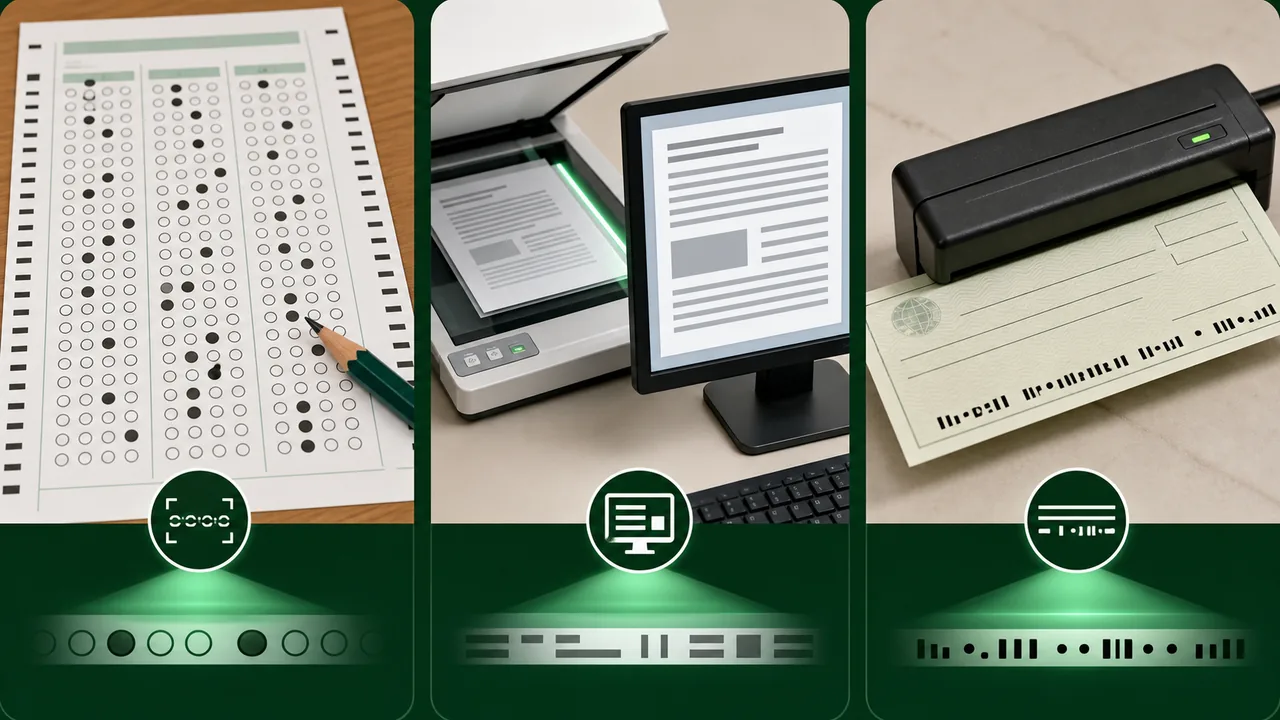
The CPU is the "brain" of the computer. It performs all processing — calculations, comparisons, and decision-making.
CPU Components
| Component | Full Form | Function |
|---|---|---|
| ALU | Arithmetic Logic Unit | Performs arithmetic (+, -, x, /) and logical (AND, OR, NOT) operations |
| CU | Control Unit | Directs and coordinates all CPU operations; fetches and decodes instructions |
| Registers | — | Ultra-fast temporary storage inside CPU |
Important CPU Registers
| Register | Full Form | Purpose |
|---|---|---|
| MAR | Memory Address Register | Holds address of memory location to be accessed |
| MDR | Memory Data Register | Holds data being read from or written to memory |
| PC | Program Counter | Holds address of the next instruction to execute |
| IR | Instruction Register | Holds the current instruction being executed |
| Accumulator | — | Stores intermediate results of ALU operations |
A simple way to remember the CPU parts is this: ALU handles calculations and logic, the Control Unit directs the work, and registers hold the fastest temporary data.
Motherboard Components
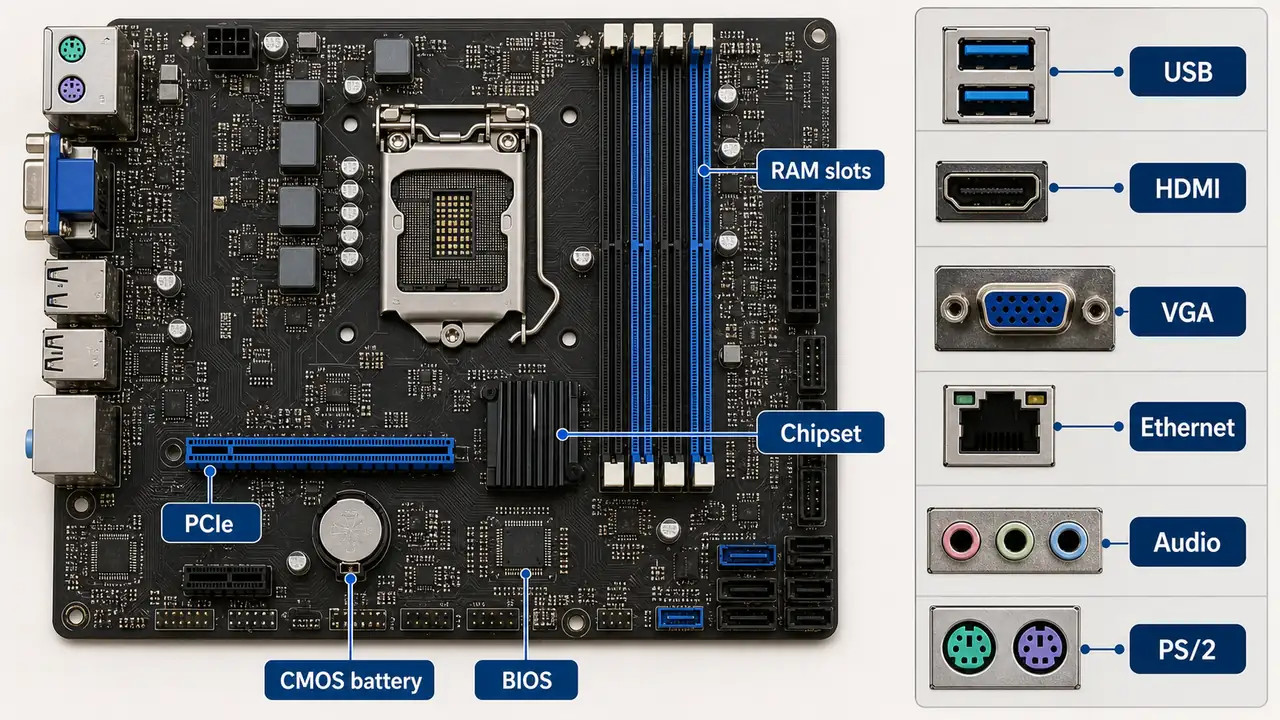
The motherboard is the main circuit board that connects all computer components together.
| Component | Purpose |
|---|---|
| Chipset | Controls data flow between CPU, RAM, and peripherals |
| RAM Slots | Where RAM modules are inserted |
| PCI Slot | Peripheral Component Interconnect — for expansion cards |
| PCIe Slot | PCI Express — faster, modern version (for GPU, SSD) |
| CMOS Battery | Keeps BIOS settings and clock running when PC is off |
| BIOS/UEFI | Basic Input Output System — firmware that boots the computer |
Ports on a Computer
| Port | Full Form | Purpose |
|---|---|---|
| USB | Universal Serial Bus | Connect peripherals (pen drive, mouse, printer) |
| HDMI | High-Definition Multimedia Interface | Video + audio to monitor/TV |
| VGA | Video Graphics Array | Older video output (analog) |
| Ethernet (RJ-45) | — | Wired internet/LAN connection |
| Audio Jack (3.5mm) | — | Headphones, microphone, speakers |
| PS/2 | — | Old keyboard/mouse port (green = mouse, purple = keyboard) |
Output Devices
An output device displays or produces the processed results from the computer.
A soft copy is output seen in digital form on a screen, such as text on a monitor or a PDF viewed on a phone. A hard copy is the physical printed version of that output on paper.
Monitor Types
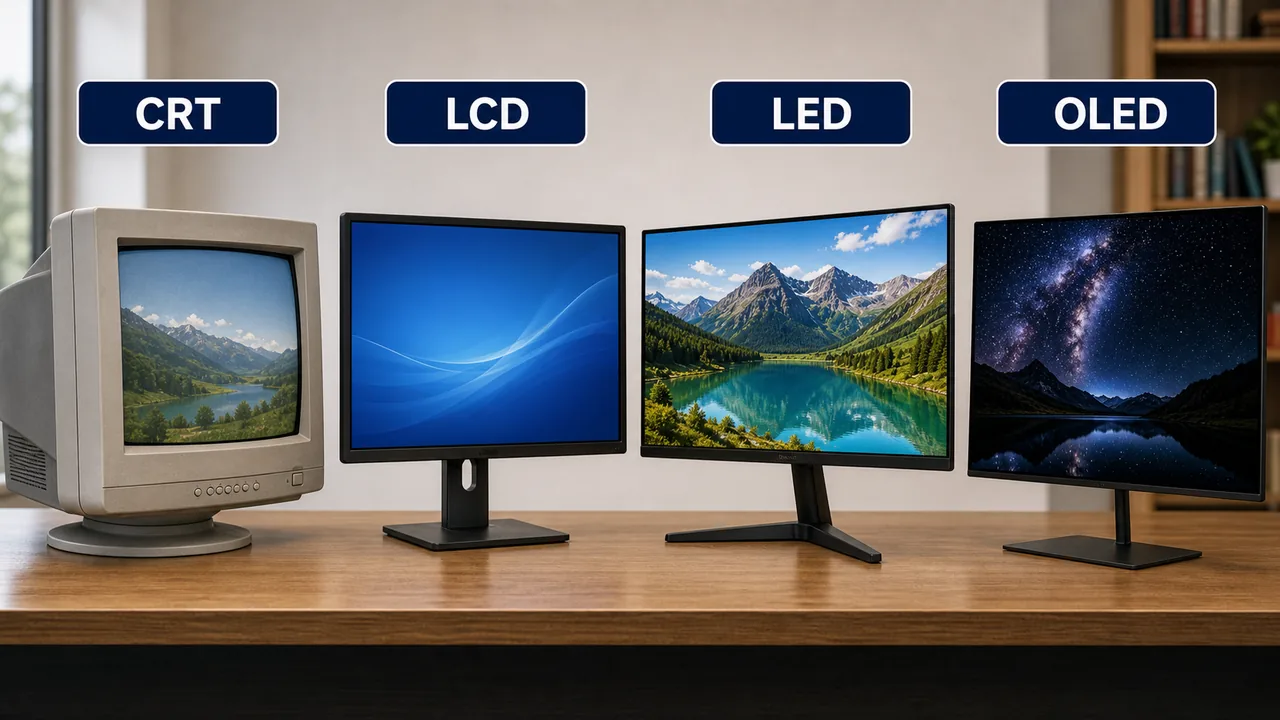
| Type | Full Form | Technology | Key Feature |
|---|---|---|---|
| CRT | Cathode Ray Tube | Electron beam on phosphor screen | Bulky, old, cheap |
| LCD | Liquid Crystal Display | Liquid crystals with backlight | Thin, low power |
| LED | Light Emitting Diode | LCD with LED backlight | Brighter, energy efficient |
| OLED | Organic LED | Each pixel emits own light | Best contrast, thinnest |
Monitor Specifications:
| Term | Meaning |
|---|---|
| Resolution | Number of pixels (e.g., 1920x1080 = Full HD) |
| Refresh Rate | How many times screen updates per second (60Hz, 144Hz) |
| Pixel | Smallest unit of display — a single dot of color |
| Aspect Ratio | Width:Height ratio (16:9 widescreen, 4:3 old monitors) |
Printers
Printers produce hard copy (physical paper output) of digital documents.
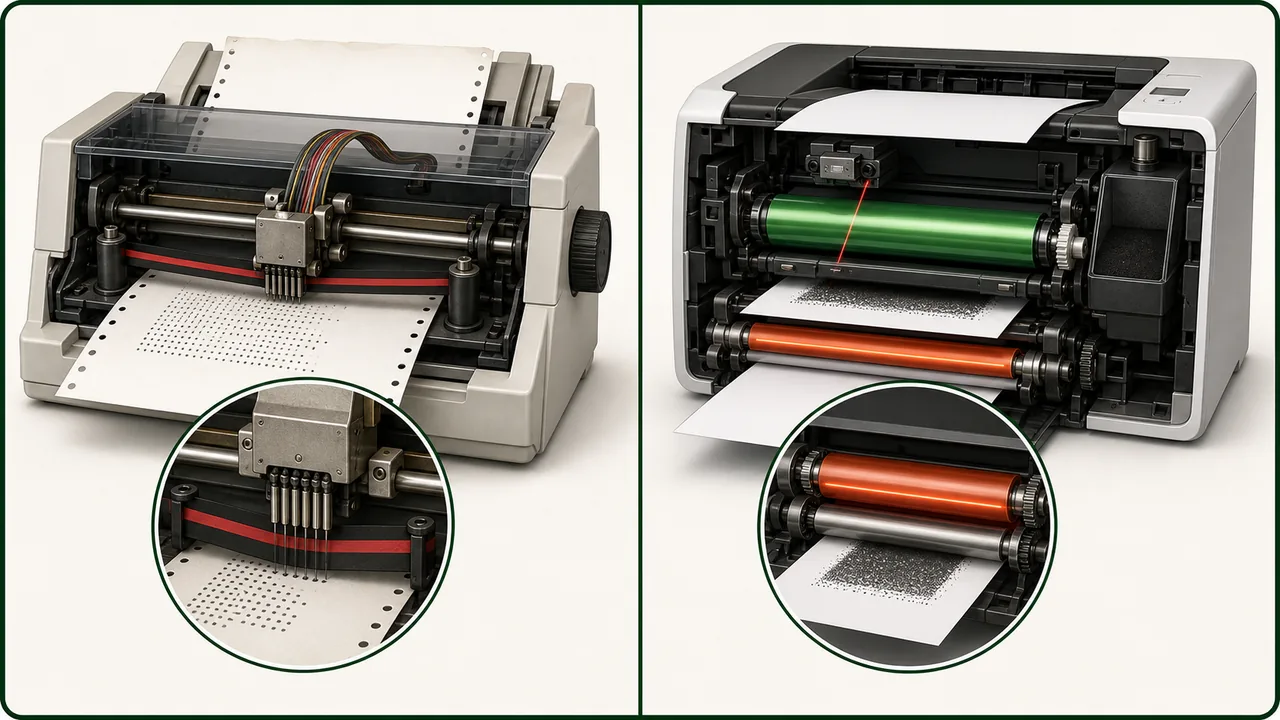
Impact vs Non-Impact Printers
| Feature | Impact Printers | Non-Impact Printers |
|---|---|---|
| Mechanism | Physical contact — strikes ribbon against paper | No physical contact — uses laser/ink/heat |
| Noise | Very noisy | Quiet |
| Speed | Slow | Fast |
| Quality | Lower | Higher |
| Carbon copies | Can make carbon copies | Cannot make carbon copies |
| Cost per page | Low | Varies |
| Examples | Dot-matrix, Daisy wheel, Line printer | Laser, Inkjet, Thermal |
Impact Printers
Dot-Matrix Printer
- Uses a print head with pins (9 or 24 pins) that strike an ink ribbon against paper
- Creates characters as a pattern of dots
- Can print on multi-part/carbon copy forms (used in billing, railways)
- Noisy but cheap to operate
Daisy Wheel Printer
- Uses a wheel with character petals (like a daisy flower)
- Produces letter-quality print (typewriter quality)
- Cannot print graphics — only pre-formed characters
- Very slow, now obsolete
Line Printer
- Prints an entire line at once — very fast
- Used in mainframe environments for bulk printing
- Types: drum printer, chain printer, band printer
Non-Impact Printers
Laser Printer
- Uses a laser beam to create image on a photosensitive drum
- Toner (dry powder) is fused onto paper using heat
- Fastest and highest quality for text documents
- Invented at Xerox PARC
- Cost: High initial cost, low per-page cost
Inkjet Printer
- Sprays tiny droplets of liquid ink through nozzles onto paper
- Excellent for color printing and photos
- Cost: Low initial cost, high ink cartridge cost
- Slower than laser for large volumes
Thermal Printer
- Uses heat on special thermal paper
- Common in: ATM receipts, POS billing, labels
- No ink or toner needed — paper itself changes color with heat
- Print fades over time
Printer Comparison Table
| Feature | Dot-Matrix | Laser | Inkjet | Thermal |
|---|---|---|---|---|
| Technology | Pins + ribbon | Laser + toner | Liquid ink + nozzles | Heat on thermal paper |
| Speed | Slow | Fastest | Moderate | Fast (for receipts) |
| Quality | Low | Highest | High (photos) | Moderate |
| Color | Limited | Yes (expensive) | Best for color | No |
| Noise | Very noisy | Quiet | Quiet | Quiet |
| Carbon Copy | Yes | No | No | No |
| Use Case | Billing, railways | Office documents | Photos, home use | Receipts, labels |
PostScript and PCL
| Technology | Developer | Description |
|---|---|---|
| PostScript | Adobe | Page Description Language — tells printer exactly how to render text, graphics, and images. Device-independent |
| PCL | HP (Hewlett-Packard) | Printer Command Language — simpler, faster, device-dependent. Most common for office printing |
PostScript vs PCL:
- PostScript: better for complex graphics, publishing, and design work
- PCL: faster for standard text documents and office use
Printer Specifications
| Term | Full Form | Meaning |
|---|---|---|
| DPI | Dots Per Inch | Print quality/resolution — higher = sharper |
| PPM | Pages Per Minute | Print speed |
Plotter
A plotter is a specialized output device for printing large-format technical drawings, blueprints, maps, and banners.
| Type | How It Works |
|---|---|
| Pen Plotter | Uses pens to draw lines on paper — precise line drawings |
| Electrostatic Plotter | Uses electrical charge to create image — faster |
| Inkjet Plotter | Large-format inkjet — for posters, banners |
Plotter vs Printer:
- Plotter = large format, vector graphics, continuous lines (engineering drawings)
- Printer = standard size (A4/A3), raster graphics, text documents
Other Output Devices
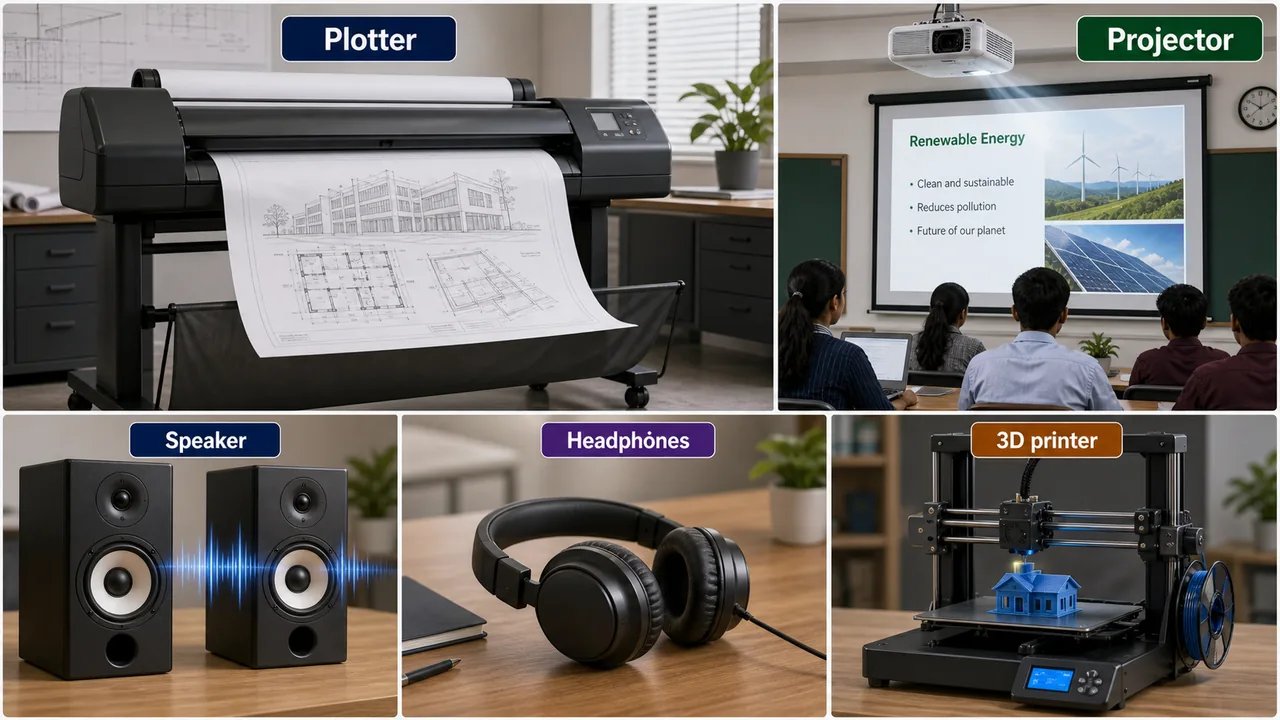
| Device | Function |
|---|---|
| Speaker | Produces audio output (music, alerts, voice) |
| Projector | Displays enlarged image on screen/wall (presentations) |
| Headphones | Personal audio output |
| 3D Printer | Builds three-dimensional objects layer by layer from a digital model (additive manufacturing) |
Input Device Details
OMR (Optical Mark Recognition)
OMR reads pencil marks on pre-printed forms. It detects the presence or absence of a mark in predefined positions. Used extensively in competitive exam answer sheets, surveys, and election ballots.
OCR (Optical Character Recognition)
OCR converts printed or handwritten text into machine-readable digital text. Used in digitising books, reading number plates, and scanning documents.
MICR (Magnetic Ink Character Recognition)
MICR reads characters printed with special magnetic ink. Used primarily in bank cheque processing to read cheque numbers, bank codes, and account numbers.
Barcode Reader vs QR Code Reader
| Feature | Barcode Reader | QR Code Reader |
|---|---|---|
| Data Format | 1D — horizontal lines of varying width | 2D — square matrix of black/white modules |
| Data Capacity | Up to ~100 characters | Up to ~4,000+ characters |
| Stores | Only numbers/text | Text, URLs, images, contact info |
| Used In | Retail products, inventory | UPI payments, tickets, websites |
| Reader | Laser/CCD scanner | Camera-based (smartphone) |
Touch Screen Types
| Type | Resistive | Capacitive |
|---|---|---|
| How it Works | Two flexible layers pressed together by touch | Senses electrical charge from human finger |
| Accuracy | Lower | Higher |
| Multi-touch | No | Yes |
| Stylus/Gloves | Works with any object | Only bare finger or special stylus |
| Used In | ATMs, older devices, industrial | Smartphones, tablets, modern touchscreens |
SMPS — Power Supply Unit
SMPS (Switch Mode Power Supply) converts AC (Alternating Current) from the wall socket into DC (Direct Current) required by computer components. It provides different voltages:
| Voltage | Components Powered |
|---|---|
| +3.3V | RAM, chipset, some CPU circuits |
| +5V | USB ports, SSD, logic circuits |
| +12V | CPU, GPU, cooling fans, hard drives |
USB Types — Speed Comparison
| USB Version | Year | Maximum Speed | Connector Type |
|---|---|---|---|
| USB 1.0 | 1996 | 1.5 Mbps (Low Speed) | Type-A |
| USB 1.1 | 1998 | 12 Mbps (Full Speed) | Type-A |
| USB 2.0 | 2000 | 480 Mbps (Hi-Speed) | Type-A, Mini, Micro |
| USB 3.0 | 2008 | 5 Gbps (SuperSpeed) | Type-A (blue), Type-B |
| USB 3.1 | 2013 | 10 Gbps | Type-A, Type-C |
| USB-C | 2014+ | 10–40 Gbps | Reversible Type-C connector |
In practical terms, USB 2.0 is much slower than USB 3.0, while USB-C refers to the newer reversible connector shape that can support very high modern transfer speeds.
Port Types — Complete Reference
| Port | Type | Purpose |
|---|---|---|
| Serial Port | Data (one bit at a time) | Older modems, mice (DB-9 connector) |
| Parallel Port | Data (multiple bits at once) | Older printers (DB-25 connector) |
| PS/2 | Input | Old keyboard (purple) and mouse (green) |
| VGA | Video (analog) | Older monitors — 15-pin connector |
| DVI (Digital Visual Interface) | Video (digital/analog) | Monitors — better than VGA |
| HDMI | Video + Audio (digital) | Modern monitors, TVs, projectors |
| DisplayPort | Video + Audio (digital) | High-end monitors, gaming displays |
| Ethernet (RJ-45) | Network | Wired LAN/internet connection |
| Audio Jack (3.5mm) | Audio | Headphones, microphone, speakers |
Serial ports send one bit at a time, whereas parallel ports send multiple bits together. Both have largely been replaced in everyday use by USB.
Printer Resolution and Speed
| Term | Full Form | Meaning | Example |
|---|---|---|---|
| DPI | Dots Per Inch | Print quality/resolution — higher DPI = sharper image | 300 DPI (basic), 1200 DPI (high quality) |
| PPM | Pages Per Minute | Print speed — higher PPM = faster printing | Laser: 20-60 PPM; Inkjet: 5-20 PPM |
Summary Points
| Concept | Key Details |
|---|---|
| ALU | Arithmetic + Logic operations in CPU |
| CU | Controls and coordinates all CPU operations |
| MAR | Memory Address Register — holds address |
| MDR | Memory Data Register — holds data |
| PC | Program Counter — address of next instruction |
| IR | Instruction Register — current instruction |
| Accumulator | Stores intermediate ALU results |
| OMR | Reads pencil marks — exam sheets |
| OCR | Reads printed/handwritten text — digitising books |
| MICR | Reads magnetic ink — bank cheques |
| Barcode | 1D lines, ~100 chars, laser/CCD scanner — retail |
| QR Code | 2D matrix, 4000+ chars, camera-based — UPI payments |
| Resistive Touch | Works with any object, no multi-touch — ATMs, industrial |
| Capacitive Touch | Bare finger only, multi-touch — smartphones, tablets |
| CRT | Old bulky monitor — cathode ray tube |
| LCD/LED/OLED | Modern thin monitors (OLED = best contrast, each pixel emits light) |
| Dot-Matrix | Impact, 9/24 pins + ribbon, noisy, carbon copies — billing, railways |
| Laser Printer | Toner + photosensitive drum, fastest, best text quality (Xerox PARC) |
| Inkjet Printer | Liquid ink + nozzles, best for color/photos |
| Thermal | Heat on special paper, no ink — ATM receipts, print fades |
| PostScript | Adobe's page description language — complex graphics |
| PCL | HP's Printer Command Language — office printing |
| DPI | Dots Per Inch — print quality (300 basic, 1200 high) |
| PPM | Pages Per Minute — print speed (Laser 20-60, Inkjet 5-20) |
| Plotter | Large-format output — engineering drawings, pen/electrostatic/inkjet |
| 3D Printer | Layer-by-layer additive manufacturing from digital model |
| SMPS | AC→DC conversion — 3.3V (RAM), 5V (USB), 12V (CPU/GPU/fans) |
| USB 1.0 | 1996, 1.5 Mbps (Low Speed) |
| USB 2.0 | 2000, 480 Mbps (Hi-Speed) |
| USB 3.0 | 2008, 5 Gbps (SuperSpeed) |
| USB-C | 2014+, 10-40 Gbps, reversible connector |
| VGA | Analog video, 15-pin — older monitors |
| DVI | Digital Visual Interface — better than VGA |
| HDMI | Digital video + audio — monitors, TVs, projectors |
| DisplayPort | High-end digital video + audio — gaming displays |
| RJ-45 | Ethernet port — wired LAN/internet |
| Serial Port | Sends one bit at a time (old modems, DB-9) |
| Parallel Port | Sends multiple bits at once (old printers, DB-25) |
Lesson Doubts
Ask questions, get expert answers