🧠 CPU, Motherboard & System Unit
Central Processing Unit (ALU, CU, registers), motherboard components, ports, connectors, buses, and personal computer architecture for UPSSSC AGTA.
The System Unit — The Computer's Body
The system unit is the rectangular box that houses all the core components of a computer. Everything important lives inside it — the processor, memory, storage, and circuit boards. The keyboard, monitor, and mouse connect to it from outside.
There are two main types:
- Desktop type — Lies flat, monitor placed on top
- Tower type — Stands vertically beside the monitor (most common today)
CPU — The Brain of the Computer
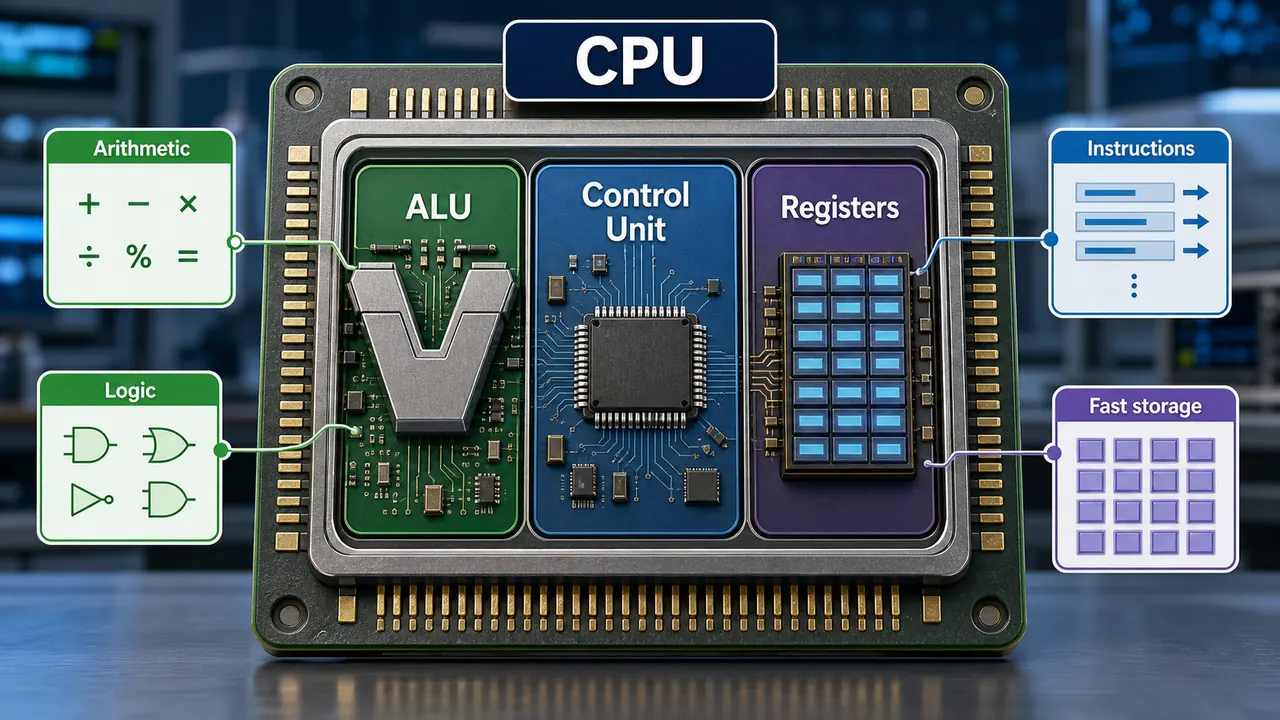
The CPU (Central Processing Unit) is the most important component. It is called the "brain" of the computer because it performs all calculations, makes decisions, and controls every operation.
The CPU has three main parts:
1. ALU (Arithmetic Logic Unit)
The ALU performs two types of operations:
- Arithmetic Operations — Addition (+), Subtraction (−), Multiplication (×), Division (÷)
- Logical Operations — Comparisons using AND, OR, NOT, greater than (>), less than (<), equal to (=)
Every calculation your computer does — from adding numbers in Excel to rendering a video — goes through the ALU.
2. CU (Control Unit)
The Control Unit is the manager of the CPU. It does not perform calculations itself, but:
- Fetches instructions from memory
- Decodes what each instruction means
- Directs other components to execute the instruction
- Controls the flow of data between CPU, memory, and devices
Think of CU as the traffic police — it doesn't drive the cars, but directs all traffic flow.
3. Registers
Registers are tiny, ultra-fast storage locations inside the CPU that hold data currently being processed. They are the fastest memory in any computer.
| Register | Purpose |
|---|---|
| Accumulator | Stores intermediate arithmetic results |
| Program Counter | Holds the address of the next instruction |
| Instruction Register | Holds the current instruction being executed |
| Memory Address Register | Holds the address of memory to read/write |
How the CPU Processes Instructions
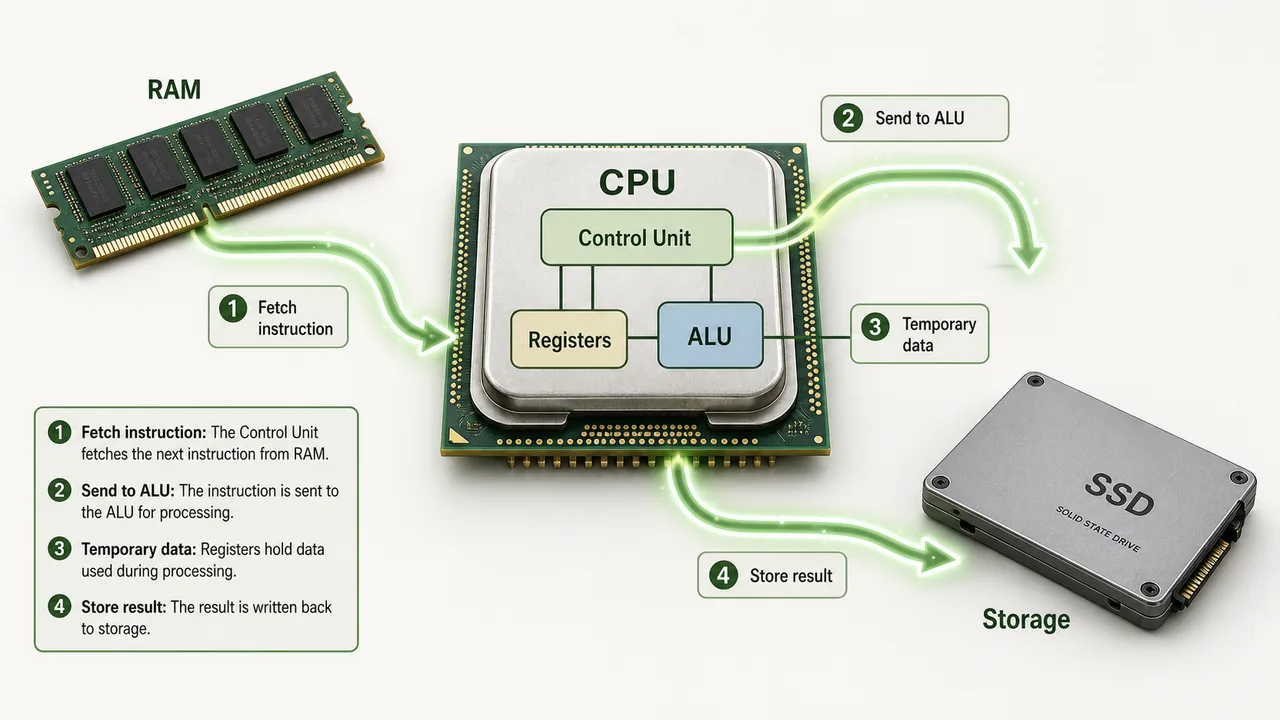
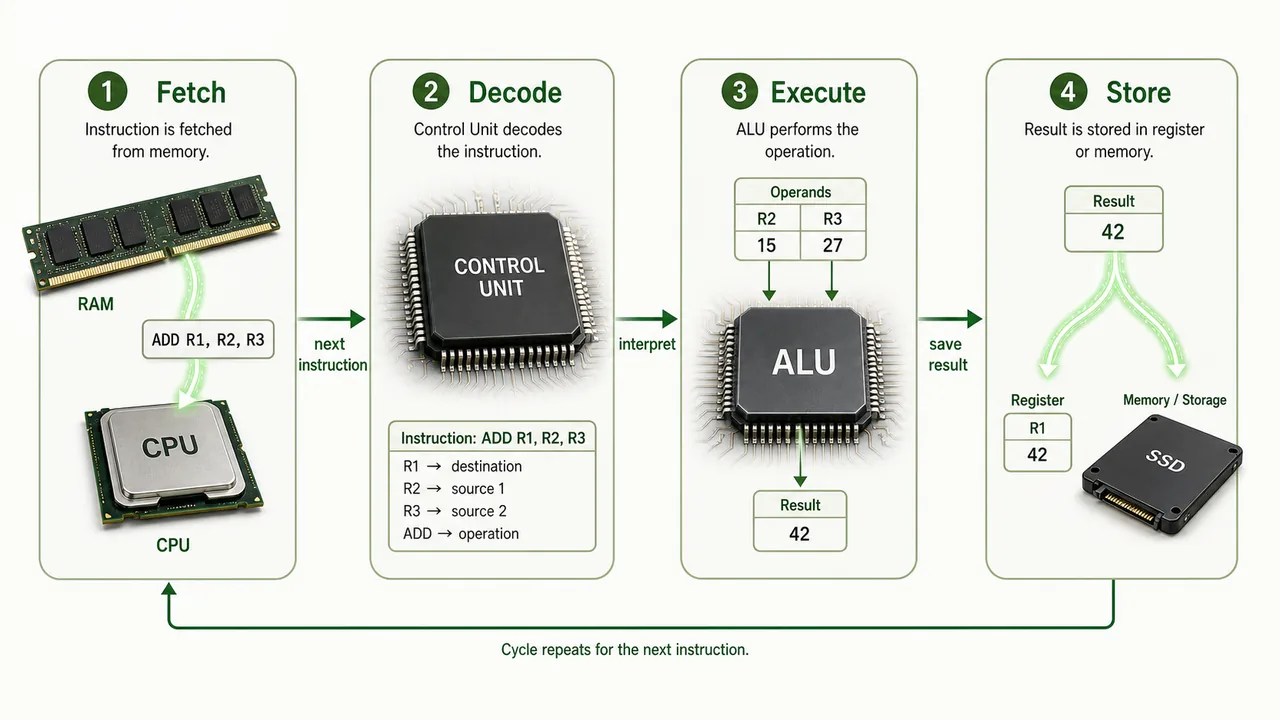
The CPU follows a cycle for every instruction called the Fetch-Decode-Execute cycle:
- Fetch — CU retrieves the next instruction from RAM
- Decode — CU interprets what the instruction means
- Execute — ALU performs the calculation or operation
- Store — Result is saved back to memory or register
This cycle repeats billions of times per second in modern processors.
Motherboard at a Glance
CPU Speed and Performance
| Measure | What it Means |
|---|---|
| Clock Speed | Number of cycles per second (measured in GHz) |
| Cores | Independent processing units (dual-core = 2, quad-core = 4, octa-core = 8) |
| Cache | Small, fast memory inside CPU for frequently used data |
| MIPS | Million Instructions Per Second |
| FLOPS | Floating Point Operations Per Second (for supercomputers) |
Major CPU Manufacturers: Intel (Core i3, i5, i7, i9) and AMD (Ryzen series)
How the Motherboard Connects Everything
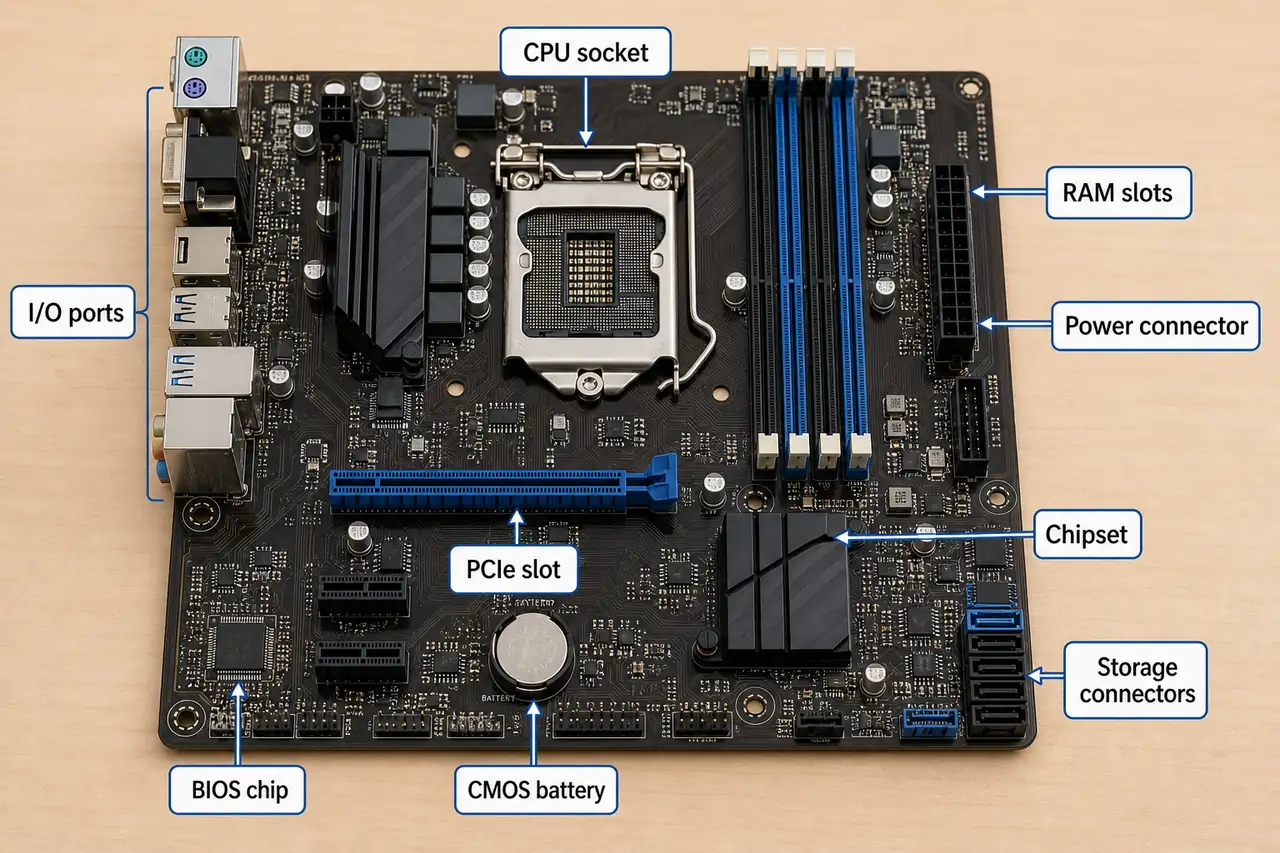
The motherboard (also called mainboard or system board) is the main circuit board of the computer. Every component connects to it — CPU, RAM, storage, graphics card, and all ports.
Key Components on the Motherboard
| Component | Function |
|---|---|
| CPU Socket/Slot | Where the processor is installed |
| RAM Slots | Where memory modules are inserted (DIMM slots) |
| Expansion Slots | For adding graphics cards, sound cards, network cards (PCI, PCIe) |
| BIOS/UEFI Chip | Stores basic startup instructions (BIOS = Basic Input Output System) |
| CMOS Battery | Powers the BIOS clock and settings when computer is off |
| Chipset | Controls communication between CPU, RAM, and peripherals |
| Power Connector | Receives power from the power supply (SMPS) |
Ports and Connectors
Ports are sockets on the back/side of the system unit where external devices plug in:
| Port | Full Form | Used For |
|---|---|---|
| USB | Universal Serial Bus | Mouse, keyboard, pen drive, printer, phone charging |
| HDMI | High Definition Multimedia Interface | Monitor, projector, TV (video + audio) |
| VGA | Video Graphics Array | Older monitors (video only) |
| Ethernet (RJ-45) | — | Wired internet connection (LAN cable) |
| Audio Jack (3.5mm) | — | Headphones, speakers, microphone |
| PS/2 | — | Older keyboard/mouse (green = mouse, purple = keyboard) |
| Serial Port | — | Older devices, modems |
| Parallel Port | — | Older printers |
USB is the most widely used port today — USB 2.0, 3.0, 3.1, and USB-C are progressively faster versions.
Buses — The Computer's Highway System
A bus is a set of electrical pathways that carry data between components inside the computer. Think of it as a highway system connecting different parts of a city.
| Bus Type | What it Carries | Direction |
|---|---|---|
| Address Bus | Memory addresses (where to read or write) | CPU to memory, so it is unidirectional |
| Data Bus | Actual data between CPU, RAM, and devices | Bidirectional |
| Control Bus | Control signals such as read, write, interrupt, and clock | Bidirectional |
Bus Width: The number of wires — a 32-bit bus carries 32 bits at a time; a 64-bit bus carries 64 bits (wider = faster).
SMPS — Power Supply
SMPS (Switched Mode Power Supply) converts AC power from the wall outlet into DC power that computer components need. It supplies different voltages to different parts:
- 3.3V — RAM, chipset
- 5V — USB ports, drives
- 12V — CPU, graphics card, fans
CPU Performance in More Detail
Clock Speed
Clock speed is measured in GHz (Gigahertz) — it indicates how many billions of cycles the CPU performs per second. A 3.5 GHz processor executes 3.5 billion cycles per second. Higher clock speed generally means faster processing.
Multi-Core Processors
Modern CPUs have multiple independent processing units called cores:
| Type | Cores | Advantage |
|---|---|---|
| Single-core | 1 | One task at a time |
| Dual-core | 2 | Two tasks simultaneously |
| Quad-core | 4 | Four tasks simultaneously |
| Octa-core | 8 | Eight tasks simultaneously |
More cores usually improve multitasking, while clock speed describes how quickly each core can execute its cycles.
Motherboard — Additional Components
Chipset
The chipset manages data flow between the CPU, memory, and all peripherals. In older systems, it was divided into two chips:
| Chip | Function |
|---|---|
| Northbridge | Connects CPU to high-speed components — RAM and GPU |
| Southbridge | Connects CPU to slower components — USB, audio, BIOS, hard drives |
In modern systems, Northbridge functions are integrated into the CPU itself.
CMOS Battery
The CMOS battery (CR2032, coin-shaped) powers the BIOS/UEFI settings and the real-time clock (RTC) when the computer is turned off. If this battery dies, the computer loses its date/time settings and BIOS configuration.
Heat Sink and Fan
The heat sink is a metal block (usually aluminium/copper) placed on top of the CPU to absorb heat. A fan blows air over the heat sink to dissipate heat. Without proper cooling, the CPU can overheat and throttle or shut down.
BIOS Chip
The BIOS (Basic Input Output System) chip stores firmware — the first program that runs when you power on the computer. It performs the POST (Power-On Self Test) and then loads the operating system from the hard drive.
Modern systems use UEFI (Unified Extensible Firmware Interface) as a replacement for traditional BIOS — it supports larger drives, faster boot, and a graphical interface.
Expansion Slots
Expansion slots on the motherboard allow you to add extra capability:
| Slot Type | Full Form | Purpose |
|---|---|---|
| PCI | Peripheral Component Interconnect | Sound cards, network cards, older devices |
| PCIe x1 | PCI Express x1 | Small cards — Wi-Fi adapters, USB expansion |
| PCIe x4 | PCI Express x4 | NVMe SSDs, RAID controllers |
| PCIe x16 | PCI Express x16 | Graphics cards (GPU) — fastest slot |
| AGP | Accelerated Graphics Port | Old graphics card slot (obsolete, replaced by PCIe) |
PCIe x16 is the standard slot for modern graphics cards, while AGP belongs to an older generation of hardware.
Motherboard Form Factors
The form factor defines the size, shape, and layout of the motherboard:
| Form Factor | Size | Expansion Slots | Used In |
|---|---|---|---|
| ATX | 305 x 244 mm | 7 slots | Standard desktops, gaming PCs |
| Micro-ATX | 244 x 244 mm | 4 slots | Budget desktops, compact builds |
| Mini-ITX | 170 x 170 mm | 1 slot | Small form factor PCs, HTPCs |
ATX (Advanced Technology Extended) is the most common form factor for desktop motherboards.
Summary Points
| Concept | Key Details |
|---|---|
| CPU | Brain of computer — ALU + CU + Registers |
| ALU | Arithmetic (+−×÷) and Logic (AND, OR, NOT, >, <, =) operations |
| Control Unit | Fetches, decodes, and directs instruction execution |
| Registers | Fastest memory, inside CPU — Accumulator, Program Counter, IR, MAR |
| Fetch-Decode-Execute | CPU instruction cycle — repeats billions of times/sec |
| Clock Speed | Measured in GHz (Gigahertz) — 3.5 GHz = 3.5 billion cycles/sec |
| Multi-core | Dual (2), Quad (4), Octa (8) — more cores = better multitasking |
| CPU Makers | Intel (Core i3/i5/i7/i9), AMD (Ryzen) |
| MIPS / FLOPS | Million Instructions Per Second / Floating Point Operations Per Second |
| Motherboard | Main circuit board (mainboard/system board) — connects all components |
| Address Bus | Unidirectional (CPU→Memory) — carries memory addresses |
| Data Bus | Bidirectional — carries actual data |
| Control Bus | Bidirectional — carries control signals (read, write, interrupt) |
| Bus Width | 32-bit or 64-bit — wider = faster data transfer |
| Northbridge | Connects CPU to RAM and GPU (high-speed) — now integrated into CPU |
| Southbridge | Connects CPU to USB, audio, BIOS, hard drives (low-speed) |
| CMOS Battery | CR2032 coin cell — powers BIOS clock/settings when PC is off |
| Heat Sink + Fan | CPU cooling — metal block absorbs heat, fan dissipates it |
| BIOS Chip | Basic Input Output System — firmware, runs POST at startup |
| POST | Power-On Self Test — BIOS checks hardware at startup |
| UEFI | Modern BIOS replacement — faster boot, graphical interface, larger drives |
| PCIe x16 | Fastest expansion slot — used for graphics cards (GPU) |
| PCIe x4 | NVMe SSDs, RAID controllers |
| PCIe x1 | Small cards — Wi-Fi adapters, USB expansion |
| AGP | Old graphics slot — obsolete, replaced by PCIe |
| ATX | Standard motherboard form factor (305x244mm, 7 slots) |
| Micro-ATX | Compact form factor (244x244mm, 4 slots) |
| Mini-ITX | Smallest form factor (170x170mm, 1 slot) |
| SMPS | Switched Mode Power Supply — AC→DC (3.3V, 5V, 12V) |
| USB | Universal Serial Bus — most common port for peripherals |
Lesson Doubts
Ask questions, get expert answers