🔢 Number Systems & Data Representation
Binary, Octal, Decimal, Hexadecimal number systems, conversions, ASCII, Unicode, and how computers represent data internally for UPSSSC AGTA.
Why Number Systems Matter
Humans think in decimal (base-10, using digits 0-9) because we have 10 fingers. But computers think in binary (base-2, using only 0 and 1) because electronic circuits have only two states — ON (1) and OFF (0).
Understanding number systems helps you grasp how computers store and process all data — from a simple number to a high-definition video.
The Four Number Systems
| System | Base | Digits Used | Used By |
|---|---|---|---|
| Binary | 2 | 0, 1 | Computers internally |
| Octal | 8 | 0, 1, 2, 3, 4, 5, 6, 7 | Older computer systems |
| Decimal | 10 | 0, 1, 2, 3, 4, 5, 6, 7, 8, 9 | Humans (everyday use) |
| Hexadecimal | 16 | 0-9, A(10), B(11), C(12), D(13), E(14), F(15) | Memory addresses, colors, programming |
Unary is the simplest counting idea, where one symbol is repeated to show quantity, but it is not a practical computer number system like binary, octal, decimal, or hexadecimal. It is mainly useful as a contrast point when understanding why place-value systems are more powerful.
Binary Number System (Base-2)
The binary system is the language of computers. Every piece of data — text, images, audio, video — is ultimately stored as sequences of 0s and 1s.
Each binary digit is called a bit. Eight bits make one byte.
Place Values in Binary
Each position represents a power of 2 (from right to left):
| Position | 7 | 6 | 5 | 4 | 3 | 2 | 1 | 0 |
|---|---|---|---|---|---|---|---|---|
| Power of 2 | 128 | 64 | 32 | 16 | 8 | 4 | 2 | 1 |
Example: Binary 1101 = 1×8 + 1×4 + 0×2 + 1×1 = 13 in decimal.
Decimal to Binary Conversion
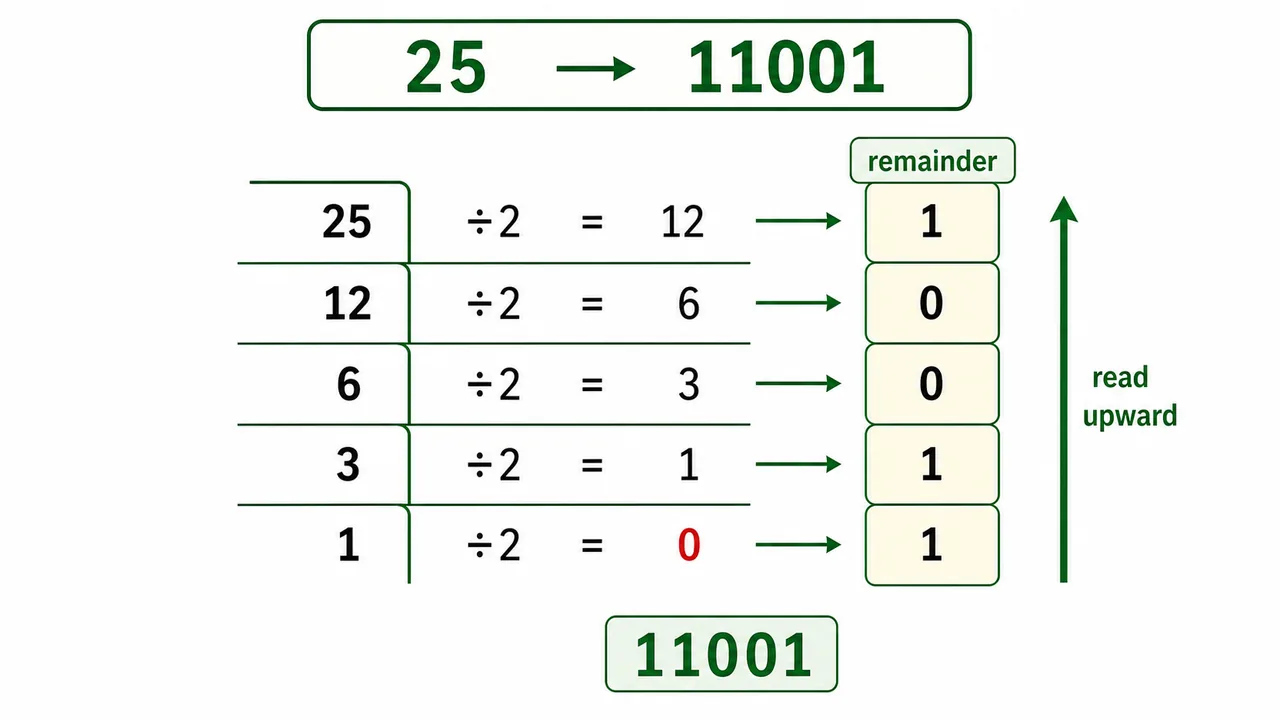
Method: Divide by 2 repeatedly, note the remainders from bottom to top.
Example: Convert 25 to binary
| Division | Quotient | Remainder |
|---|---|---|
| 25 ÷ 2 | 12 | 1 |
| 12 ÷ 2 | 6 | 0 |
| 6 ÷ 2 | 3 | 0 |
| 3 ÷ 2 | 1 | 1 |
| 1 ÷ 2 | 0 | 1 |
Read remainders bottom to top: 25 = 11001 in binary
Binary to Decimal Conversion
Method: Multiply each bit by its place value and add.
Example: Convert 11010 to decimal = 1×16 + 1×8 + 0×4 + 1×2 + 0×1 = 16 + 8 + 0 + 2 + 0 = 26
Octal Number System (Base-8)
Uses digits 0-7. Each octal digit represents exactly 3 binary bits.
| Octal | Binary |
|---|---|
| 0 | 000 |
| 1 | 001 |
| 3 | 011 |
| 5 | 101 |
| 7 | 111 |
Hexadecimal Number System (Base-16)
Uses 0-9 and A-F (where A=10, B=11, C=12, D=13, E=14, F=15). Each hex digit represents exactly 4 binary bits (1 nibble).
| Hex | Decimal | Binary |
|---|---|---|
| 0 | 0 | 0000 |
| 5 | 5 | 0101 |
| 9 | 9 | 1001 |
| A | 10 | 1010 |
| F | 15 | 1111 |
Common use: Memory addresses, HTML colors (#FF5733 = Red:FF, Green:57, Blue:33), MAC addresses.
Data Representation — How Computers Store Text
Since computers only understand 0s and 1s, every character (letter, digit, symbol) must be assigned a unique binary number. This is done using coding systems:
ASCII (American Standard Code for Information Interchange)
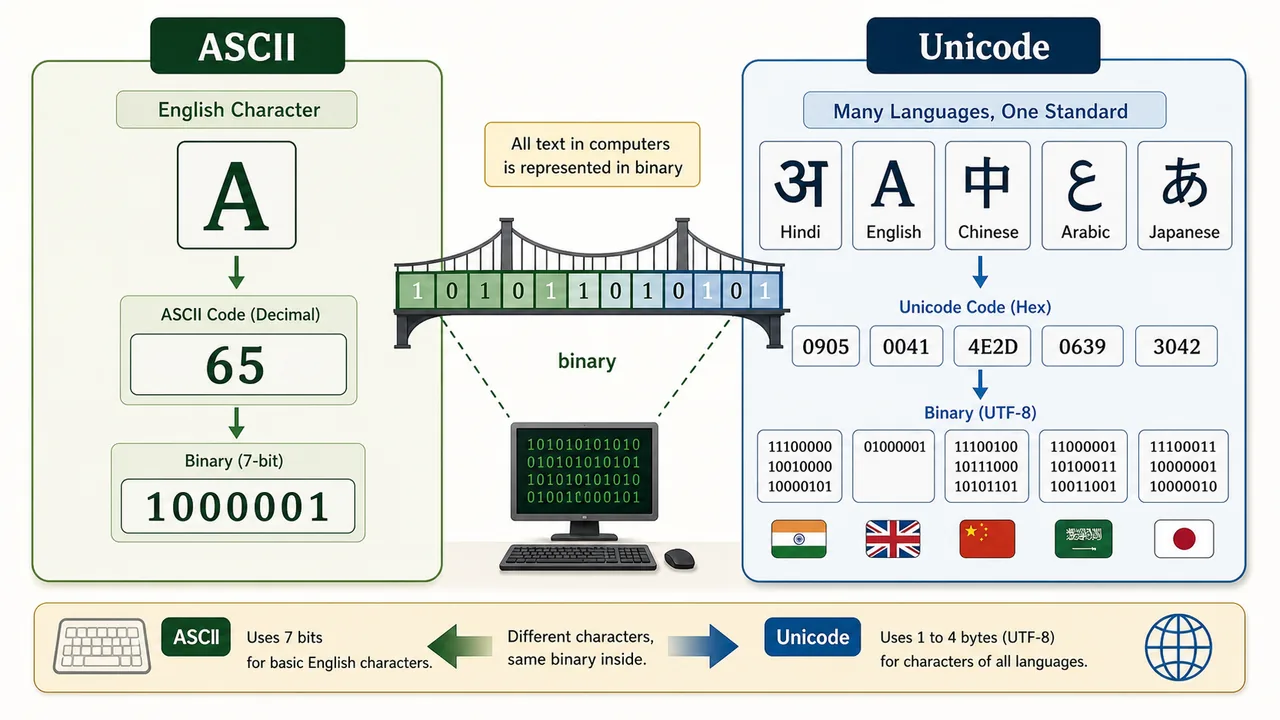
ASCII uses 7 bits to represent characters, giving 128 possible characters (0-127).
| Character | ASCII Code | Binary |
|---|---|---|
| A | 65 | 1000001 |
| B | 66 | 1000010 |
| Z | 90 | 1011010 |
| a | 97 | 1100001 |
| 0 | 48 | 0110000 |
| Space | 32 | 0100000 |
Extended ASCII uses 8 bits = 256 characters (includes accented letters, symbols).
Unicode
Unicode is a modern standard that supports over 1,00,000 characters from virtually every language in the world — including Hindi (Devanagari), Arabic, Chinese, Japanese, emojis, and mathematical symbols.
- UTF-8 — Most common encoding on the internet (uses 1-4 bytes per character)
- UTF-16 — Used by Windows and Java
ASCII can represent only English; Unicode can represent ALL languages including Hindi (हिंदी).
Types of Data in Computers
| Data Type | What it Represents | How it's Stored |
|---|---|---|
| Text | Letters, numbers, symbols | ASCII or Unicode codes |
| Numbers | Integers, decimals | Binary (integer) or Floating point |
| Images | Photos, graphics | Pixels with color values (BMP, JPEG, PNG) |
| Audio | Music, voice | Sampled waveforms (MP3, WAV) |
| Video | Moving images + audio | Frames + audio track (MP4, AVI) |
Summary Points
| Concept | Key Details |
|---|---|
| Binary | Base-2 (0,1) — computer's native language |
| Decimal | Base-10 (0-9) — human system |
| Octal | Base-8 (0-7) — 1 octal digit = 3 bits |
| Hexadecimal | Base-16 (0-F) — 1 hex digit = 4 bits (1 nibble) |
| Decimal→Binary | Divide by 2, remainders bottom to top |
| Binary→Decimal | Multiply bits by powers of 2, add up |
| Bit | Smallest unit — 0 or 1 |
| Byte | 8 bits |
| Nibble | 4 bits = 1 hex digit |
| ASCII | 7-bit, 128 characters, English only |
| Extended ASCII | 8-bit, 256 characters |
| Unicode | 1,00,000+ characters, all languages including Hindi |
| UTF-8 | Most common Unicode encoding on internet |
| A in ASCII | 65 |
| a in ASCII | 97 |
| 0 in ASCII | 48 |
Lesson Doubts
Ask questions, get expert answers