⚙️ Operating System & Interfaces
Kernel, CLI vs GUI, process states, device drivers, types of OS (batch, real-time, multitasking), memory management for UPSSSC AGTA.
What is an Operating System?
An Operating System (OS) is system software that acts as an intermediary between the user and the computer hardware. Without an OS, you would have to write binary instructions for every task — even moving the mouse cursor. The OS manages all hardware resources, runs your applications, and provides a user-friendly interface.
Definition: An Operating System is a collection of programs that manages hardware resources, provides services to application programs, and acts as an interface between the user and the computer.
Functions of an Operating System
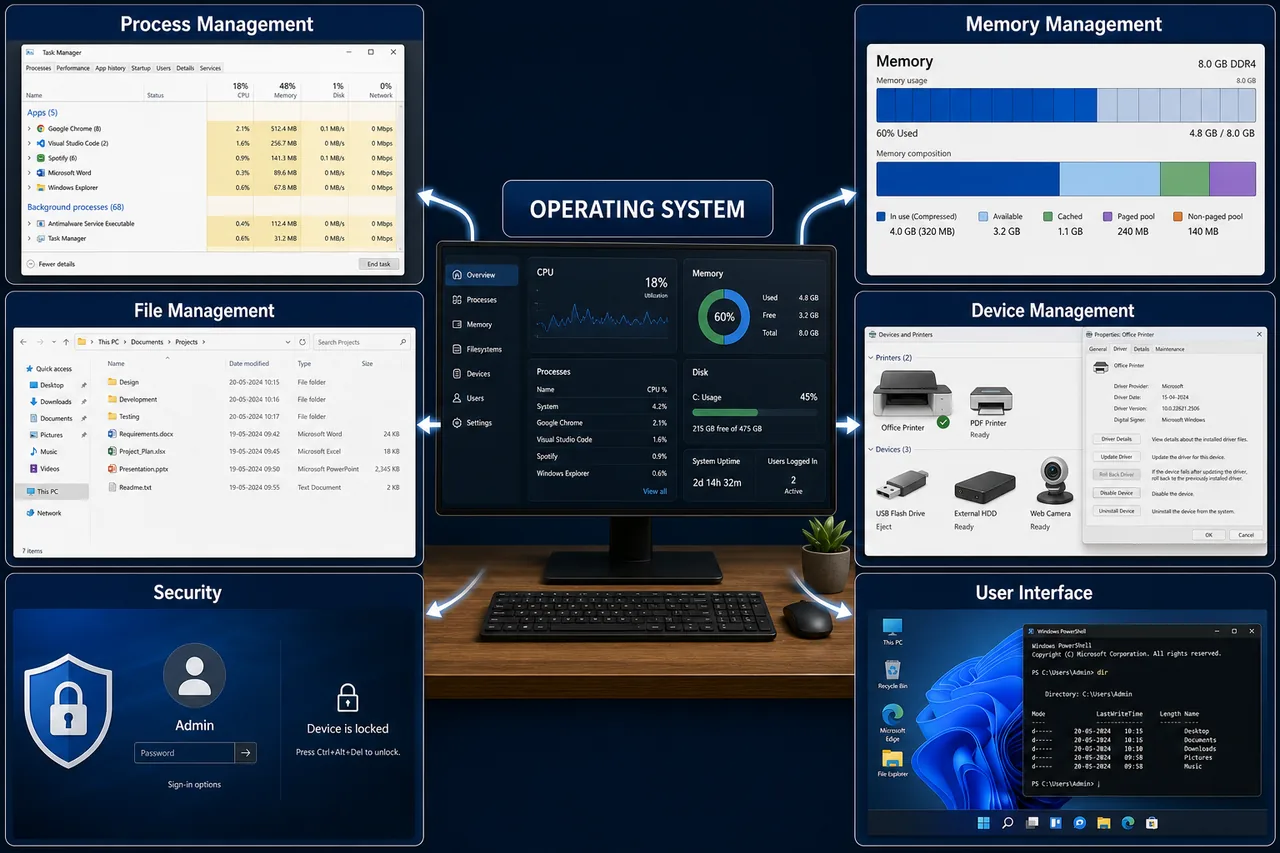
| Function | What It Does |
|---|---|
| Process Management | Creates, schedules, and terminates processes; handles multitasking |
| Memory Management | Allocates and deallocates RAM to programs; manages virtual memory |
| File Management | Creates, deletes, organizes files and directories; manages permissions |
| Device Management | Controls hardware devices through device drivers |
| Security | User authentication (login/password), access control, firewall |
| User Interface | Provides GUI (icons, windows) or CLI (text commands) |
Types of Operating Systems
This is one of the most frequently asked topics. Know each type with its key characteristic.
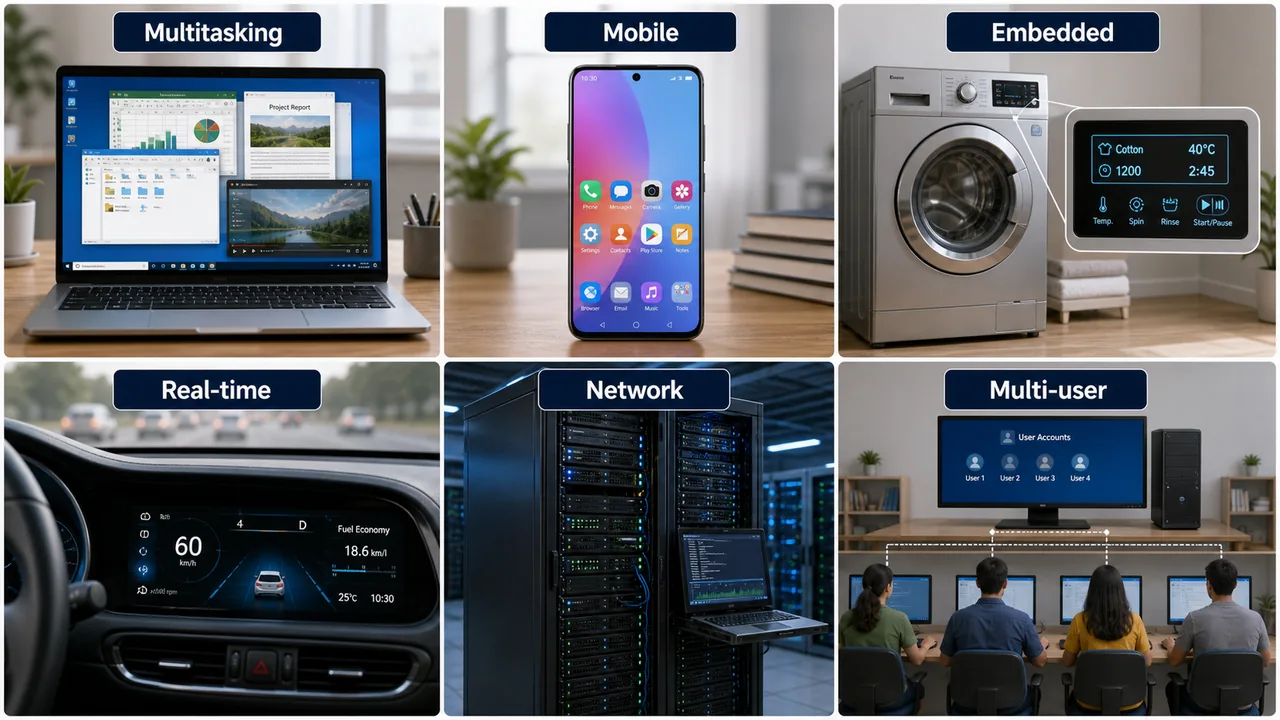
| Type | Key Feature | Example |
|---|---|---|
| Batch OS | Jobs collected in batches, processed without user interaction | Early IBM mainframes, IBSYS |
| Multi-programming OS | Multiple programs loaded in memory; CPU switches when one waits for I/O | THE OS, early Unix |
| Multi-tasking OS | Multiple tasks run simultaneously with rapid CPU switching (time slicing) | Windows, macOS, Linux |
| Time-sharing OS | Multiple users share system resources; each gets a time slice | Unix, Multics |
| Real-time OS (RTOS) | Processes data within a strict time deadline | Missile guidance, ABS brakes, medical devices |
| Network OS | Manages resources across a network; supports file sharing | Windows Server, Novell NetWare |
| Distributed OS | Multiple computers appear as a single system | LOCUS, Amoeba |
| Embedded OS | Built into devices with limited resources | ATM, washing machine, microwave, car ECU |
| Mobile OS | Designed for smartphones and tablets | Android, iOS |
Real-time OS — Two Types
| Type | Deadline | Example |
|---|---|---|
| Hard Real-time | Missing deadline = system failure (life-critical) | Missile system, pacemaker, ABS brakes |
| Soft Real-time | Missing deadline = degraded performance (not fatal) | Video streaming, online gaming, VoIP calls |
Popular Operating Systems
| OS | Developer | Type | Open Source? |
|---|---|---|---|
| Windows | Microsoft | Desktop / Server | No (Proprietary) |
| Linux | Linus Torvalds (1991) | Desktop / Server | Yes |
| macOS | Apple | Desktop (Mac only) | No |
| Unix | Ken Thompson & Dennis Ritchie (1969, AT&T Bell Labs) | Server | Proprietary (variants exist) |
| Android | Google (based on Linux kernel) | Mobile | Yes |
| iOS | Apple | Mobile (iPhone/iPad) | No |
| MS-DOS | Microsoft (1981) | CLI-only desktop | No |
| z/OS | IBM | Mainframe | No |
| Ubuntu | Canonical | Desktop / Server (Linux distro) | Yes |
| Chrome OS | Cloud-based, Chromebooks | Yes (Chromium OS) |
Unix (1969) is the "grandfather" of modern OS. Linux, macOS, and Android all have Unix roots. Linux distributions include Ubuntu, Fedora, CentOS, Debian, and Red Hat.
Kernel — The Core of an OS
The Kernel is the core component of an operating system. It is the first program loaded into memory when a computer starts and remains in memory throughout the session. The kernel directly communicates with the hardware.
Types of Kernel
| Type | How It Works | Example |
|---|---|---|
| Monolithic Kernel | All OS services run in kernel space — fast but large | Linux, Unix |
| Micro Kernel | Minimal kernel; most services run in user space — modular, secure | Minix, QNX, L4 |
| Hybrid Kernel | Combines monolithic speed + micro modularity | Windows NT, macOS |
| Nano Kernel | Extremely minimal — only basic task management | Experimental systems |
CLI vs GUI
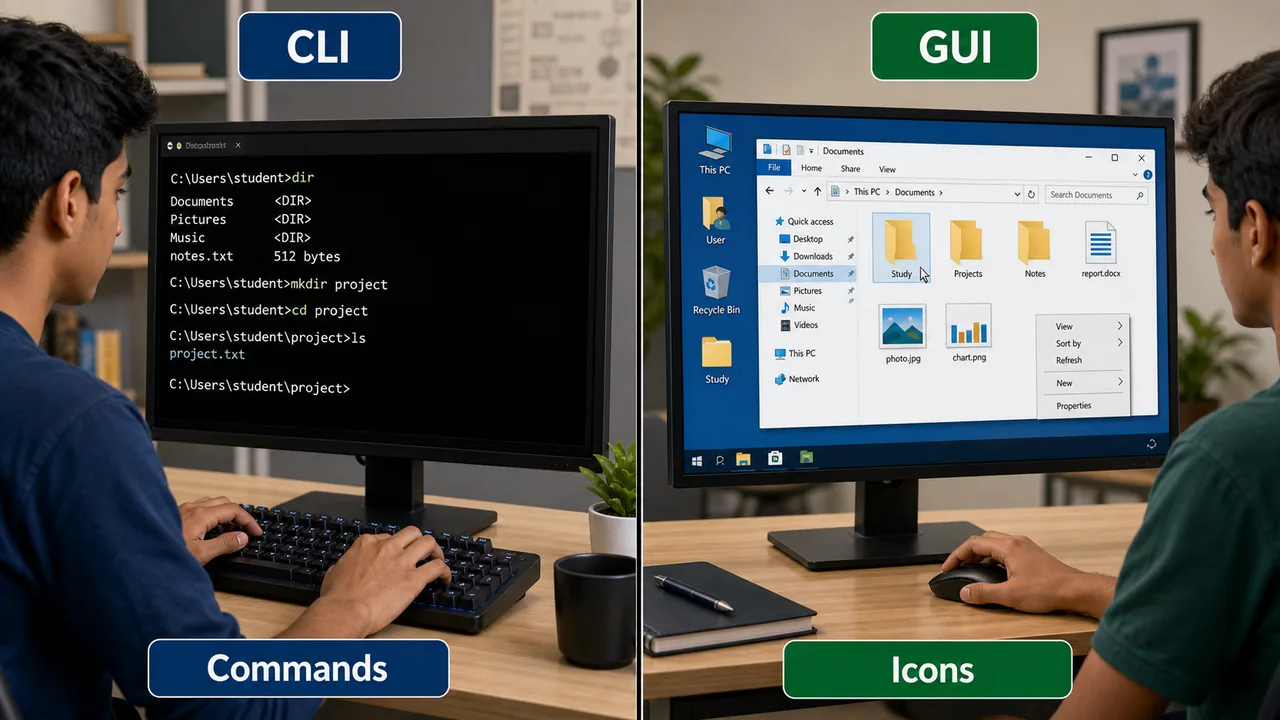
| Feature | CLI (Command Line Interface) | GUI (Graphical User Interface) |
|---|---|---|
| Interaction | Type text commands | Click icons, menus, buttons |
| Speed | Faster for experts | Easier for beginners |
| Resource Usage | Uses less RAM and CPU | Uses more resources |
| Examples | MS-DOS, Linux Terminal, Command Prompt, PowerShell | Windows Desktop, macOS, Android |
| Precision | Very precise — exact commands | Less precise — limited to GUI options |
| Multitasking | Possible but harder to visualize | Easy — multiple windows visible |
Common CLI Commands
| Task | Windows (CMD) | Linux / macOS Terminal |
|---|---|---|
| List files | dir | ls |
| Change directory | cd folder_name | cd folder_name |
| Create folder | mkdir name | mkdir name |
| Delete file | del filename | rm filename |
| Copy file | copy src dest | cp src dest |
| Clear screen | cls | clear |
| Show current path | cd | pwd |
| Rename file | ren old new | mv old new |
| Network config | ipconfig | ifconfig |
| Show processes | tasklist | ps |
Process Management
A process is a program in execution. When you open Chrome, the OS creates a process for it. Each process has its own memory space, registers, and state. The OS manages thousands of processes simultaneously.
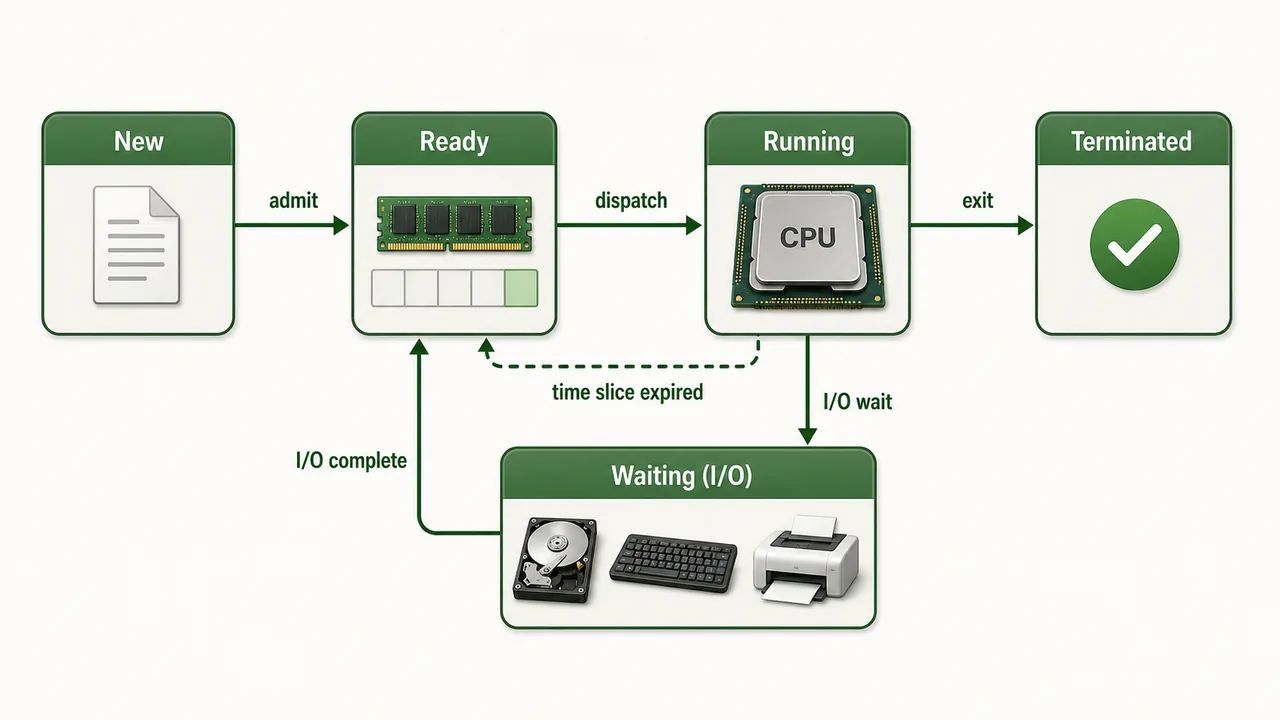
Process States
| State | Description |
|---|---|
| New | Process is being created |
| Ready | Process is loaded in memory, waiting for CPU |
| Running | CPU is executing the process instructions |
| Waiting (Blocked) | Process is waiting for I/O operation (e.g., reading from disk) |
| Terminated | Process has finished execution |
Context Switching — When the CPU switches from one process to another, it saves the state of the current process and loads the state of the next one. This happens so fast that it appears as if multiple programs run simultaneously.
Memory Management
| Concept | What It Does |
|---|---|
| RAM Allocation | OS divides RAM among running programs; each gets a portion |
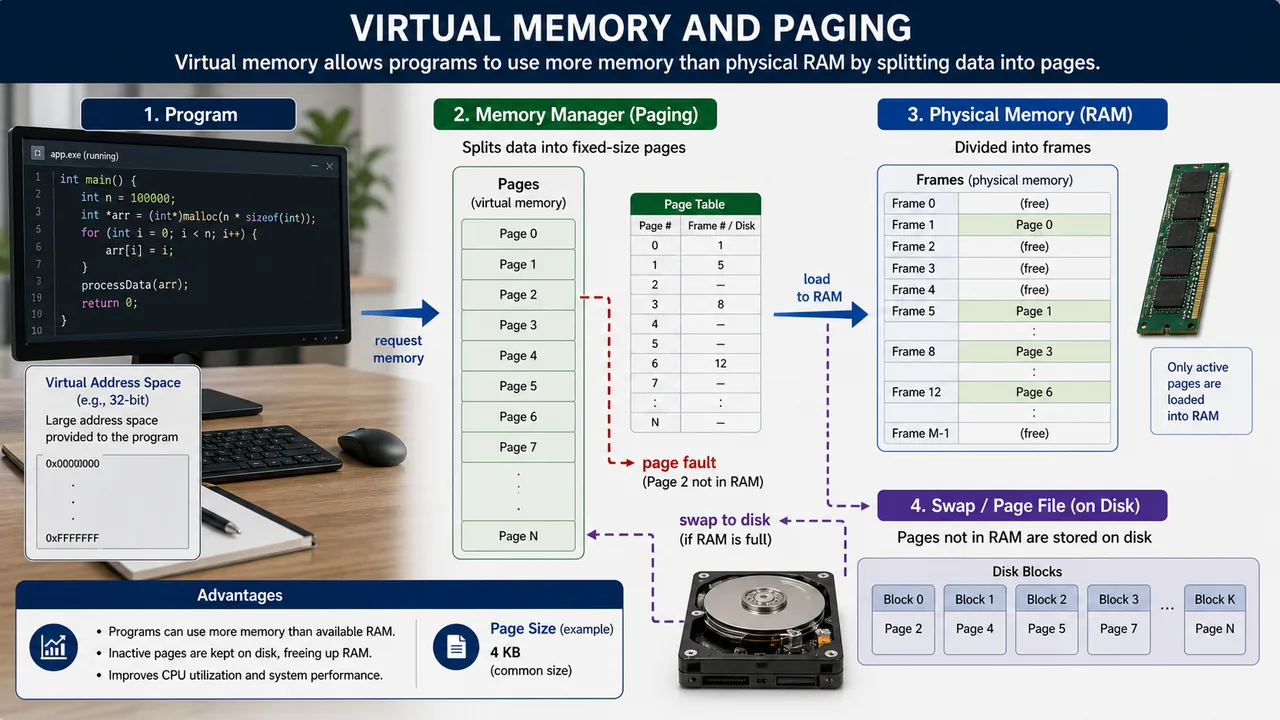
| Virtual Memory | Uses hard disk space as "extra RAM" when physical RAM is full; slower but extends capacity |
| Paging | Divides memory into fixed-size blocks called pages (logical) and frames (physical) |
| Segmentation | Divides memory into variable-size segments based on logical divisions (code, data, stack) |
| Swapping | Moves entire process from RAM to disk and back when needed |
| Fragmentation | Wasted memory — Internal (unused space within block) or External (scattered free spaces between blocks) |
Virtual Memory makes it possible to run programs larger than your physical RAM. Windows uses a page file; Linux uses a swap partition.
File Management
The OS manages how data is stored, organized, and accessed on storage devices.
| Concept | Description |
|---|---|
| File System | Method of organizing files on disk — NTFS (Windows), ext4 (Linux), APFS (macOS) |
| Directory Structure | Hierarchical tree — Root directory contains subdirectories and files |
| File Attributes | Name, type, size, permissions, creation date, modification date |
| Access Control | Read, Write, Execute permissions (especially important in Linux: rwx) |
Device Drivers
A device driver is a specialized program that allows the OS to communicate with a hardware device. Without the correct driver, the OS cannot "talk to" the hardware.
- Printer driver — tells OS how to send print commands
- Graphics driver — enables display of images and video (NVIDIA, AMD drivers)
- Audio driver — enables sound output
- Network driver — enables Wi-Fi and Ethernet connectivity
- Plug and Play (PnP) — OS automatically detects and installs drivers for new devices
- Updated drivers fix bugs and improve performance
When you plug in a new device and Windows says "Installing device driver..." — it is loading the translator between OS and hardware.
Booting Process
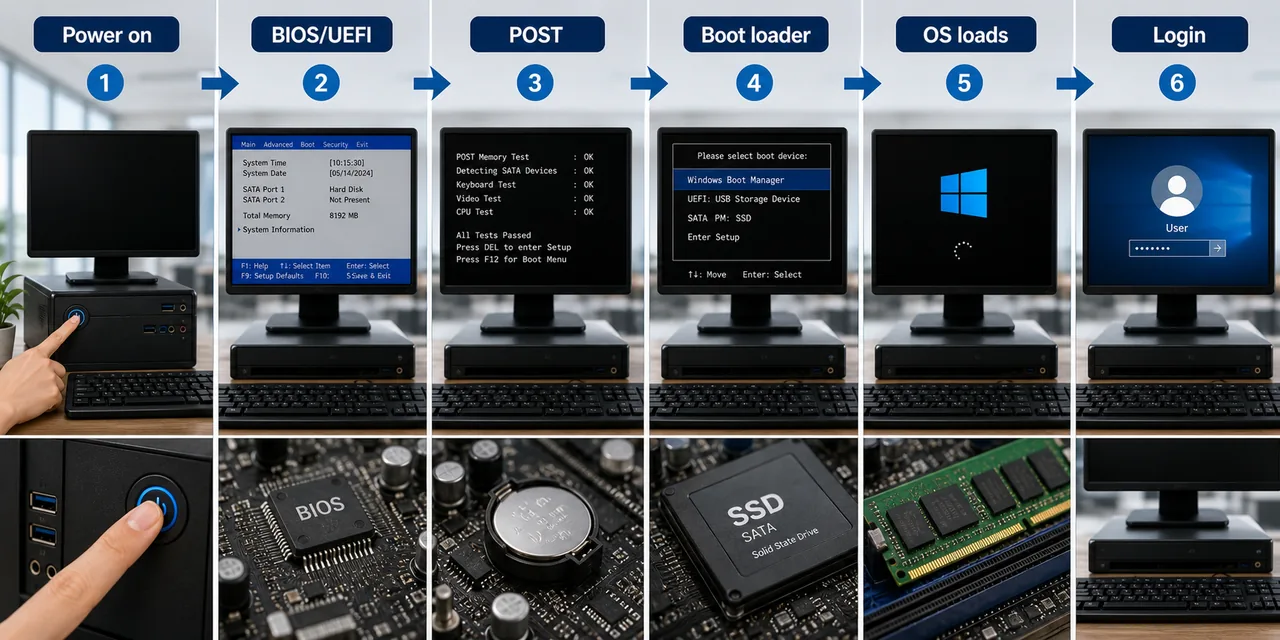
Booting is the process of starting a computer and loading the OS into memory.
| Step | What Happens |
|---|---|
| 1. Power On | Electricity reaches the motherboard |
| 2. BIOS/UEFI | Firmware stored in ROM activates; initializes hardware |
| 3. POST (Power-On Self Test) | Checks CPU, RAM, keyboard, display — if error, beep codes |
| 4. Boot Loader | BIOS/UEFI finds and loads the boot loader from disk (GRUB for Linux, Windows Boot Manager) |
| 5. OS Loading | Kernel loads into RAM; drivers initialize; login screen appears |
- Cold Boot = starting from power off (full POST runs)
- Warm Boot = restart without power off (Ctrl+Alt+Del)
BIOS vs UEFI
| Feature | BIOS | UEFI |
|---|---|---|
| Full Form | Basic Input Output System | Unified Extensible Firmware Interface |
| Interface | Text-only, keyboard navigation | Graphical, mouse support |
| Disk Support | MBR — max 2 TB, 4 partitions | GPT — supports disks > 2 TB, 128 partitions |
| Boot Speed | Slower | Faster boot |
| Security | No Secure Boot | Secure Boot (blocks unauthorized OS) |
| Era | Legacy (1975) | Modern (2005+) |
Deadlock
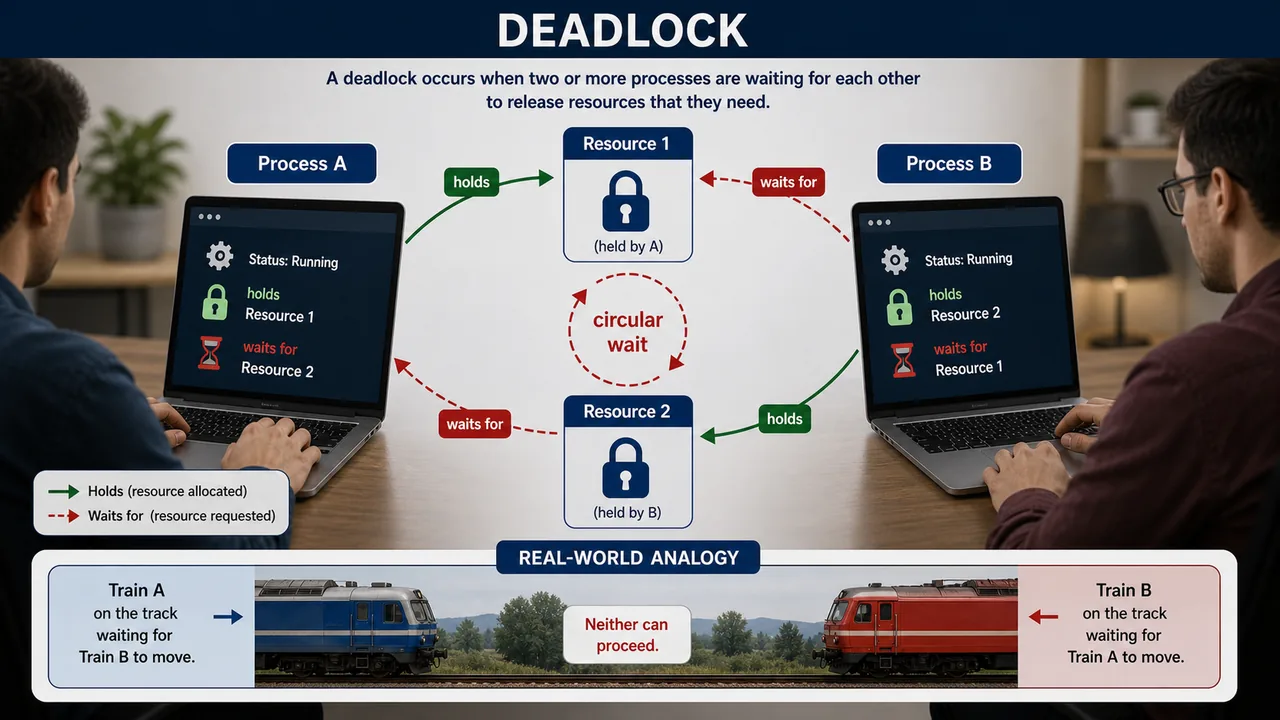
A deadlock occurs when two or more processes are stuck forever, each waiting for a resource held by the other. Neither can proceed — like two trains on a single track facing each other.
Four Necessary Conditions for Deadlock (all must hold simultaneously)
| Condition | Meaning |
|---|---|
| Mutual Exclusion | At least one resource is non-sharable (only one process can use it) |
| Hold and Wait | A process holds one resource and waits for another |
| No Preemption | A resource cannot be forcibly taken from a process |
| Circular Wait | A circular chain of processes, each waiting for a resource held by the next |
To prevent deadlock, break any one of these four conditions.
Spooling & Thrashing
Spooling (Simultaneous Peripheral Operations On-Line) is a technique where data is temporarily held in a buffer (usually on disk) so that a slower device like a printer can access it at its own pace. When you print multiple documents, they are placed in a print queue — the OS sends them to the printer one by one while you continue working.
Thrashing occurs when the OS spends more time swapping pages between RAM and disk than actually executing processes. This happens when too many programs are loaded and physical memory is insufficient, causing constant page faults. The system becomes extremely slow despite high CPU activity.
Spooling is essentially queue management for a slow output device such as a printer, while thrashing means the system is so busy paging between RAM and disk that useful work slows down sharply.
Multiprogramming vs Multitasking vs Multiprocessing vs Multithreading
| Feature | Multiprogramming | Multitasking | Multiprocessing | Multithreading |
|---|---|---|---|---|
| Definition | Multiple programs in memory; CPU switches when one waits for I/O | Multiple tasks run with rapid time slicing | Multiple CPUs/cores execute processes simultaneously | Single process divided into multiple threads |
| CPU Count | Single CPU | Single CPU | Multiple CPUs/cores | Single or multiple CPUs |
| Switching | On I/O wait | Time slice expiry | True parallel execution | Threads share process resources |
| Goal | Maximize CPU utilization | User responsiveness | Speed and reliability | Efficient resource sharing within a process |
| Example | Early mainframes | Windows, Linux desktop | Dual-core/Quad-core systems | Chrome browser (tabs as threads) |
DOS Commands (Frequently Asked)
MS-DOS (Microsoft Disk Operating System) was a CLI-only OS. These commands are part of the traditional DOS command set:
| Command | Function |
|---|---|
| DIR | Lists files and directories |
| COPY | Copies one or more files to another location |
| DEL | Deletes one or more files |
| REN | Renames a file |
| MD (MKDIR) | Creates a new directory |
| CD (CHDIR) | Changes the current directory |
| RD (RMDIR) | Removes an empty directory |
| TYPE | Displays the contents of a text file |
| CLS | Clears the screen |
| FORMAT | Formats a disk for use |
If you are learning the command names, MD creates a directory, RD removes one, REN renames a file, and DEL deletes a file.
Linux Distributions
Linux is an open-source kernel; a distribution (distro) bundles the kernel with software, package manager, and desktop environment.
| Distribution | Known For |
|---|---|
| Ubuntu | Most popular for beginners and desktops (by Canonical) |
| Fedora | Cutting-edge features, sponsored by Red Hat |
| CentOS | Enterprise server use (free version of RHEL) |
| Debian | Stability and reliability; Ubuntu is based on Debian |
| Red Hat (RHEL) | Enterprise Linux with paid support |
| Kali Linux | Cybersecurity and penetration testing |
Android Version History
Android versions were named after desserts alphabetically until Android 10. From Android 10 onwards, Google switched to just numbers.
| Version | Name / Code | Year |
|---|---|---|
| 1.5 | Cupcake | 2009 |
| 1.6 | Donut | 2009 |
| 4.4 | KitKat | 2013 |
| 5.0 | Lollipop | 2014 |
| 8.0 | Oreo | 2017 |
| 9 | Pie | 2018 |
| 10 | (No dessert name publicly) | 2019 |
| 13 | — | 2022 |
| 14 | — | 2023 |
| 15 | — | 2024 |
Android is developed by Google on top of the Linux kernel, and its public dessert branding ended with Android 9 before the numbering-only style began from Android 10.
Windows Version Timeline
| Version | Year | Key Feature |
|---|---|---|
| Windows 1.0 | 1985 | First GUI-based Windows |
| Windows 3.1 | 1992 | First widely successful version |
| Windows 95 | 1995 | Introduced Start Menu and Taskbar |
| Windows 98 | 1998 | USB support, Internet Explorer integration |
| Windows XP | 2001 | Most popular Windows ever; used for over a decade |
| Windows Vista | 2007 | Heavy resource usage; poorly received |
| Windows 7 | 2009 | Improved performance over Vista; very popular |
| Windows 8 | 2012 | Tile-based Start Screen; controversial |
| Windows 10 | 2015 | Cortana, Edge browser, "last version of Windows" |
| Windows 11 | 2021 | Centered taskbar, Android app support, TPM 2.0 required |
File System Management (Quick Reference)
The OS uses a file system to organize data on storage devices. Different OS use different file systems:
| File System | OS | Max File Size | Key Feature |
|---|---|---|---|
| FAT32 | Cross-platform | 4 GB | Universal compatibility (USB drives) |
| NTFS | Windows | 16 TB | Permissions, encryption, journaling |
| ext4 | Linux | 16 TB | Default Linux file system, journaling |
| HFS+ | macOS (older) | 8 EB | Mac OS X default before APFS |
| APFS | macOS (modern) | 8 EB | SSD-optimized, encryption, snapshots |
For detailed file system comparison (FAT32 vs NTFS vs ext4), see the Storage, Memory & File Systems lesson.
Summary Points
| Concept | Key Details |
|---|---|
| Operating System | System software — bridge between user and hardware |
| Batch OS | Jobs in batches, no user interaction |
| Multiprogramming OS | Multiple programs in memory; CPU switches on I/O wait |
| Multitasking OS | Multiple tasks, rapid time slicing — Windows, Linux |
| Multiprocessing | Multiple CPUs/cores execute simultaneously — true parallelism |
| Multithreading | Single process split into threads — Chrome tabs as threads |
| Time-sharing OS | Multiple users share system — Unix, Multics |
| Hard RTOS | Strict deadline — missile, pacemaker, ABS brakes |
| Soft RTOS | Flexible deadline — video streaming, VoIP, gaming |
| Distributed OS | Multiple computers appear as single system — LOCUS, Amoeba |
| Embedded OS | Built into devices — ATM, washing machine, microwave |
| Mobile OS | Android (Google), iOS (Apple) |
| Kernel | Core of OS — always in memory, talks to hardware |
| Monolithic Kernel | All services in kernel — Linux, Unix |
| Micro Kernel | Minimal kernel — QNX, Minix, L4 |
| Hybrid Kernel | Best of both — Windows NT, macOS |
| CLI | Command Line — MS-DOS, Terminal, CMD, PowerShell |
| GUI | Graphical — Windows Desktop, macOS, Android |
| DIR | DOS: List files and directories |
| COPY | DOS: Copy files to another location |
| DEL | DOS: Delete files |
| REN | DOS: Rename a file |
| MD / MKDIR | DOS: Make (create) new directory |
| CD / CHDIR | DOS: Change directory |
| RD / RMDIR | DOS: Remove empty directory |
| TYPE | DOS: Display contents of text file |
| CLS | DOS: Clear screen |
| FORMAT | DOS: Format a disk |
| dir / ls | List files (Windows CMD / Linux) |
| del / rm | Delete file (Windows CMD / Linux) |
| copy / cp | Copy file (Windows CMD / Linux) |
| cls / clear | Clear screen (Windows CMD / Linux) |
| ipconfig / ifconfig | Network config (Windows / Linux) |
| Process States | New → Ready → Running → Waiting → Terminated |
| Context Switching | CPU saves state of one process, loads another |
| Spooling | Simultaneous Peripheral Operations On-Line — queue for slow devices (print queue) |
| Thrashing | Excessive paging — OS swaps more than it executes; system very slow |
| Virtual Memory | Disk used as extra RAM (page file / swap) |
| Paging | Fixed-size memory blocks (pages & frames) |
| Segmentation | Variable-size memory based on logical divisions (code, data, stack) |
| Swapping | Moves entire process RAM ↔ disk |
| Fragmentation | Internal (within block) or External (between blocks) |
| File System | NTFS (Windows), ext4 (Linux), APFS (macOS) |
| FAT32 | Cross-platform, 4 GB max file, USB drives |
| Device Driver | Translator between OS and hardware |
| Plug and Play | OS auto-detects and installs drivers |
| BIOS | Legacy firmware — text UI, MBR, max 2 TB, 4 partitions |
| UEFI | Modern firmware — GUI, GPT, Secure Boot, > 2 TB, 128 partitions |
| POST | Power-On Self Test — checks hardware at startup |
| Cold Boot | Start from power off (full POST) |
| Warm Boot | Restart without power off (Ctrl+Alt+Del) |
| Deadlock | Processes stuck forever — needs all 4 conditions |
| Deadlock Conditions | Mutual Exclusion, Hold & Wait, No Preemption, Circular Wait |
| Unix | 1969, Ken Thompson & Dennis Ritchie, Bell Labs |
| Linux | 1991, Linus Torvalds — open source, monolithic kernel |
| Ubuntu | Most popular Linux for beginners (by Canonical) |
| Fedora | Cutting-edge features (Red Hat sponsored) |
| CentOS | Enterprise server (free RHEL) |
| Debian | Stability — Ubuntu is based on Debian |
| Kali Linux | Cybersecurity and penetration testing |
| MS-DOS | Microsoft (1981) — CLI-only OS |
| z/OS | IBM mainframe OS |
| Windows XP | 2001 — most popular Windows ever |
| Windows 7 | 2009 — improved performance over Vista |
| Windows 10 | 2015 — Cortana, Edge, "last version of Windows" |
| Windows 11 | 2021 — centered taskbar, TPM 2.0 required |
| Android | Google, based on Linux kernel, dessert names until v10 |
| Android 15 | 2024 — latest version |
Lesson Doubts
Ask questions, get expert answers