🧩 Software — System & Application
What is software, types of software (system, application, utility), operating systems, language processors (compiler, interpreter, assembler), and open source vs proprietary.
What is Software?
If hardware is the body of a computer, software is its soul. Software is a set of instructions (programs) that tells the hardware what to do. You cannot touch software — it is intangible — but without it, hardware is just an expensive paperweight.
Definition: Software is a collection of programs, data, and instructions that enable a computer to perform specific tasks.
Types of Software
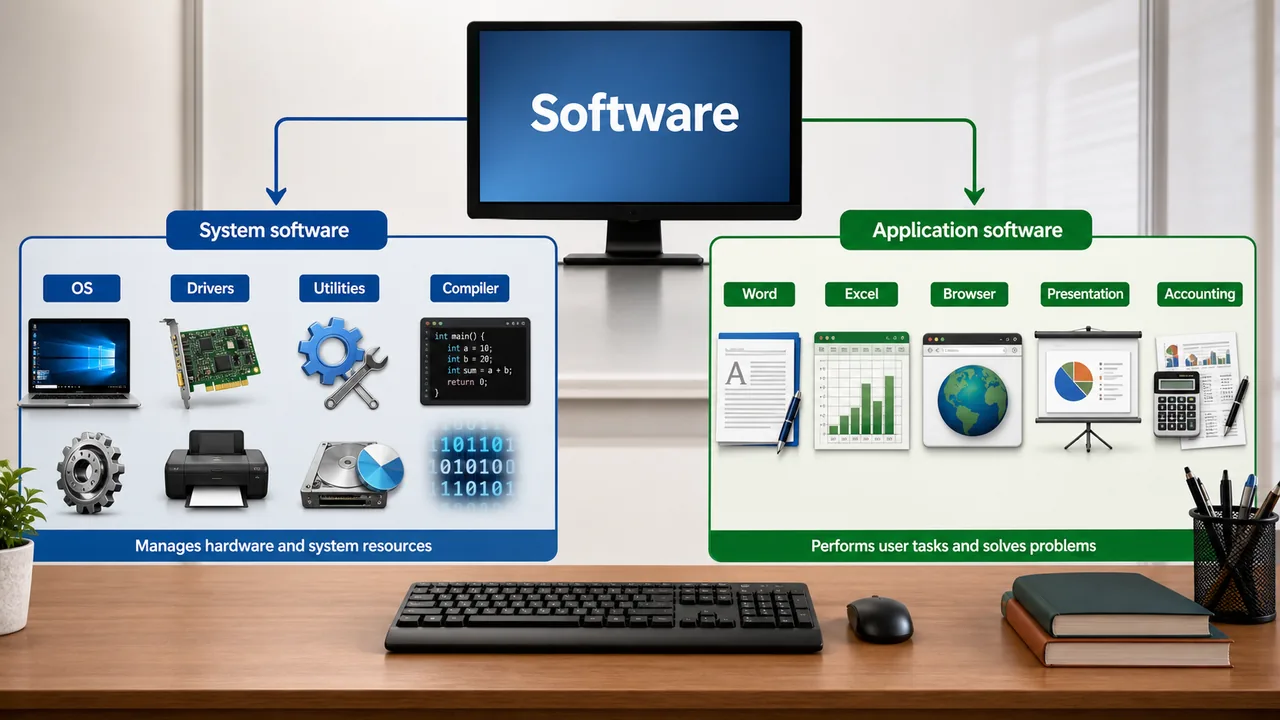
Software is broadly classified into two categories:
1. System Software
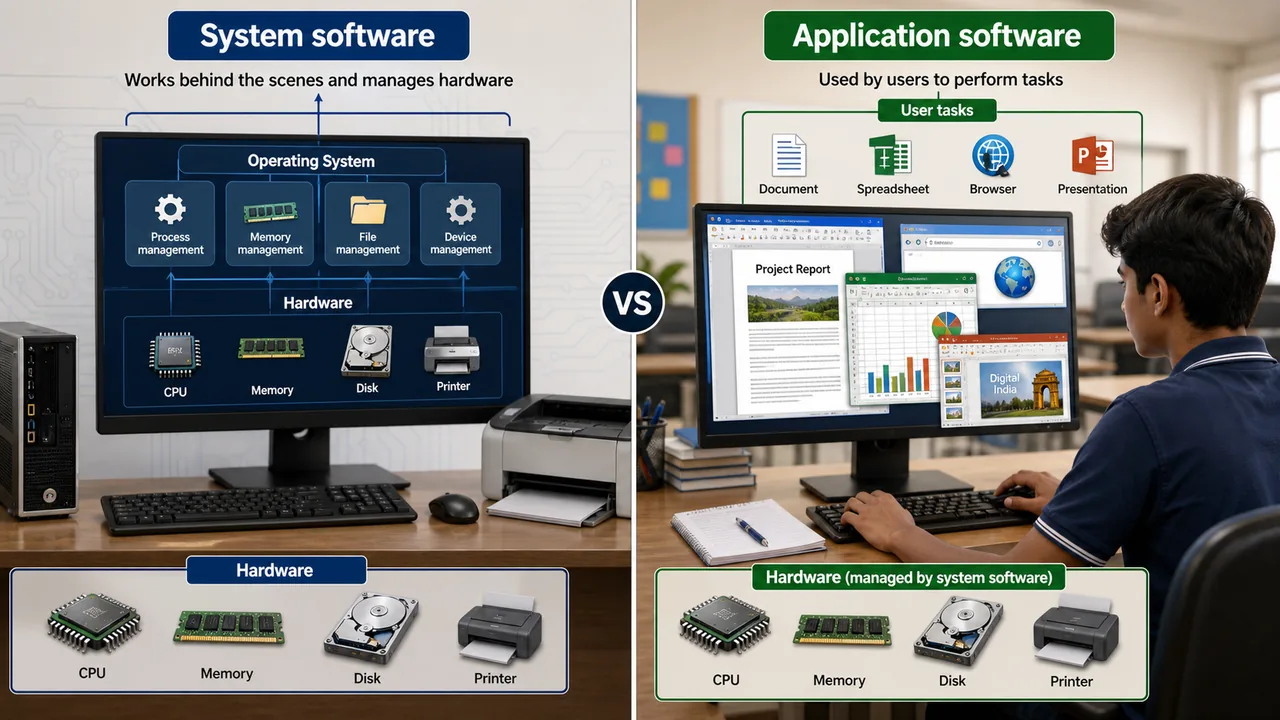
System software manages and controls the computer hardware, providing a platform for application software to run. The user doesn't interact with it directly for tasks — it works behind the scenes.
Examples of System Software:
| Type | What it Does | Examples |
|---|---|---|
| Operating System (OS) | Manages hardware, runs programs, provides user interface | Windows, Linux, macOS, Android, iOS |
| Device Drivers | Enables OS to communicate with hardware devices | Printer driver, graphics driver, audio driver |
| Language Processors | Converts programming code to machine language | Compiler, Interpreter, Assembler |
| Utility Software | System maintenance and optimization | Antivirus, Disk Cleaner, File Manager, Backup tools |
2. Application Software
Application software is designed for end-users to perform specific tasks. This is what you directly interact with.
| Category | Purpose | Examples |
|---|---|---|
| Word Processing | Creating documents | MS Word, Google Docs, LibreOffice Writer |
| Spreadsheet | Data, calculations, charts | MS Excel, Google Sheets, Lotus 1-2-3 |
| Presentation | Slideshows | MS PowerPoint, Google Slides |
| Database | Organizing large data | MS Access, MySQL, Oracle |
| Web Browser | Accessing websites | Chrome, Firefox, Safari, Edge |
| Email Client | Managing emails | Outlook, Gmail, Thunderbird |
| Media Player | Playing audio/video | VLC, Windows Media Player |
| Accounting | Financial management | Tally, QuickBooks |
| Graphics/Design | Image editing, design | Photoshop, GIMP, CorelDRAW, MS Paint |
| Agriculture Software | Farm management, crop planning | e-NAM, IFFCO Kisan app, AgroStar |
System Software vs Application Software
| Feature | System Software | Application Software |
|---|---|---|
| Purpose | Manages hardware and system resources | Performs specific user tasks |
| User Interaction | Indirect (works in background) | Direct (user opens and uses) |
| Examples | Windows, Linux, device drivers | Word, Excel, Chrome, Tally |
| Dependency | Runs independently | Needs system software (OS) to run |
| Development | Built by system programmers | Built by application developers |
| Installation | Installed first (before any app) | Installed on top of OS |
Operating System — Quick Reference
The Operating System (OS) is the most important system software. It manages hardware, runs programs, provides a user interface, and handles security. Popular examples: Windows, Linux, macOS, Android.
For detailed coverage of OS types (Batch, Multi-tasking, Real-time), Kernel, CLI vs GUI, process management, booting, and deadlock — see the Operating System & Interfaces lesson.
Language Processors
Computers only understand machine language (binary — 0s and 1s). Humans write programs in high-level languages (English-like). Language processors convert human-readable code into machine code.
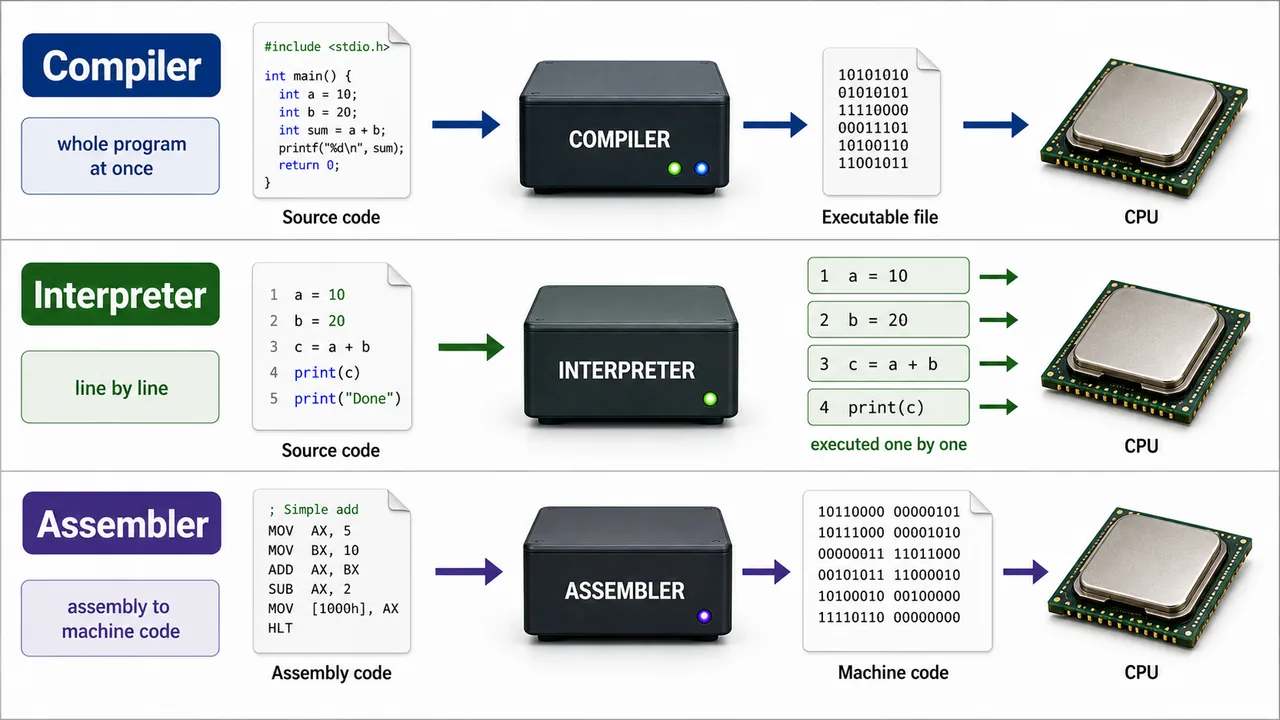
| Processor | What it Does | How it Works |
|---|---|---|
| Assembler | Converts Assembly Language → Machine Language | Translates the entire program at once |
| Compiler | Converts High-Level Language → Machine Language | Translates entire program first, then executes (C, C++) |
| Interpreter | Converts High-Level Language → Machine Language | Translates and executes line by line (Python, BASIC) |
Compiler vs Interpreter
| Feature | Compiler | Interpreter |
|---|---|---|
| Translation | Entire program at once | Line by line |
| Speed | Faster execution (after compilation) | Slower (translates each time) |
| Error Detection | Shows all errors after complete scan | Stops at first error |
| Output | Creates an executable file (.exe) | No separate output file |
| Languages | C, C++, Java | Python, BASIC, JavaScript |
Utility Software
Utility software helps maintain, optimize, and protect the computer:
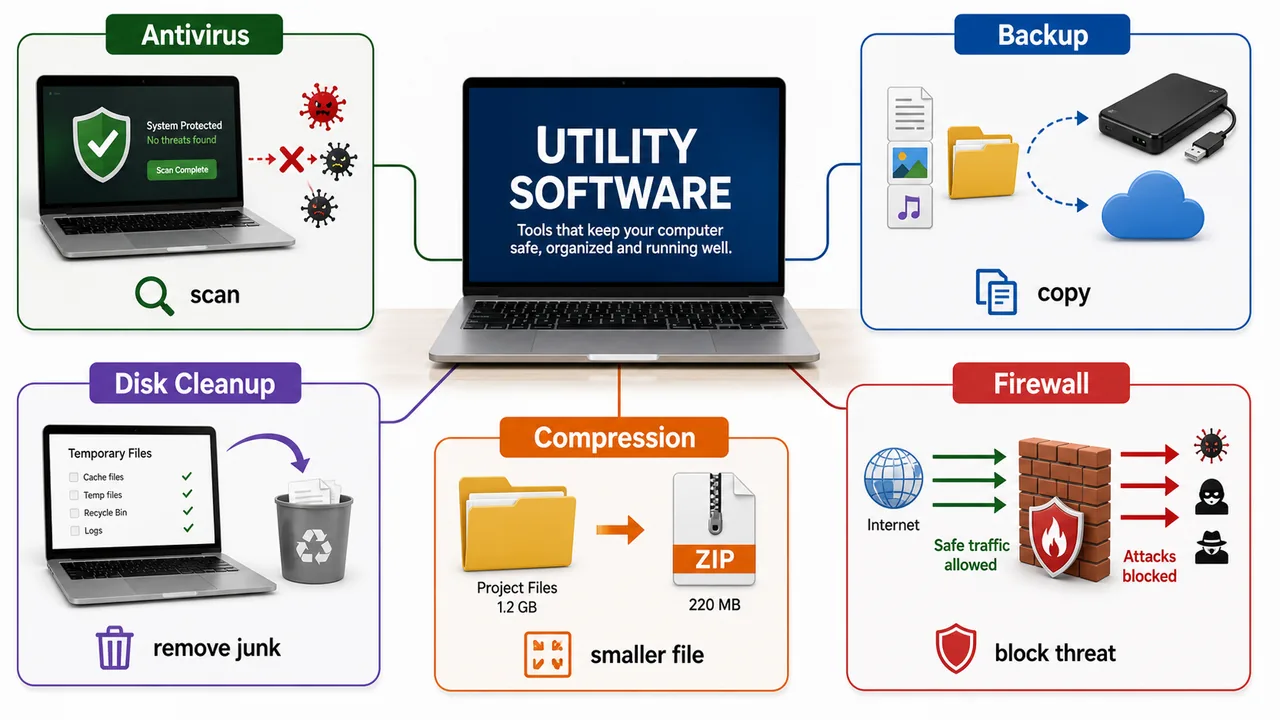
| Utility | Purpose |
|---|---|
| Antivirus | Detects and removes viruses and malware (Quick Heal, Kaspersky, Windows Defender) |
| Disk Defragmenter | Reorganizes fragmented files on hard disk for faster access |
| Disk Cleanup | Removes temporary and unnecessary files to free space |
| Backup Software | Creates copies of important data for recovery |
| File Compression | Reduces file size (WinRAR, 7-Zip, WinZip) |
| Firewall | Monitors and controls incoming/outgoing network traffic |
Open Source vs Proprietary Software
| Feature | Open Source | Proprietary |
|---|---|---|
| Source Code | Freely available to view and modify | Hidden, owned by company |
| Cost | Usually free | Paid (license fee) |
| Examples | Linux, LibreOffice, Firefox, Android, VLC | Windows, MS Office, Photoshop, macOS |
| Customization | Fully customizable | Limited by vendor |
| Support | Community support | Professional support from company |
Firmware
Firmware is a special type of software permanently stored in ROM or flash memory on hardware devices. It provides low-level control for the device.
Examples: BIOS in computers, software in a TV remote, printer firmware, router firmware.
Firmware sits between hardware and software — it's "firm" because it rarely changes.
Middleware
Middleware is software that sits between the operating system and application software, acting as a bridge. It enables communication, data management, and integration between different applications or services.
Examples of Middleware:
- Web Servers — Apache, Nginx (handle HTTP requests between client and application)
- Message Queues — RabbitMQ, Apache Kafka (manage communication between services)
- Database Middleware — ODBC, JDBC (connect applications to databases)
- Application Servers — Apache Tomcat, JBoss
The easiest way to place middleware is to see it as the glue layer between system software and application software.
ERP & CRM Software
ERP — Enterprise Resource Planning
ERP software integrates and manages core business processes (finance, HR, manufacturing, supply chain, procurement) into a single unified system.
| ERP Software | Developer |
|---|---|
| SAP | SAP SE (Germany) — world's largest ERP provider |
| Oracle ERP | Oracle Corporation |
| Microsoft Dynamics | Microsoft |
| Tally ERP | Tally Solutions (India) |
CRM — Customer Relationship Management
CRM software manages a company's interactions with current and potential customers — sales tracking, marketing, customer support.
| CRM Software | Developer |
|---|---|
| Salesforce | Salesforce Inc. — world's #1 CRM |
| Zoho CRM | Zoho Corporation (India) |
| HubSpot | HubSpot Inc. |
ERP = manages internal business processes. CRM = manages external customer relationships.
Freeware vs Shareware vs Open Source
| Feature | Freeware | Shareware | Open Source |
|---|---|---|---|
| Cost | Free | Free trial, then paid | Free |
| Source Code | Not available | Not available | Freely available |
| Modification | Not allowed | Not allowed | Allowed |
| Time Limit | No limit | Trial period (30/60 days) | No limit |
| Examples | Adobe Acrobat Reader, Skype | WinRAR, WinZip | Linux, LibreOffice, Firefox, GIMP |
Freeware = free to use but code is hidden. Open Source = free AND code is open to modify. Shareware = "try before you buy."
Device Drivers — OS-Specific
A device driver is written for a specific operating system. A Windows driver will not work on Linux or macOS, and vice versa. When you install a printer, you must install the driver version matching your OS.
- Drivers for the same hardware (e.g., NVIDIA GPU) must be downloaded separately for Windows, Linux, and macOS
- Linux includes many drivers in the kernel itself (built-in support)
- Windows uses .sys and .inf files for drivers
- Plug and Play (PnP) automatically detects hardware and installs the correct driver
Disk Defragmenter
Disk Defragmenter is a utility that rearranges fragmented data on a hard disk so that related data is stored contiguously, resulting in faster read/write speeds.
- Over time, files get scattered (fragmented) across different sectors of the HDD
- Defragmentation collects fragments and places them together
- Only needed for HDDs — SSDs do not need defragmentation (it can actually reduce SSD lifespan)
- Windows includes a built-in defragmenter (Defragment and Optimize Drives)
Defragmentation helps mechanical hard disks by rearranging scattered data, but it is not needed for SSDs and can reduce their lifespan.
Common File Compression Formats
| Format | Developer | Features |
|---|---|---|
| .zip | Phil Katz (1989) | Most universal; built-in support in Windows, macOS, Linux |
| .rar | Eugene Roshal | Better compression ratio; requires WinRAR to extract |
| .7z | Igor Pavlov | Best compression ratio; open source (7-Zip) |
| .tar.gz | GNU Project | Common in Linux; .tar bundles files, .gz compresses |
- File compression reduces file size for storage and transfer
- Lossless compression — original data fully recoverable (ZIP, RAR)
- Lossy compression — some data permanently removed (JPEG, MP3)
Summary Points
| Concept | Key Details |
|---|---|
| Software | Set of programs and instructions — intangible |
| System Software | Manages hardware — OS, drivers, utilities |
| Application Software | User tasks — Word, Excel, Chrome, Tally |
| Operating System | Most important system software (see OS lesson for details) |
| Assembler | Assembly language → Machine language |
| Compiler | High-level → Machine (entire program, creates .exe) — C, C++ |
| Interpreter | High-level → Machine (line by line) — Python, BASIC |
| Middleware | Bridge between OS and apps — Apache, ODBC, Kafka, Tomcat |
| ERP | Enterprise Resource Planning — SAP, Oracle, Tally (business processes) |
| CRM | Customer Relationship Management — Salesforce, Zoho (customer data) |
| Freeware | Free to use, code hidden — Adobe Acrobat Reader, Skype |
| Shareware | Free trial, then paid — WinRAR, WinZip |
| Open Source | Free, code visible and modifiable — Linux, Firefox, VLC, GIMP |
| Proprietary | Paid, code hidden — Windows, MS Office, Photoshop |
| Device Drivers | OS-specific — Windows driver won't work on Linux; PnP auto-detects |
| Disk Defragmenter | Rearranges fragmented HDD data — NOT for SSDs |
| .zip | Most universal compression, Phil Katz (1989), built-in OS support |
| .rar | Better compression ratio, requires WinRAR |
| .7z | Best compression ratio, open source (7-Zip) |
| Lossless vs Lossy | ZIP/RAR = full recovery; JPEG/MP3 = some data removed |
| Antivirus | Utility — detects/removes viruses |
| Firewall | Utility — controls network traffic |
| Firmware | Software stored in ROM/flash — BIOS, router software, rarely changes |
Lesson Doubts
Ask questions, get expert answers