Lesson
11 of 26
Translate

MS PowerPoint, Access & Outlook

Presentation software (PowerPoint), database management (Access), and email client (Outlook) essentials for UPSSSC AGTA exam.

MS PowerPoint — Presentation Software

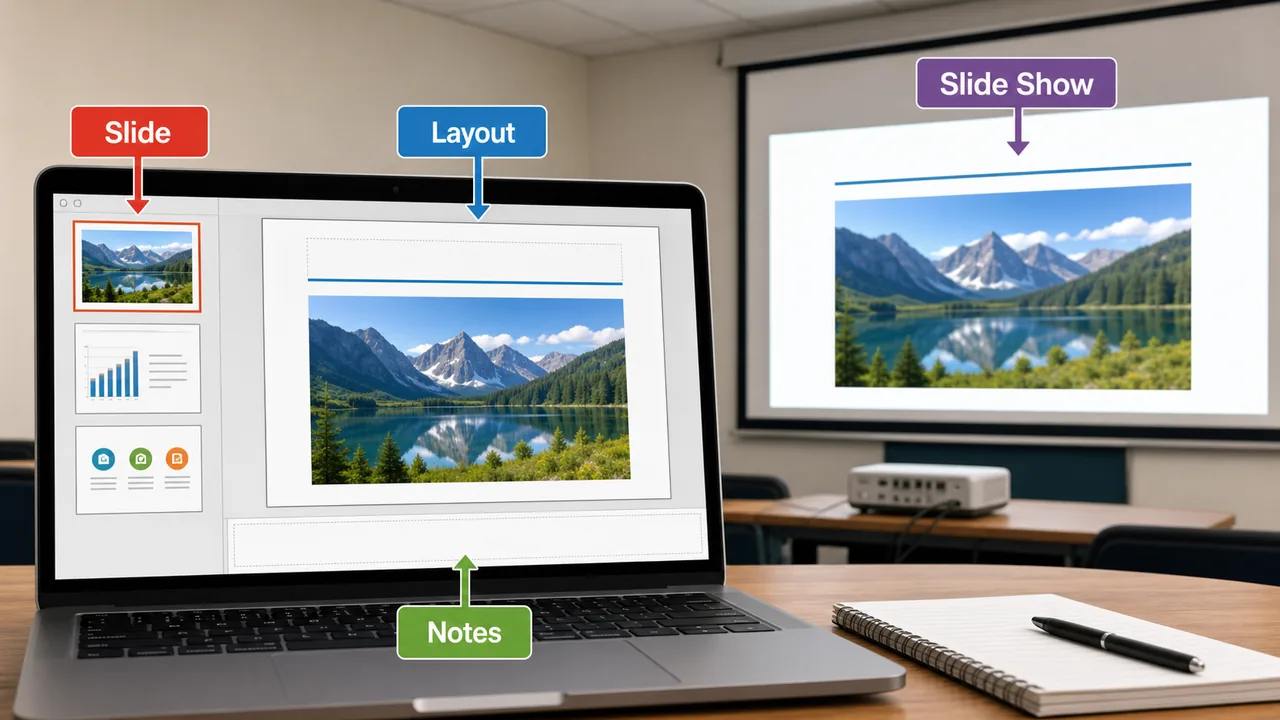
Microsoft PowerPoint is a presentation software used to create visual slideshows for meetings, classrooms, seminars, and training sessions.

  • File extension: .pptx (older: .ppt)
  • A presentation consists of individual slides — like pages in a book

Key PowerPoint Concepts

TermMeaning
SlideA single page in a presentation
Slide LayoutPre-designed arrangement (Title, Two Content, Blank, etc.)
ThemeVisual design template (colors, fonts, backgrounds)
TransitionVisual effect when moving from one slide to the next (Fade, Push, Wipe)
AnimationEffect applied to objects WITHIN a slide (Appear, Fly In, Zoom)
Slide MasterMaster template that controls the look of all slides
Slide ShowFull-screen presentation mode (press F5)
Speaker NotesNotes visible only to the presenter, not the audience

PowerPoint Views

ViewPurpose
Normal ViewDefault editing view — edit slides one at a time
Slide SorterSee all slides as thumbnails — rearrange easily
Notes PageSee slide with speaker notes below
Reading ViewPreview without full screen
Slide ShowFull-screen presentation (F5 = from beginning, Shift+F5 = from current)

Important Shortcuts

ShortcutFunction
F5Start slideshow from beginning
Shift+F5Start from current slide
EscEnd slideshow
Ctrl+MNew slide
B (during show)Black screen
W (during show)White screen

MS Access — Database Management

Microsoft Access is a database management system (DBMS) used to create, manage, and query databases for organizing structured data.

  • File extension: .accdb (older: .mdb)
  • Best for small to medium databases (office records, inventory, student data)
  • Uses SQL (Structured Query Language) for querying data

Key Access Concepts

TermMeaning
DatabaseOrganized collection of related data
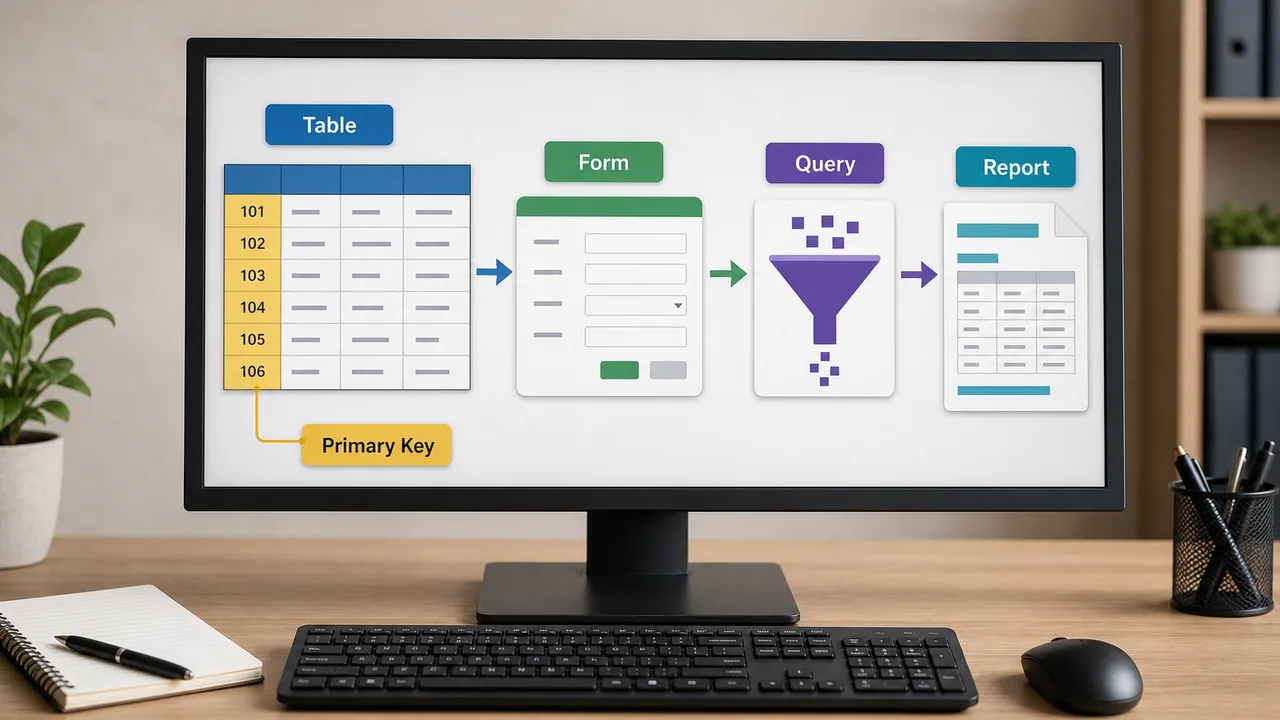
TableStores data in rows and columns (like an Excel sheet)
RecordOne row in a table (one complete entry)
FieldOne column in a table (one attribute — Name, Age, City)
Primary KeyUnique identifier for each record (e.g., Student ID, Aadhaar number)
FormUser-friendly interface for data entry
QueryRequest to retrieve specific data from tables (using SQL)
ReportFormatted output for printing or sharing
RelationshipConnection between two tables via common fields

Data Types in Access

TypeStoresExample
Short TextText up to 255 charactersName, City
Long TextLarge text (memo)Description, Address
NumberNumeric valuesAge, Quantity
CurrencyMoney values₹25,500
Date/TimeDates and times28/03/2026
Yes/NoBoolean (true/false)Is Active?
AutoNumberAuto-incrementing ID1, 2, 3…

MS Outlook — Email Client

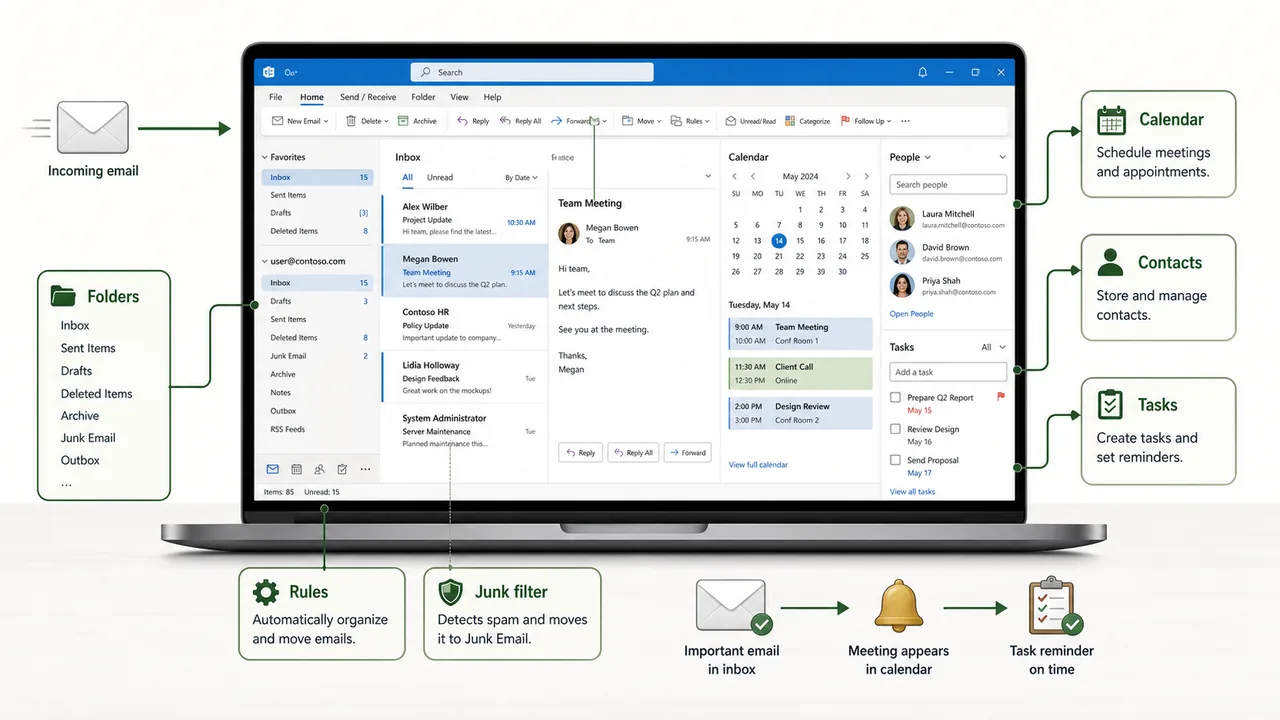
Microsoft Outlook is an email client and personal information manager. It manages emails, calendar, contacts, and tasks in one application.

  • File extension for data: .pst (Personal Storage Table)
  • Part of Microsoft Office Suite
  • Used extensively in government and corporate offices

Key Outlook Features

FeaturePurpose
MailSend, receive, organize, and search emails
CalendarSchedule meetings, appointments, reminders
ContactsStore and manage address book
TasksCreate to-do lists with deadlines
NotesQuick digital sticky notes
FoldersOrganize emails into Inbox, Sent, Drafts, Trash, custom folders
RulesAuto-sort incoming emails based on conditions
Junk FilterBlocks spam and unwanted emails

Outlook vs Gmail/Yahoo

FeatureOutlookGmail/Yahoo
TypeDesktop application + webPrimarily web-based
OfflineWorks offlineNeeds internet
CalendarBuilt-in, integratedSeparate app
Best forOffices, governmentPersonal use

Key Takeaways

  • PowerPoint creates visual slideshows (.pptx); Transition = between slides, Animation = within a slide
  • F5 starts slideshow; Ctrl+M adds new slide
  • Access is a database tool (.accdb); uses Tables, Queries, Forms, Reports
  • Primary Key uniquely identifies each record in a table
  • Outlook manages emails, calendar, contacts, and tasks in one application
  • Access uses SQL for querying; best for small-medium databases

Summary Cheat Sheet

ConceptKey Details
PowerPointPresentation software — .pptx format
SlideOne page in a presentation
TransitionEffect between slides (Fade, Wipe)
AnimationEffect on objects within a slide (Appear, Fly In)
F5Start slideshow from beginning
Shift+F5Start from current slide
AccessDatabase management — .accdb format
TableRows (records) × Columns (fields)
Primary KeyUnique identifier for each record
QuerySQL-based data retrieval request
FormUser-friendly data entry interface
ReportFormatted printable output
SQLStructured Query Language for databases
OutlookEmail client + calendar + contacts + tasks
.pstOutlook personal data file

Knowledge Check

Take a dynamically generated quiz based on the material you just read to test your understanding and get personalized feedback.

Lesson Doubts

Ask questions, get expert answers

Lesson Doubts is a Pro feature.Upgrade