👨💻 Programming Languages & Flowcharts
Machine, assembly, high-level languages (C, C++, Java, Python), flowcharts, algorithms, and program development concepts for UPSSSC AGTA.
What is a Programming Language?
Just as humans communicate using languages like Hindi or English, programmers communicate with computers using programming languages. These languages provide a structured way to write instructions that a computer can understand and execute.
Definition: A programming language is a formal set of rules and syntax used to write instructions (programs) that a computer can execute.
Generations of Programming Languages
Programming languages evolved from machine-level to human-friendly:
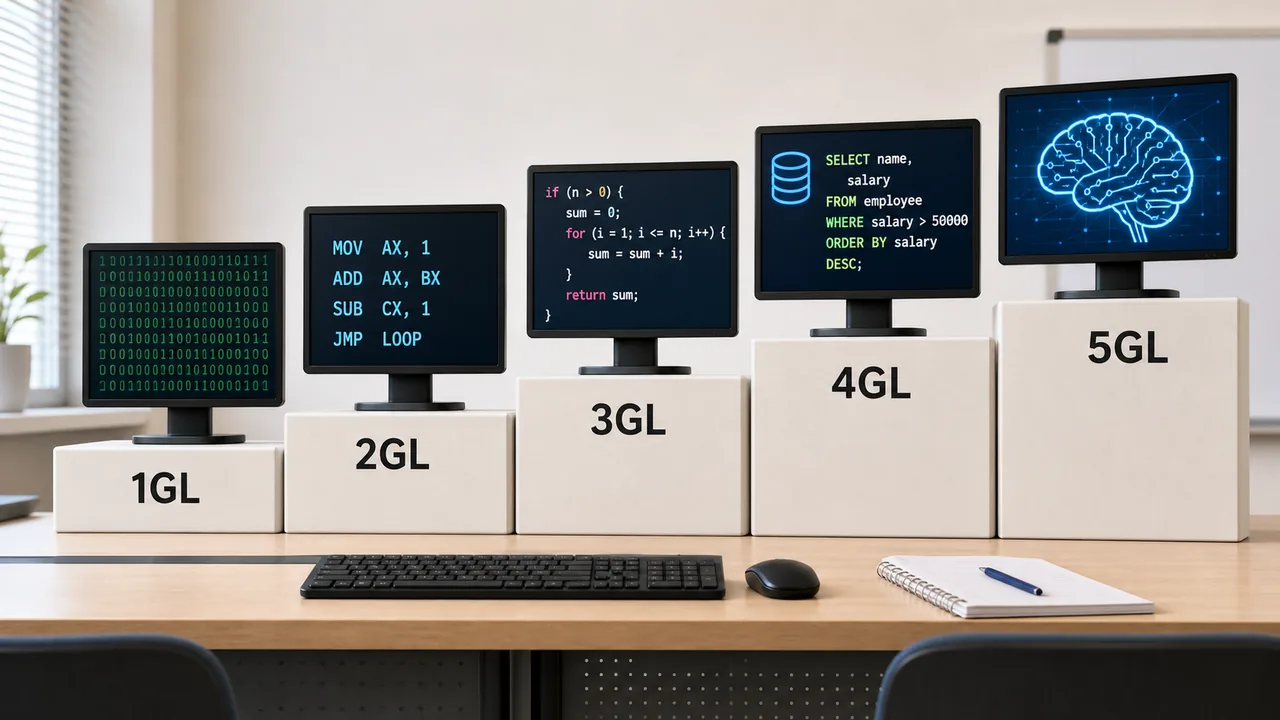
1. First Generation — Machine Language (1GL)
- Written in pure binary (0s and 1s)
- Directly understood by CPU — no translation needed
- Extremely difficult for humans to write and debug
- Machine-dependent — different for each processor
2. Second Generation — Assembly Language (2GL)
- Uses mnemonics (short codes) instead of binary: ADD, SUB, MOV, JMP
- Requires an Assembler to convert to machine language
- Slightly easier than binary but still complex
- Still machine-dependent
3. Third Generation — High-Level Languages (3GL)
- Written in English-like syntax that humans can read
- Needs a Compiler or Interpreter to convert to machine language
- Machine-independent (portable) — same code runs on different computers
- Most popular generation
| Language | Created By | Year | Key Use |
|---|---|---|---|
| FORTRAN | IBM (John Backus) | 1957 | Scientific computing (FORmula TRANslation) |
| ALGOL | Friedrich L. Bauer, Hermann Bottenbruch and collaborators | 1958 | Algorithmic and scientific problem solving |
| COBOL | Grace Hopper | 1959 | Business applications (COmmon Business Oriented Language) |
| BASIC | John G. Kemeny & Thomas E. Kurtz | 1964 | Teaching beginners |
| C | Dennis Ritchie | 1972 | System programming, OS development |
| C++ | Bjarne Stroustrup | 1979 | Object-Oriented, games, applications |
| Pascal | Niklaus Wirth | 1970 | Structured and procedural programming education |
| Java | James Gosling (Sun) | 1995 | Web, mobile (Android), enterprise |
| Python | Guido van Rossum | 1991 | AI, Data Science, web, scripting |
| JavaScript | Brendan Eich | 1995 | Web pages, interactive websites |
4. Fourth Generation (4GL)
- Designed for specific purposes — database queries, reports
- Even closer to natural English
- Examples: SQL (database queries), MATLAB, R
5. Fifth Generation (5GL)
- Languages for Artificial Intelligence
- Focus on problem-solving rather than step-by-step instructions
- Examples: Prolog, LISP, Mercury
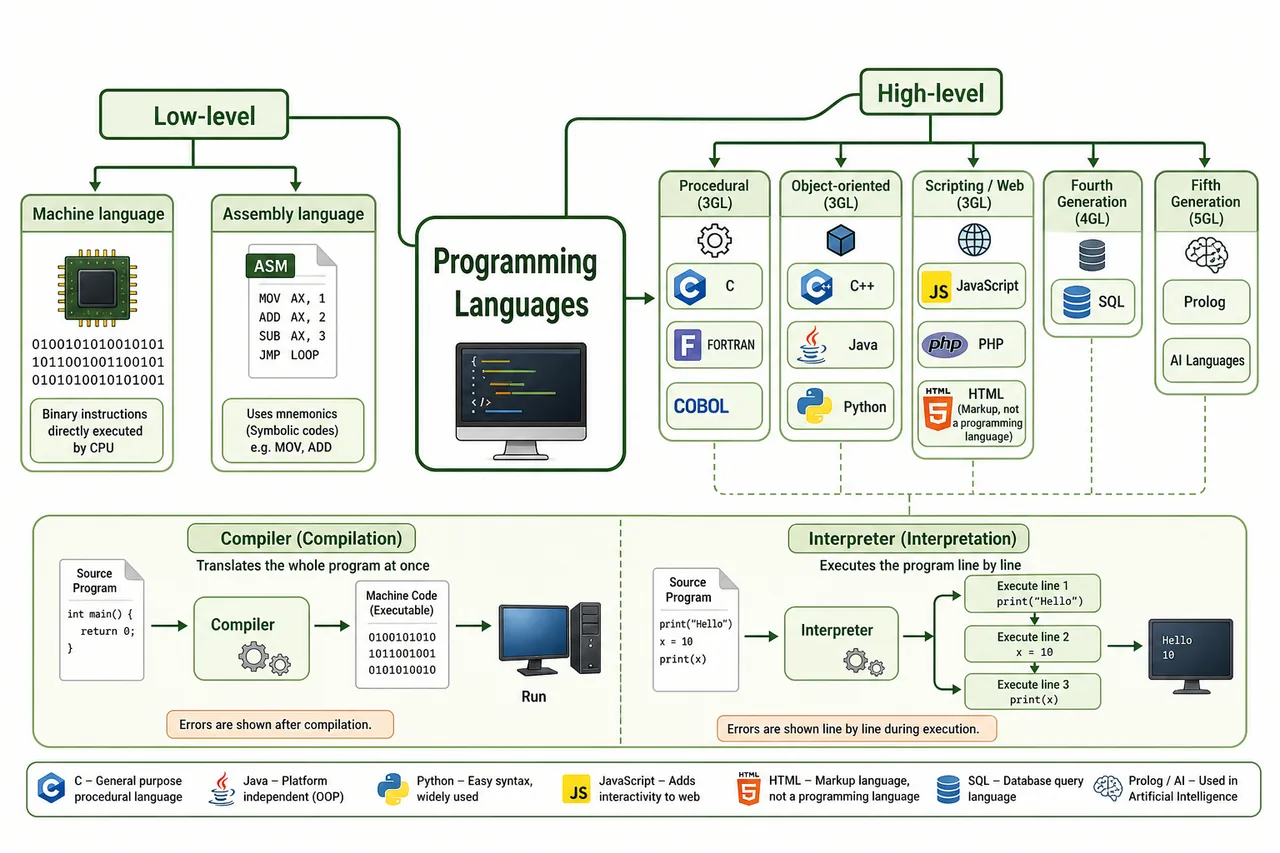
Low-Level vs High-Level Languages
| Feature | Low-Level (1GL, 2GL) | High-Level (3GL, 4GL, 5GL) |
|---|---|---|
| Readability | Difficult (binary/mnemonics) | Easy (English-like) |
| Speed | Faster execution | Slower (needs translation) |
| Portability | Machine-dependent | Machine-independent |
| Examples | Machine code, Assembly | C, Java, Python |
| Translation | Assembler | Compiler/Interpreter |
| Memory Control | Direct hardware access | Abstracted from hardware |
Algorithms
An algorithm is a step-by-step procedure to solve a problem. Before writing a program, a programmer first designs an algorithm.
Properties of a Good Algorithm:
- Finiteness — Must end after a finite number of steps
- Definiteness — Each step must be clear and unambiguous
- Input — Takes zero or more inputs
- Output — Produces at least one output
- Effectiveness — Each step must be doable in finite time
Example Algorithm: Finding the largest of three numbers
- START
- Read three numbers A, B, C
- If A > B and A > C, then LARGEST = A
- Else if B > C, then LARGEST = B
- Else LARGEST = C
- Print LARGEST
- STOP
Flowcharts
A flowchart is a diagrammatic representation of an algorithm using standard symbols connected by arrows showing the flow of logic.
Example Flowchart: Finding Largest of Three Numbers
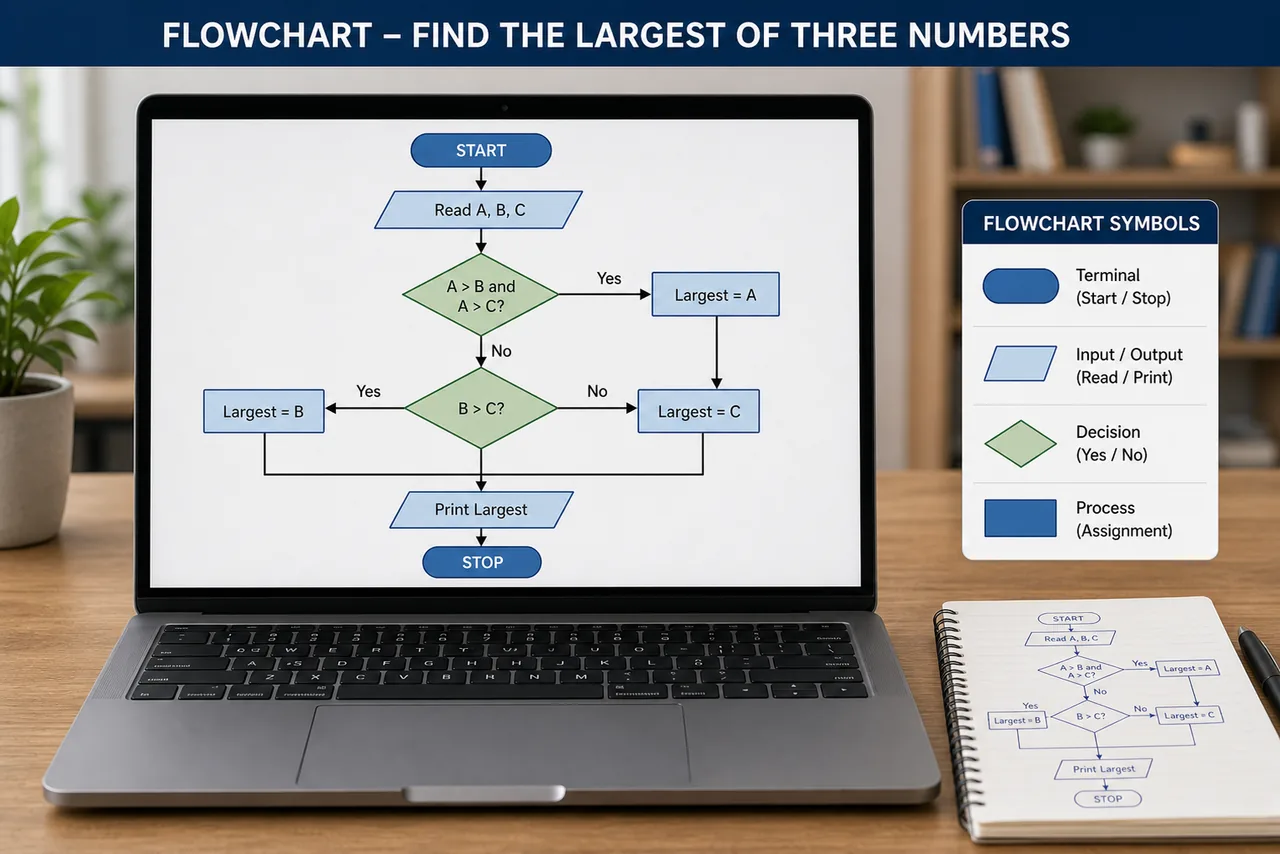
Standard Flowchart Symbols
| Symbol | Shape | Purpose |
|---|---|---|
| Terminal | Oval/Rounded rectangle | START and STOP |
| Process | Rectangle | Calculations, operations |
| Decision | Diamond | Yes/No or True/False branching |
| Input/Output | Parallelogram | Reading input or displaying output |
| Flow Lines | Arrows | Direction of flow |
| Connector | Small circle | Connecting different parts |
Advantages of Flowcharts
- Easy to understand visually
- Helps in debugging and error finding
- Serves as documentation
- Makes programming easier
Limitations
- Complex for large programs
- Difficult to modify once drawn
- No standard for detail level
Key Programming Concepts
| Concept | Meaning |
|---|---|
| Source Code | The program as written by the programmer |
| Object Code | Machine-language version after compilation |
| Executable | Final runnable program (.exe file) |
| Bug | An error in a program |
| Debugging | Finding and fixing bugs |
| Syntax | Rules of the programming language (grammar) |
| Syntax Error | Violation of language rules (typo, missing semicolon) |
| Logic Error | Program runs but gives wrong results |
| Runtime Error | Error during program execution (e.g., divide by zero) |
Python — The AI/ML Language
Python is currently the most popular language for Artificial Intelligence and Machine Learning. Key reasons:
- Simple syntax — reads almost like English, easy for beginners
- Extensive libraries: NumPy (numbers), Pandas (data analysis), TensorFlow & PyTorch (deep learning), Scikit-learn (ML), Matplotlib (graphs)
- Used in: AI, Data Science, Web Development (Django, Flask), Automation, Scripting
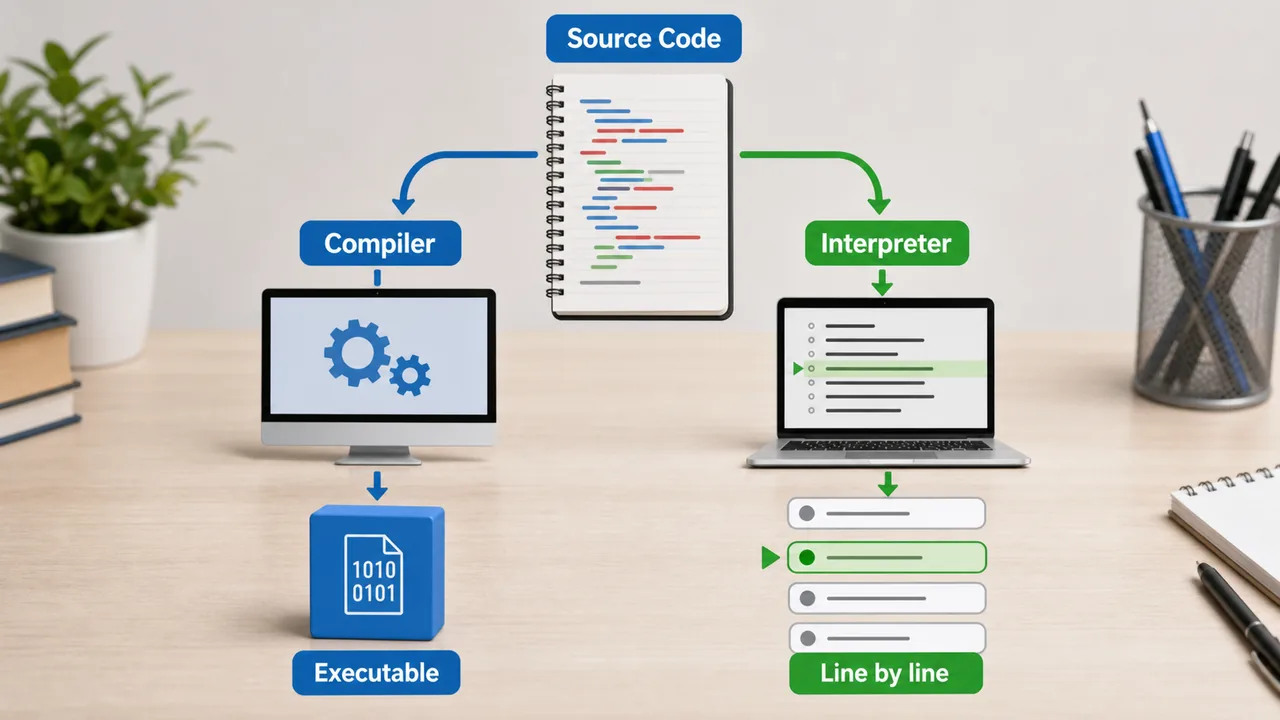
- Interpreted language — runs line by line (no compilation needed)
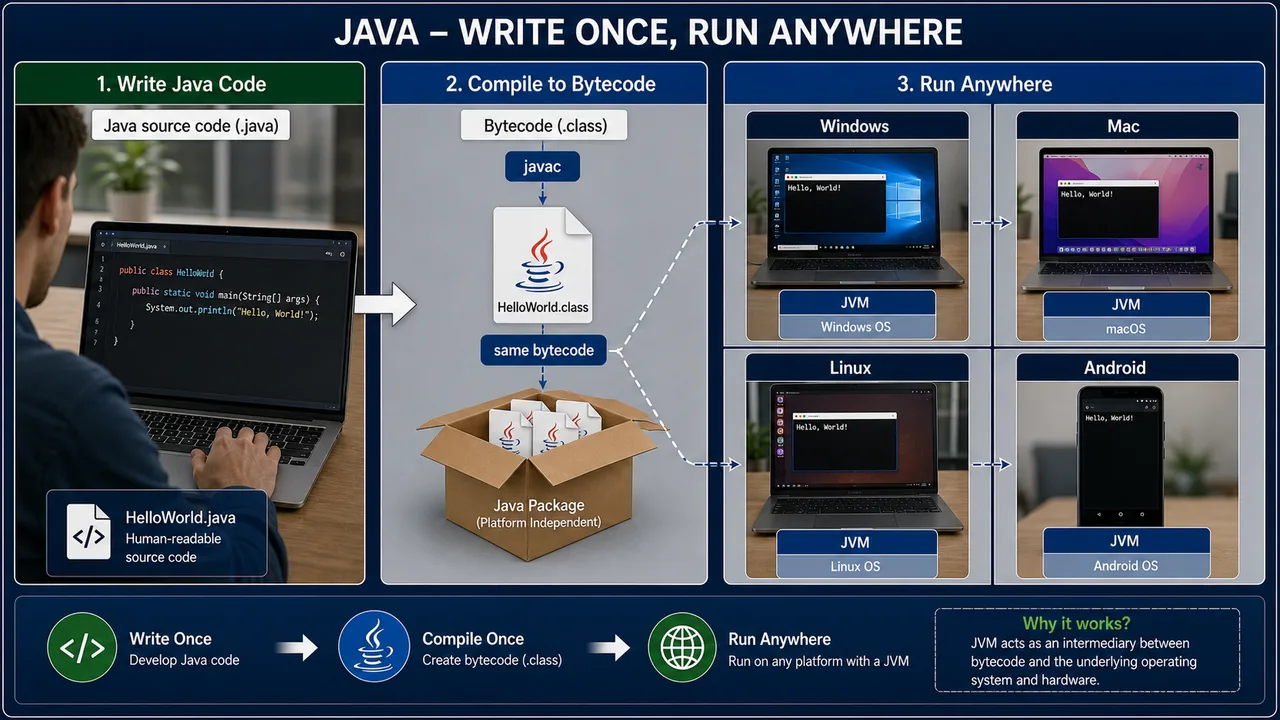
Java — Platform Independent
Java's motto: "Write Once, Run Anywhere" (WORA)
- Java programs compile into bytecode, which runs on the JVM (Java Virtual Machine)
- JVM is available on all platforms (Windows, Mac, Linux, Android)
- This makes Java platform-independent — same program runs everywhere
- Used in: Android apps, enterprise applications, web servers, banking systems
HTML is NOT a Programming Language
HTML (HyperText Markup Language) is a markup language, not a programming language. It defines the structure of web pages using tags like <h1>, <p>, <img> — but it cannot perform logic, loops, or calculations.
- CSS — styles the appearance (colors, fonts, layout)
- JavaScript — adds interactivity and logic to web pages
- Together: HTML (structure) + CSS (style) + JavaScript (behavior) = modern websites
OOP — Object-Oriented Programming Concepts
| Concept | Meaning |
|---|---|
| Class | Blueprint/template for creating objects (e.g., "Car" class defines properties like color, speed) |
| Object | Instance of a class (e.g., "MyCar" is an object of Car class) |
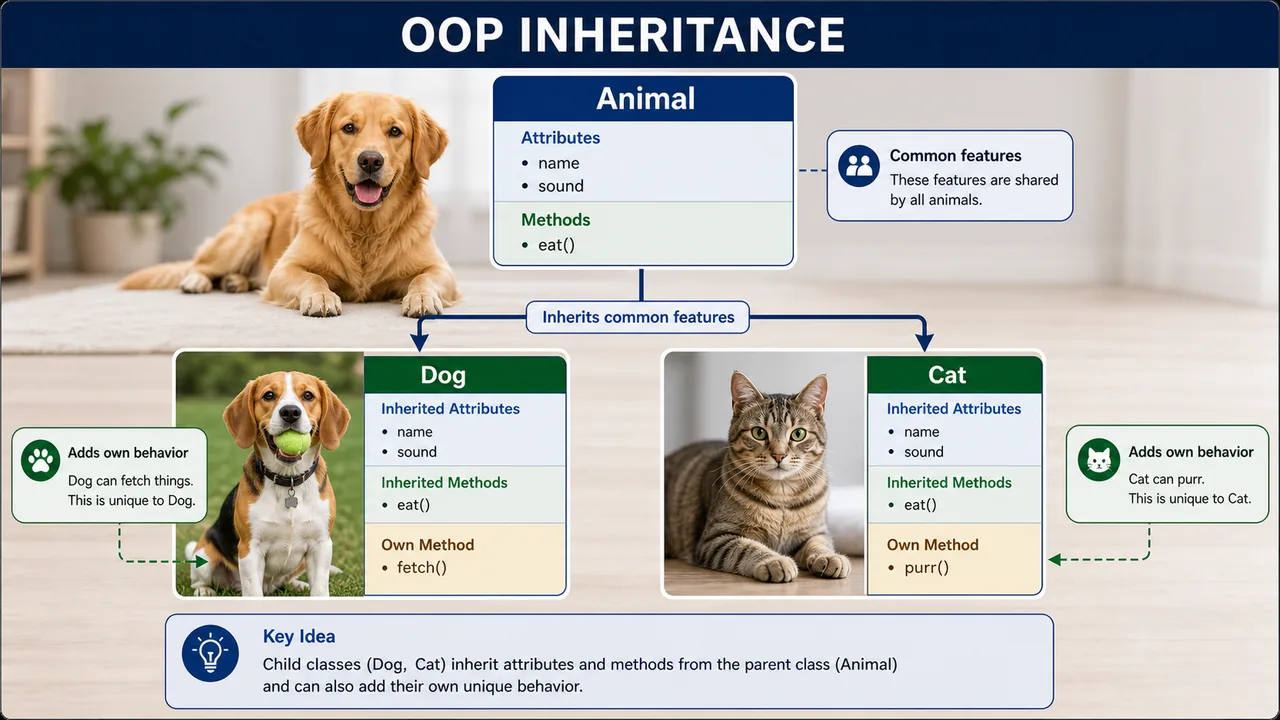
| Inheritance | A class can inherit properties/methods from another class (parent → child) |
| Polymorphism | Same function behaves differently based on context ("poly" = many, "morph" = forms) |
| Encapsulation | Bundling data and methods together, hiding internal details (data hiding) |
| Abstraction | Showing only essential features, hiding complexity (e.g., driving a car without knowing engine internals) |
OOP languages: Java, C++, Python, C#
Development Tools & Concepts
IDE (Integrated Development Environment)
An IDE is a software application that provides tools for writing, testing, and debugging code — all in one place.
| IDE | Used For |
|---|---|
| VS Code | Multi-language (most popular, free, by Microsoft) |
| PyCharm | Python development |
| Eclipse | Java development |
| NetBeans | Java development |
| Android Studio | Android app development |
Version Control — Git
Git is a version control system that tracks changes in code over time. Developers use GitHub or GitLab for online collaboration, code sharing, and backup.
API (Application Programming Interface)
An API allows different programs or systems to communicate with each other. For example, a weather app on your phone uses an API to fetch weather data from a remote server.
Pseudocode
Pseudocode is an informal, plain-English description of algorithm steps in a structured format. It is NOT actual code — it helps plan logic before writing real code.
Important Pioneers
| Person | Contribution |
|---|---|
| John Backus | Created FORTRAN (1957) — first high-level programming language |
| Niklaus Wirth | Created Pascal — an important structured procedural language |
| Grace Hopper | Coined the terms "bug" and "debugging"; developed COBOL; pioneered compiler development |
| Dennis Ritchie | Created C language (1972); co-created UNIX operating system |
| James Gosling | Created Java (1995) at Sun Microsystems |
| Guido van Rossum | Created Python (1991) |
| John G. Kemeny & Thomas E. Kurtz | Created BASIC as a beginner-friendly language in 1964 |
| Charles Babbage | Father of Computer — designed Analytical Engine |
| Ada Lovelace | First computer programmer — wrote algorithm for Analytical Engine |
Summary Points
| Concept | Key Details |
|---|---|
| 1GL Machine Language | Binary (0/1), fastest, hardest to write, machine-dependent |
| 2GL Assembly | Mnemonics (ADD, MOV), needs Assembler, machine-dependent |
| 3GL High-Level | English-like, needs Compiler/Interpreter, machine-independent |
| FORTRAN | First high-level language, 1957, John Backus, scientific computing |
| COBOL | 1959, Grace Hopper, business applications |
| C | 1972, Dennis Ritchie, system programming, UNIX |
| C++ | Object-Oriented extension of C, Bjarne Stroustrup |
| Java | 1995, James Gosling, WORA, JVM bytecode, Android |
| Python | 1991, Guido van Rossum, AI/ML, NumPy/Pandas/TensorFlow, interpreted |
| SQL | 4GL, database query language |
| HTML | NOT a programming language — markup for web structure |
| OOP — Class | Blueprint/template for creating objects |
| OOP — Object | Instance of a class |
| OOP — Inheritance | Child class inherits from parent class |
| OOP — Polymorphism | Same function, different behavior (poly=many, morph=forms) |
| OOP — Encapsulation | Bundling data + methods, hiding internals |
| OOP — Abstraction | Show essential features, hide complexity |
| IDE | Integrated Development Environment — VS Code (most popular, Microsoft) |
| Git | Version control — tracks code changes; GitHub for collaboration |
| API | Application Programming Interface — programs communicate |
| Grace Hopper | Coined "bug"/"debugging", developed COBOL, pioneered compilers |
| Algorithm | Step-by-step problem-solving procedure (5 properties) |
| Flowchart | Visual diagram — Oval, Rectangle, Diamond, Parallelogram |
| Pseudocode | Informal English-like algorithm — NOT actual code |
| Bug | Error in program |
| Debugging | Finding and fixing bugs |
| Compiler | Translates entire program → .exe (C, C++) |
| Interpreter | Translates line by line (Python, BASIC) |
Lesson Doubts
Ask questions, get expert answers