Lesson
11 of 52

📽️ MS PowerPoint, Access & Outlook

Presentation software (PowerPoint), database management (Access), and email client (Outlook) essentials for UPSSSC AGTA exam.

MS PowerPoint — Presentation Software

Microsoft PowerPoint is a presentation software used to create visual slideshows for meetings, classrooms, seminars, and training sessions.

  • File extension: .pptx (older: .ppt)
  • A presentation consists of individual slides — like pages in a book

Before looking at the individual applications, it helps to remember that the Microsoft Office family contains different tools for different kinds of work. PowerPoint is used for presentations, Access for databases, and Outlook for email and scheduling. Older or related software names are sometimes mentioned for comparison: Lotus 1-2-3 was a famous spreadsheet package, while MS Paint is a drawing program rather than presentation software.

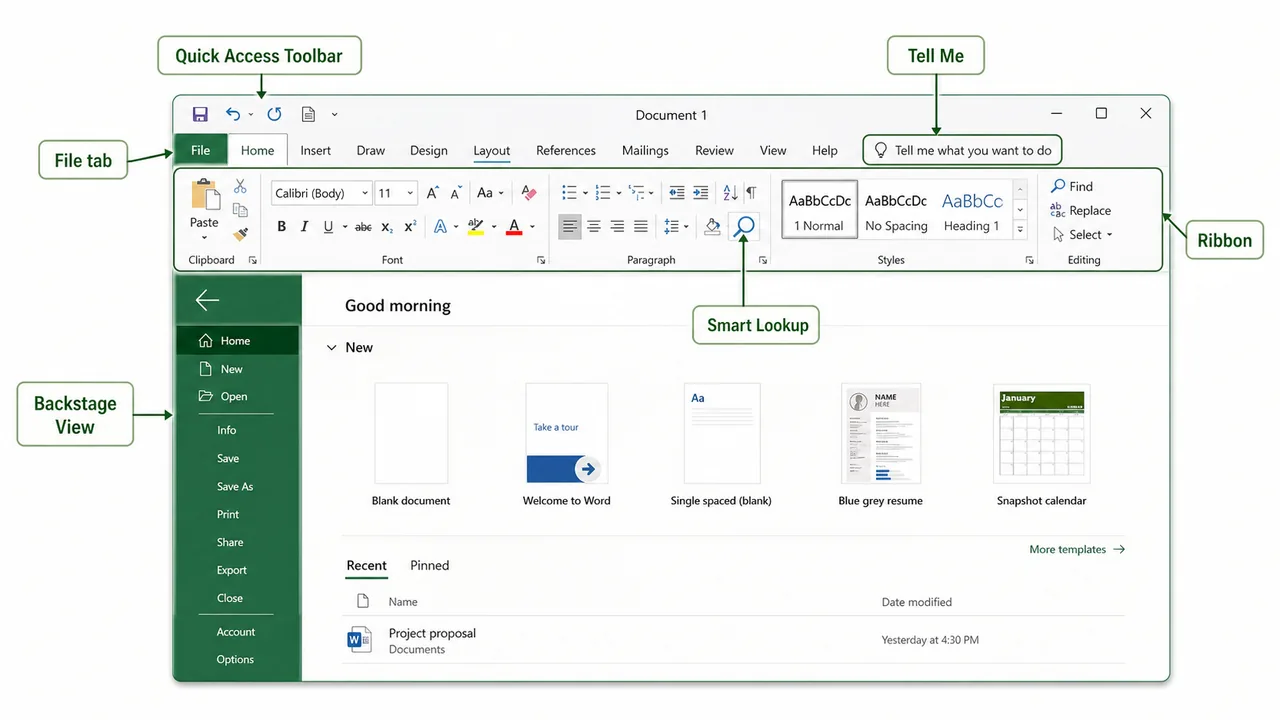
Modern Office versions also include shared interface tools across applications. Backstage View is the file-management area opened from the File tab, where you see commands such as Open, Save, Print, Export, and recent documents. Tell Me works like a built-in search box for finding commands quickly, and Smart Lookup connects selected content with web-based definitions and contextual search.

Shared Microsoft Office interface showing File tab Backstage View Tell Me Smart Lookup Ribbon and Quick Access Toolbar
This interface view links shared Office terms such as File tab, Backstage View, Tell Me, Smart Lookup, and the Ribbon in one screen.

Key PowerPoint Concepts

Term Meaning
Slide A single page in a presentation
Slide Layout Pre-designed arrangement (Title, Two Content, Blank, etc.)
Theme Visual design template (colors, fonts, backgrounds)
Transition Visual effect when moving from one slide to the next (Fade, Push, Wipe)
Animation Effect applied to objects WITHIN a slide (Appear, Fly In, Zoom)
Slide Master Master template that controls the look of all slides
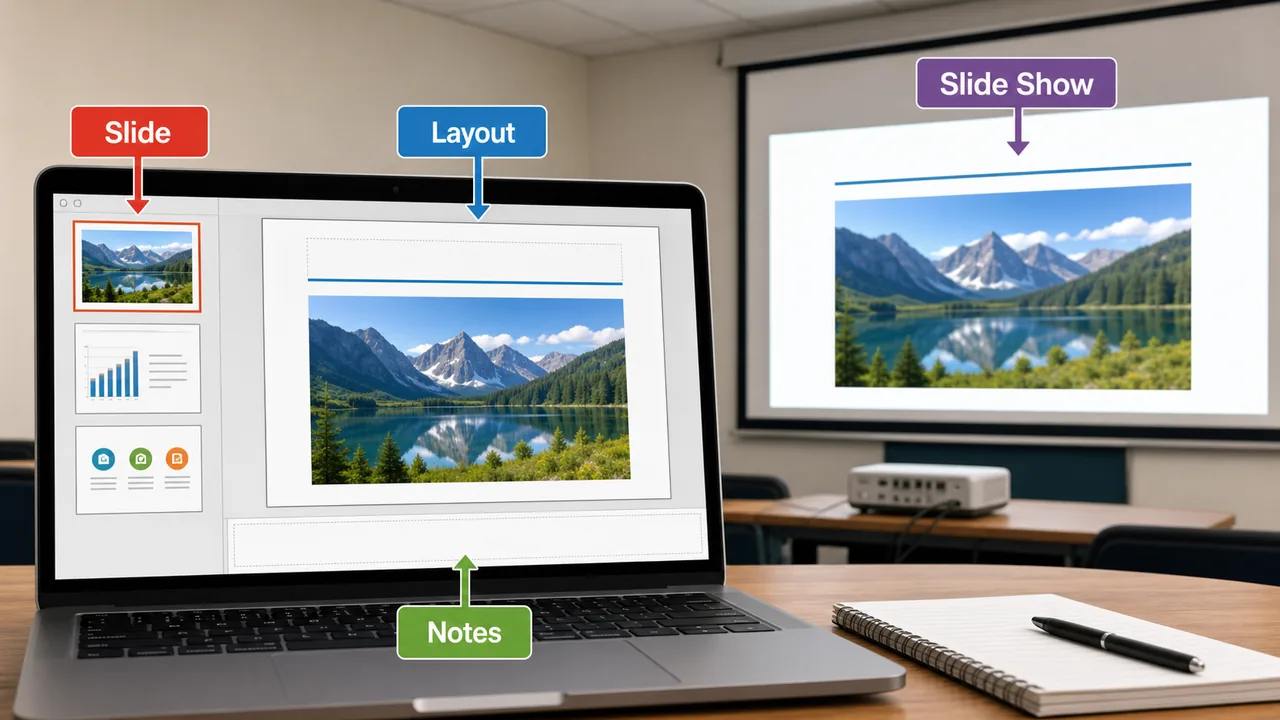
Slide Show Full-screen presentation mode (press F5)
Speaker Notes Notes visible only to the presenter, not the audience
PowerPoint slide layout notes and slide show view for UPSSSC AGTA MS Office preparation
PowerPoint editing view connects slide thumbnails, layout placeholders, speaker notes, and the final slideshow output.

PowerPoint Views

View Purpose
Normal View Default editing view — edit slides one at a time
Slide Sorter See all slides as thumbnails — rearrange easily
Notes Page See slide with speaker notes below
Reading View Preview without full screen
Slide Show Full-screen presentation (F5 = from beginning, Shift+F5 = from current)

Important Shortcuts

Shortcut Function
F5 Start slideshow from beginning
Shift+F5 Start from current slide
Esc End slideshow
Ctrl+M New slide
B (during show) Black screen
W (during show) White screen

MS Access — Database Management

Microsoft Access is a database management system (DBMS) used to create, manage, and query databases for organizing structured data.

  • File extension: .accdb (older: .mdb)
  • Best for small to medium databases (office records, inventory, student data)
  • Uses SQL (Structured Query Language) for querying data

Key Access Concepts

Term Meaning
Database Organized collection of related data
Table Stores data in rows and columns (like an Excel sheet)
Record One row in a table (one complete entry)
Field One column in a table (one attribute — Name, Age, City)
Primary Key Unique identifier for each record (e.g., Student ID, Aadhaar number)
Form User-friendly interface for data entry
Query Request to retrieve specific data from tables (using SQL)
Report Formatted output for printing or sharing
Relationship Connection between two tables via common fields
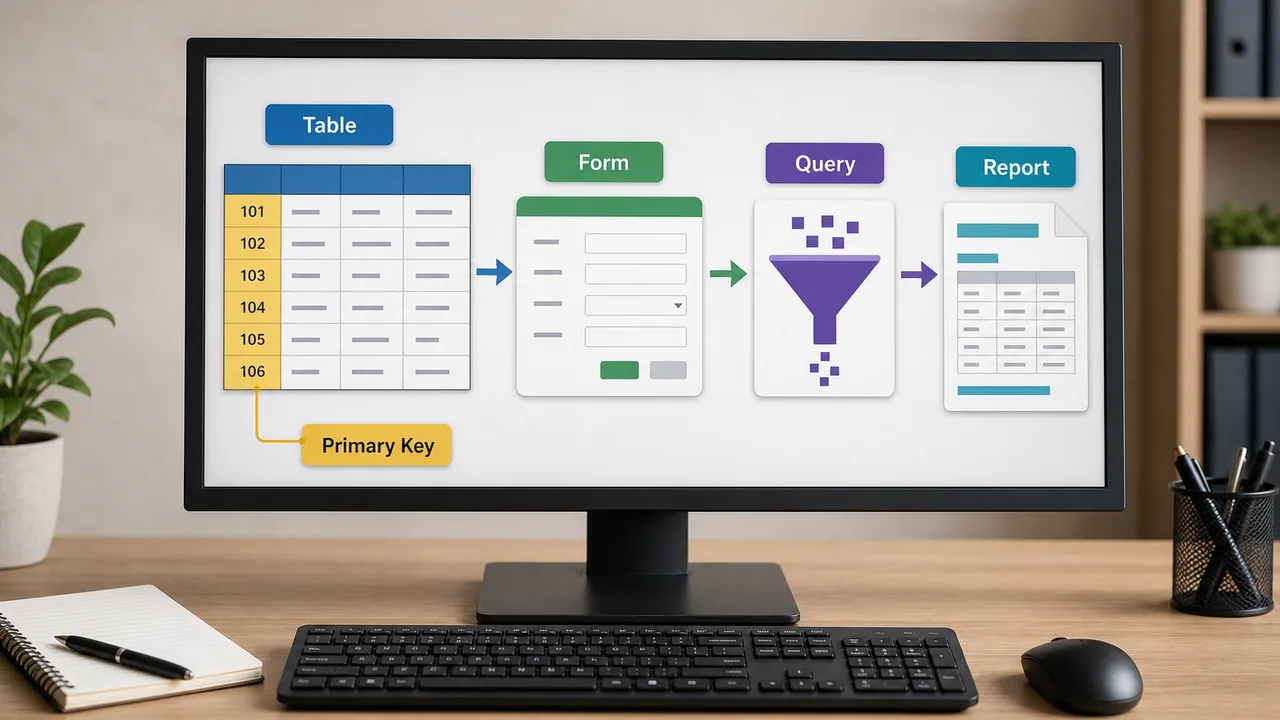
MS Access database table primary key form query and report objects for UPSSSC AGTA Computer section
Access organizes data in tables, uses keys to identify records, and turns selected data into forms, queries, and reports.

Data Types in Access

Type Stores Example
Short Text Text up to 255 characters Name, City
Long Text Large text (memo) Description, Address
Number Numeric values Age, Quantity
Currency Money values ₹25,500
Date/Time Dates and times 28/03/2026
Yes/No Boolean (true/false) Is Active?
AutoNumber Auto-incrementing ID 1, 2, 3...

MS Outlook — Email Client

Microsoft Outlook is an email client and personal information manager. It manages emails, calendar, contacts, and tasks in one application.

  • File extension for data: .pst (Personal Storage Table)
  • Part of Microsoft Office Suite
  • Used extensively in government and corporate offices

Key Outlook Features

Feature Purpose
Mail Send, receive, organize, and search emails
Calendar Schedule meetings, appointments, reminders
Contacts Store and manage address book
Tasks Create to-do lists with deadlines
Notes Quick digital sticky notes
Folders Organize emails into Inbox, Sent, Drafts, Trash, custom folders
Rules Auto-sort incoming emails based on conditions
Junk Filter Blocks spam and unwanted emails

Outlook vs Gmail/Yahoo

Feature Outlook Gmail/Yahoo
Type Desktop application + web Primarily web-based
Offline Works offline Needs internet
Calendar Built-in, integrated Separate app
Best for Offices, government Personal use
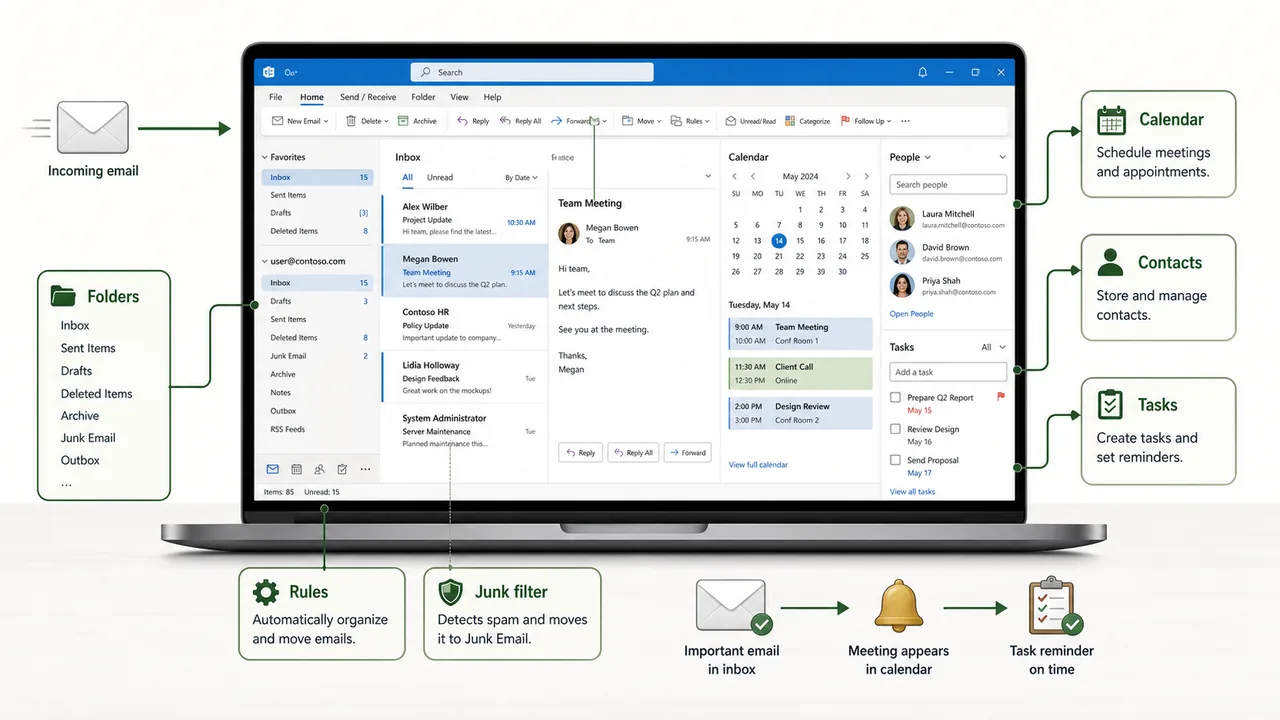
Outlook workflow showing inbox calendar contacts tasks folders rules and junk filter in one productivity interface
Outlook works as a productivity hub by combining email, calendar, contacts, tasks, folders, and automatic rules in one place.

Summary Points

Concept Key Details
PowerPoint Presentation software — .pptx format
Slide One page in a presentation
Transition Effect between slides (Fade, Wipe)
Animation Effect on objects within a slide (Appear, Fly In)
F5 Start slideshow from beginning
Shift+F5 Start from current slide
Access Database management — .accdb format
Table Rows (records) × Columns (fields)
Primary Key Unique identifier for each record
Query SQL-based data retrieval request
Form User-friendly data entry interface
Report Formatted printable output
SQL Structured Query Language for databases
Outlook Email client + calendar + contacts + tasks
.pst Outlook personal data file

Lesson Doubts

Ask questions, get expert answers