🌐 Internet & Its Protocols
HTTP, HTTPS, FTP, SMTP, OSI model, TCP/IP, IP addressing, NAT, DNS, ports, and web protocols for UPSSSC AGTA.
What is the Internet?
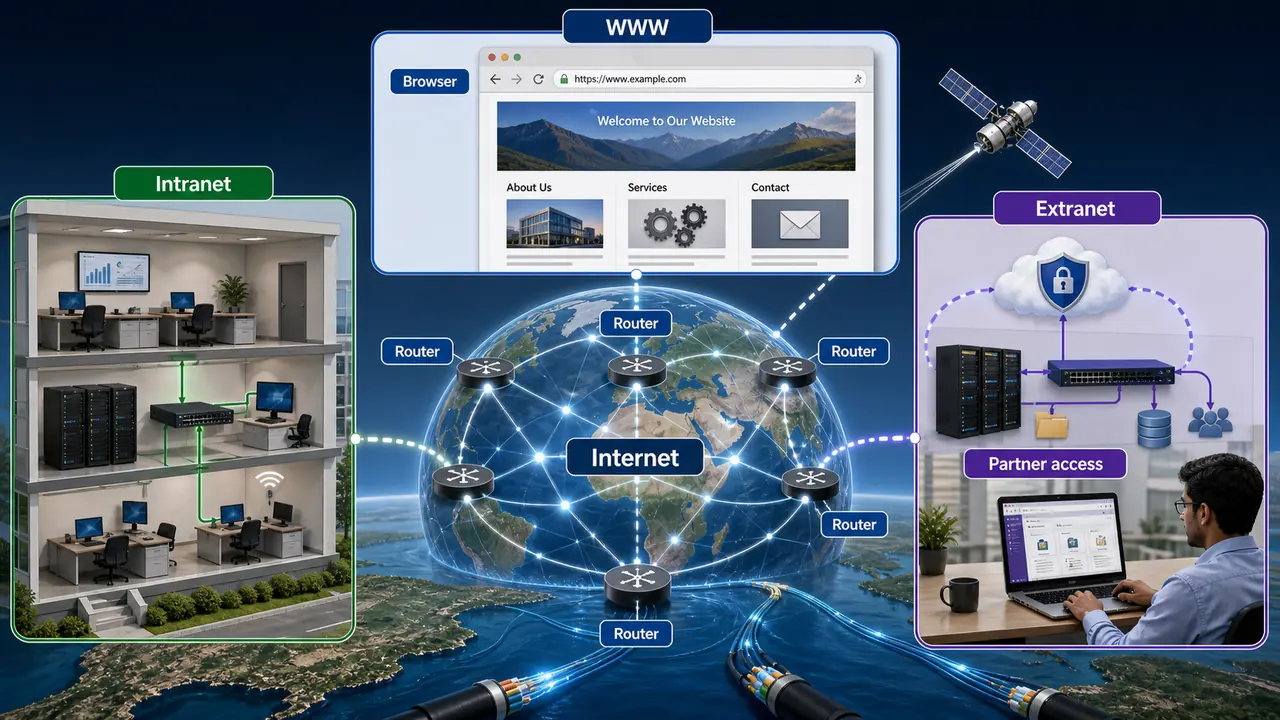
The Internet is a global network of interconnected computers that communicate using standardized protocols. It originated from ARPANET (Advanced Research Projects Agency Network), created by the US Department of Defense in 1969.
Internet vs WWW: The Internet is the physical network (cables, routers, servers). The World Wide Web (WWW) is a service that runs on the Internet — a collection of web pages linked by hyperlinks. WWW was invented by Tim Berners-Lee in 1989 at CERN.
| Term | Meaning |
|---|---|
| Internet | Global network of networks |
| WWW | Collection of web pages (a service on Internet) |
| Intranet | Private network within an organization |
| Extranet | Intranet extended to authorized external users |
OSI Model — 7 Layers
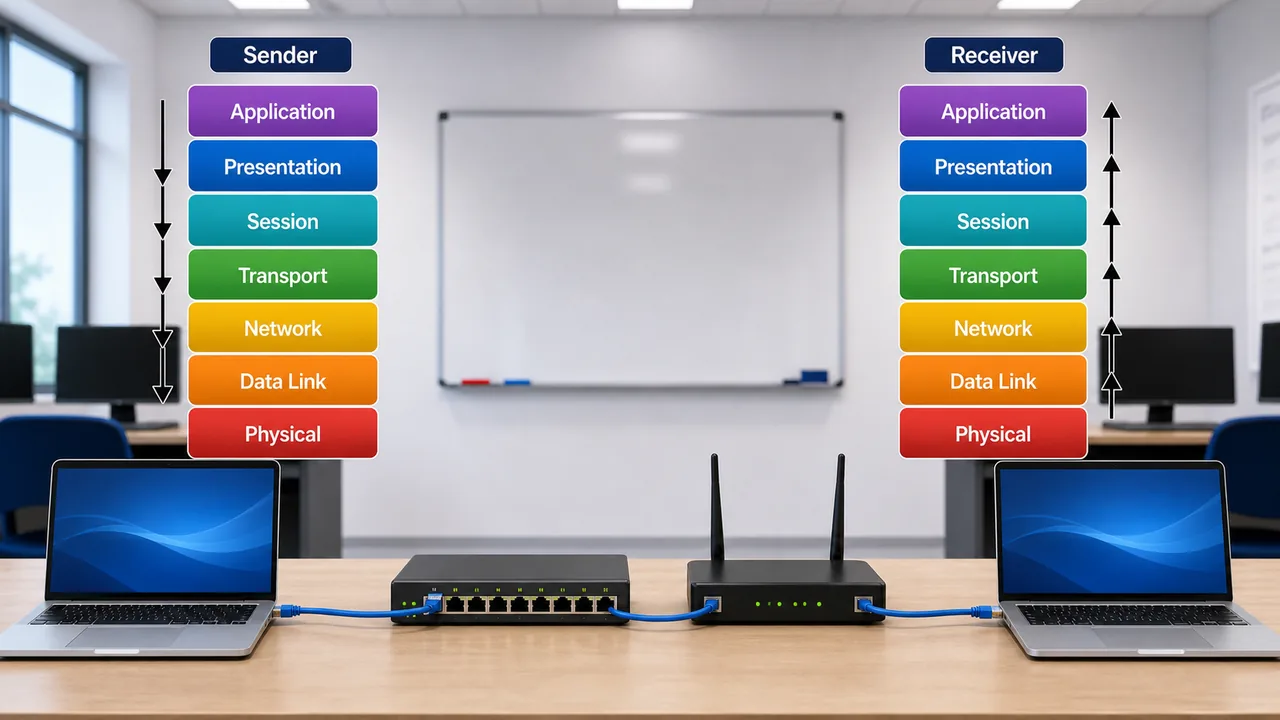
The OSI (Open Systems Interconnection) model divides network communication into 7 layers. It was developed by ISO (International Organization for Standardization).
Mnemonic (top to bottom): All People Seem To Need Data Processing
| Layer | Name | Function | Protocol/Device |
|---|---|---|---|
| 7 | Application | User interface, email, browsing | HTTP, FTP, SMTP, DNS |
| 6 | Presentation | Data formatting, encryption, compression | SSL/TLS, JPEG, MPEG |
| 5 | Session | Establishes/manages sessions | NetBIOS, RPC |
| 4 | Transport | Reliable data delivery, error checking | TCP, UDP |
| 3 | Network | Routing, IP addressing | IP, ICMP, Router |
| 2 | Data Link | Frame delivery, MAC address | Ethernet, Switch, Bridge |
| 1 | Physical | Bits over cables, signals | Hub, Repeater, Cables |
Remember: Data flows down at sender (Application → Physical) and up at receiver (Physical → Application).
TCP/IP Model — 4 Layers
The TCP/IP model is the practical model used by the Internet. It has 4 layers:
| TCP/IP Layer | OSI Equivalent | Function |
|---|---|---|
| Application | Application + Presentation + Session | HTTP, FTP, SMTP, DNS |
| Transport | Transport | TCP (reliable), UDP (fast) |
| Internet | Network | IP addressing, routing |
| Network Access | Data Link + Physical | Physical transmission |
TCP vs UDP
| Feature | TCP | UDP |
|---|---|---|
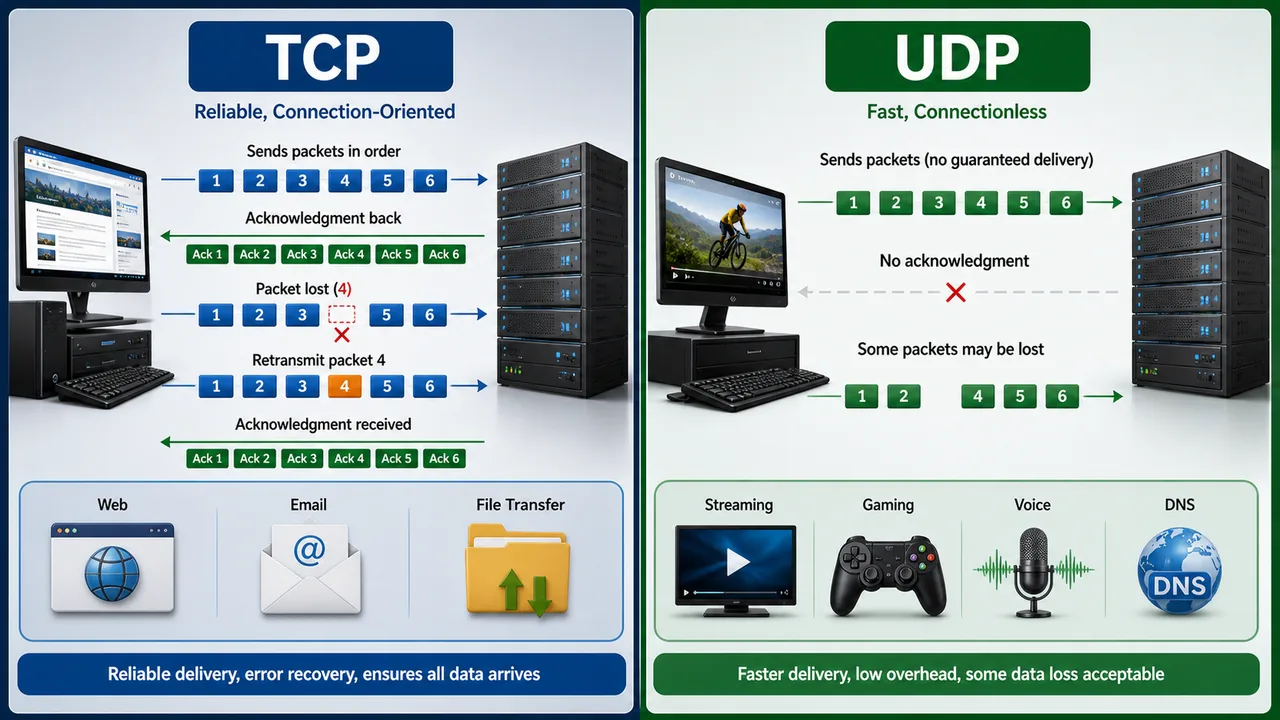
| Full Form | Transmission Control Protocol | User Datagram Protocol |
| Connection | Connection-oriented | Connectionless |
| Reliability | Reliable (acknowledgment) | Unreliable (no ack) |
| Speed | Slower | Faster |
| Use | Web, email, file transfer | Video streaming, gaming, DNS |
| Example | HTTP, FTP, SMTP | VoIP, live video, DHCP |
Important Protocols & Port Numbers
| Protocol | Full Form | Port | Purpose |
|---|---|---|---|
| HTTP | HyperText Transfer Protocol | 80 | Web page access (unencrypted) |
| HTTPS | HTTP Secure | 443 | Encrypted web (SSL/TLS) |
| FTP | File Transfer Protocol | 20 (data), 21 (control) | File upload/download |
| PPP | Point-to-Point Protocol | — | Carries TCP/IP traffic over direct serial links such as telephone connections |
| SMTP | Simple Mail Transfer Protocol | 25 | Sending emails |
| POP3 | Post Office Protocol 3 | 110 | Receiving email (downloads) |
| IMAP | Internet Message Access Protocol | 143 | Receiving email (server sync) |
| TELNET | Telecommunication Network | 23 | Remote access (unencrypted) |
| SSH | Secure Shell | 22 | Secure remote access |
| DNS | Domain Name System | 53 | Domain → IP resolution |
| DHCP | Dynamic Host Configuration Protocol | 67/68 | Auto-assigns IP addresses |
| SNMP | Simple Network Management Protocol | 161 | Network device monitoring |
HTTPS = HTTP + SSL/TLS encryption. Banks and login pages always use HTTPS (look for the lock icon in the browser).
An older but important exam term is PPP (Point-to-Point Protocol). It is a data-link-layer protocol used to carry network traffic over a direct link, especially in dial-up or telephone-line style serial connections.
IP Addressing
An IP address uniquely identifies every device on a network.
IPv4
IPv4 uses 32 bits written as 4 octets separated by dots (e.g., 192.168.1.1).
| Class | Range | Default Subnet Mask | Use |
|---|---|---|---|
| A | 1.0.0.0 – 126.255.255.255 | 255.0.0.0 | Large networks |
| B | 128.0.0.0 – 191.255.255.255 | 255.255.0.0 | Medium networks |
| C | 192.0.0.0 – 223.255.255.255 | 255.255.255.0 | Small networks (most common) |
| D | 224.0.0.0 – 239.255.255.255 | — | Multicasting |
| E | 240.0.0.0 – 255.255.255.255 | — | Research/Experimental |
- 127.0.0.1 = Loopback address (localhost) — device refers to itself
- Total IPv4 addresses: ~4.3 billion (2³²)
IPv6
IPv6 uses 128 bits written in 8 groups of hexadecimal (e.g., 2001:0db8:85a3::8a2e).
- Total addresses: 2¹²⁸ (virtually unlimited)
- No need for NAT
- Built-in security (IPSec)
NAT (Network Address Translation)
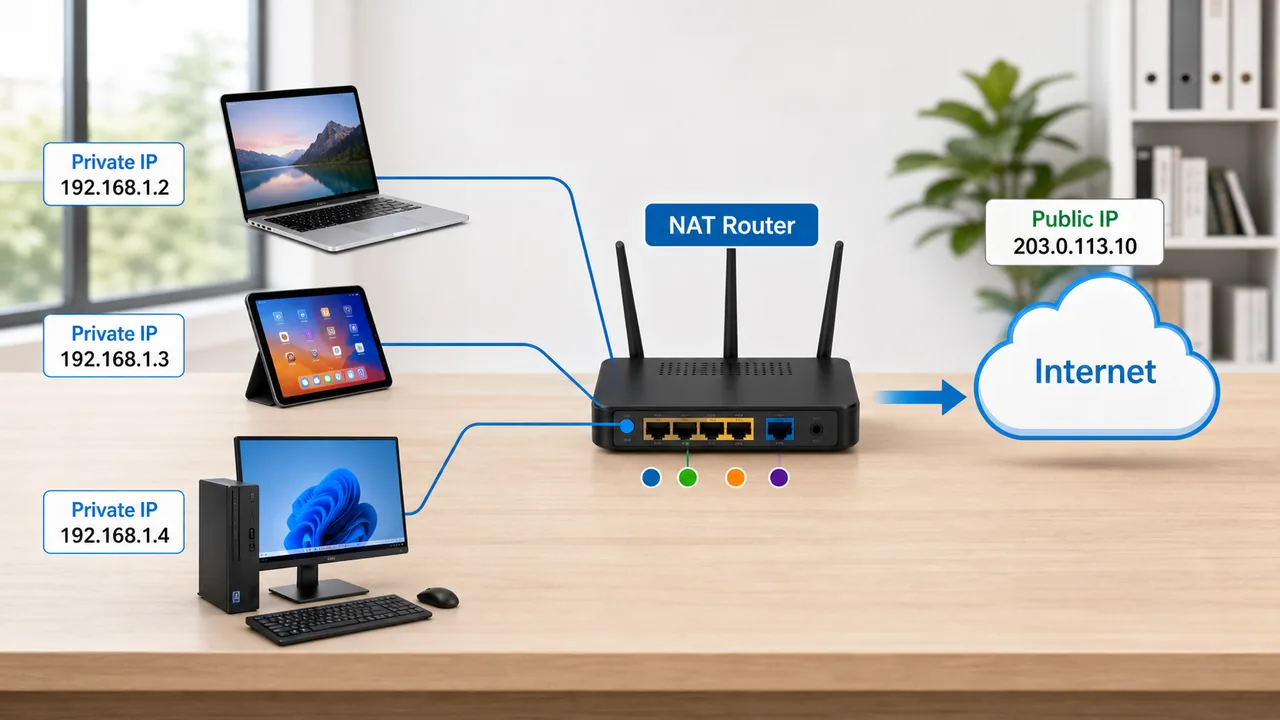
NAT allows multiple devices on a private network to share a single public IP address to access the Internet.
- Why needed: IPv4 addresses are limited; NAT conserves public IPs
- How it works: Router translates private IPs (192.168.x.x) to a public IP for internet communication
- Types: Static NAT (1:1 mapping), Dynamic NAT (pool of public IPs), PAT/NAT Overload (many-to-one using port numbers — most common)
URL Structure
A URL (Uniform Resource Locator) is the address of a web resource:
https://www.example.com:443/path/page.html?id=1#section
  |        |          |    |              |      |
Protocol  Domain     Port  Path         Query  Fragment
A website's home page is the main or starting page that usually opens first when you visit the domain. In exam language, "home page" means the default introductory page of a website, while a URL is the full address used to reach a specific page or resource.
Web Browsers & Search Engines
| Web Browsers | Search Engines |
|---|---|
| Google Chrome | |
| Mozilla Firefox | Bing (Microsoft) |
| Safari (Apple) | Yahoo |
| Microsoft Edge | DuckDuckGo |
| Opera | Baidu (China) |
A browser displays web pages; a search engine finds them. Google is a search engine accessed through a browser.
History of the Internet — Key Facts
| Fact | Details |
|---|---|
| ARPANET First Message | Sent from UCLA to Stanford on Oct 29, 1969 — only "LO" was transmitted (system crashed before completing "LOGIN") |
| WWW Inventor | Tim Berners-Lee invented WWW at CERN (Switzerland) in 1989; first website: info.cern.ch |
| First Web Browser | The first browser created by Tim Berners-Lee was called WorldWideWeb, later renamed Nexus |
| Father of Internet | Vint Cerf and Bob Kahn — designed the TCP/IP protocol |
| ICANN | Internet Corporation for Assigned Names and Numbers — manages domain names globally |
| ISP | Internet Service Provider — provides internet access (e.g., Jio, Airtel, BSNL in India) |
Bandwidth vs Latency
| Term | Meaning | Analogy |
|---|---|---|
| Bandwidth | Maximum data capacity of a connection | Width of a water pipe |
| Latency | Time delay for data to travel from source to destination | Time for water to flow through the pipe |
High bandwidth + low latency = best internet experience. Bandwidth is measured in bps (bits per second); latency in ms (milliseconds).
Protocol Transport — TCP vs UDP Usage
| Uses TCP (Reliable) | Uses UDP (Fast) |
|---|---|
| HTTP, HTTPS | DNS |
| FTP | DHCP |
| SMTP | SNMP |
| SSH | TFTP |
| TELNET | VoIP (Voice over IP) |
Port Number Ranges
| Range | Name | Description |
|---|---|---|
| 0 – 1023 | Well-known ports | Reserved for standard services (HTTP=80, FTP=21, SSH=22) |
| 1024 – 49151 | Registered ports | Used by specific applications (MySQL=3306, PostgreSQL=5432) |
| 49152 – 65535 | Dynamic/Private ports | Temporary ports assigned by OS for client connections |
Subnet Mask & Private IP Ranges
A subnet mask determines which part of an IP address is the network portion and which is the host portion.
- Example: 255.255.255.0 (Class C) means first 3 octets = network, last octet = host
- Used by routers to decide if traffic stays local or goes to another network
Private IP Address Ranges (Not Routable on Internet)
| Class | Private IP Range | Subnet Mask | No. of Addresses |
|---|---|---|---|
| A | 10.0.0.0 – 10.255.255.255 | 255.0.0.0 | ~16.7 million |
| B | 172.16.0.0 – 172.31.255.255 | 255.255.0.0 | ~1 million |
| C | 192.168.0.0 – 192.168.255.255 | 255.255.255.0 | 65,536 |
Your home WiFi router typically uses 192.168.x.x (Class C private range). These addresses are free to use internally but need NAT to access the internet.
Summary Points
| Concept | Key Details |
|---|---|
| ARPANET | First internet (1969), US DoD |
| ARPANET First Message | UCLA → Stanford, Oct 29, 1969 — only "LO" sent (crashed before "LOGIN") |
| WWW | Tim Berners-Lee, 1989, CERN (Switzerland) |
| First Website | info.cern.ch |
| Father of Internet | Vint Cerf & Bob Kahn — designed TCP/IP |
| ICANN | Manages domain names globally |
| ISP | Internet Service Provider (Jio, Airtel, BSNL) |
| Internet vs WWW | Internet = physical network; WWW = web pages (service on Internet) |
| Intranet / Extranet | Intranet = private org network; Extranet = intranet + authorized external users |
| OSI Model | 7 layers — Application to Physical (mnemonic: APSTNDP) |
| TCP/IP Model | 4 layers — Application, Transport, Internet, Network Access |
| TCP | Reliable, connection-oriented, slower — HTTP, FTP, SMTP, SSH, TELNET |
| UDP | Fast, connectionless, unreliable — DNS, DHCP, SNMP, TFTP, VoIP |
| HTTP/HTTPS | Port 80/443, web access |
| FTP | Port 20 (data) / 21 (control), file transfer |
| SMTP | Port 25, sending email |
| POP3 / IMAP | Port 110 / 143, receiving email (download vs server sync) |
| SSH | Port 22, secure remote access |
| TELNET | Port 23, unencrypted remote |
| DNS | Port 53, domain → IP resolution |
| DHCP | Port 67/68, auto-assigns IP addresses |
| SNMP | Port 161, network device monitoring |
| Well-known Ports | 0–1023 — reserved standard services (HTTP=80, SSH=22) |
| Registered Ports | 1024–49151 — specific apps (MySQL=3306) |
| Dynamic Ports | 49152–65535 — temporary OS-assigned client ports |
| IPv4 | 32-bit, 4 octets, ~4.3 billion (2^32) |
| IPv6 | 128-bit, 8 hex groups, unlimited, built-in IPSec |
| Class A | 1–126.x.x.x, large networks, mask 255.0.0.0 |
| Class B | 128–191.x.x.x, medium networks, mask 255.255.0.0 |
| Class C | 192–223.x.x.x, small/most common, mask 255.255.255.0 |
| Class D / E | D = multicasting (224–239); E = experimental (240–255) |
| 127.0.0.1 | Loopback / localhost |
| Private IP: Class A | 10.0.0.0 – 10.255.255.255 (~16.7M addresses) |
| Private IP: Class B | 172.16.0.0 – 172.31.255.255 (~1M addresses) |
| Private IP: Class C | 192.168.0.0 – 192.168.255.255 (65,536 addresses) |
| Subnet Mask | Determines network vs host portion (e.g., 255.255.255.0) |
| NAT | Private → Public IP translation |
| PAT / NAT Overload | Many-to-one NAT using port numbers — most common type |
| Bandwidth | Max data capacity of connection (measured in bps) — like pipe width |
| Latency | Time delay source → destination (measured in ms) — like water travel time |
| SSL/TLS | Encryption for HTTPS |
| URL Structure | Protocol://Domain:Port/Path?Query#Fragment |
Lesson Doubts
Ask questions, get expert answers