🗄️ DBMS & SQL Fundamentals
Database concepts, types (Relational, Hierarchical, Network), SQL commands (SELECT, INSERT, UPDATE, DELETE), keys, and normalization for UPSSSC AGTA.
What is a Database?
A database is an organized collection of structured data stored electronically. Think of it as a digital filing cabinet where information is arranged systematically for easy access, retrieval, and management.
Examples of databases in daily life:
- Bank records (account numbers, balances, transactions)
- Aadhaar database (biometric data of all Indians)
- PM-KISAN beneficiary list (farmer details, payment records)
- School records (student names, marks, attendance)
What is DBMS?
A DBMS (Database Management System) is software that manages databases — it allows users to create, read, update, and delete data while maintaining security and integrity.
Popular DBMS Software:
| DBMS | Developer | Type |
|---|---|---|
| MySQL | Oracle (open source) | Relational |
| MS Access | Microsoft | Relational |
| Oracle | Oracle Corporation | Relational |
| PostgreSQL | Community (open source) | Relational |
| MongoDB | MongoDB Inc. | Non-relational (NoSQL) |
| SQL Server | Microsoft | Relational |
Types of Database Models
| Model | Structure | Example |
|---|---|---|
| Relational (RDBMS) | Data in tables with rows and columns | MySQL, Oracle, Access |
| Hierarchical | Tree-like structure (parent-child) | IBM IMS |
| Network | Complex web of relationships | IDMS |
| Object-Oriented | Data as objects (like programming) | db4o |
| NoSQL | Flexible, non-tabular (document, key-value) | MongoDB, Cassandra |
RDBMS (Relational DBMS) is the most widely used type. Data is stored in tables with defined relationships between them.
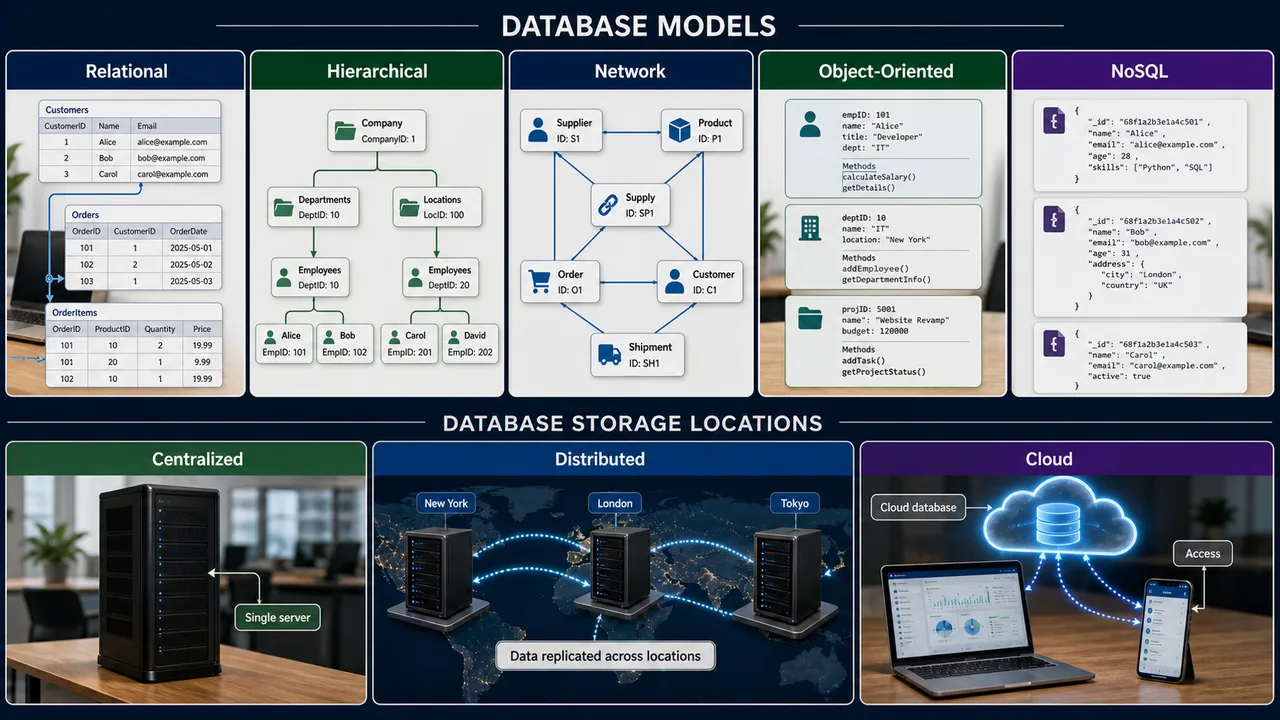
Database by Location
| Type | Description |
|---|---|
| Centralized | All data on one computer/server |
| Distributed | Data spread across multiple locations/servers |
| Cloud | Data stored on remote cloud servers (AWS, Azure, Google Cloud) |
Relational Database Concepts
Tables, Records, and Fields
| Term | Meaning | Also Called |
|---|---|---|
| Table | Collection of related data in rows/columns | Relation |
| Record | One row — a complete entry | Tuple |
| Field | One column — a single attribute | Attribute |
| Cell | Intersection of one row and one column | Value |
Example — Farmer Database:
| FarmerID | Name | Village | Crop | Area (Hectare) |
|---|---|---|---|---|
| 101 | Ram Singh | Sultanpur | Wheat | 2.5 |
| 102 | Geeta Devi | Faizabad | Rice | 1.8 |
| 103 | Anil Kumar | Varanasi | Sugarcane | 3.2 |
Here: FarmerID, Name, Village, Crop, Area are fields. Each row is a record. The whole thing is a table.
DBMS Architecture — Three Levels of Abstraction
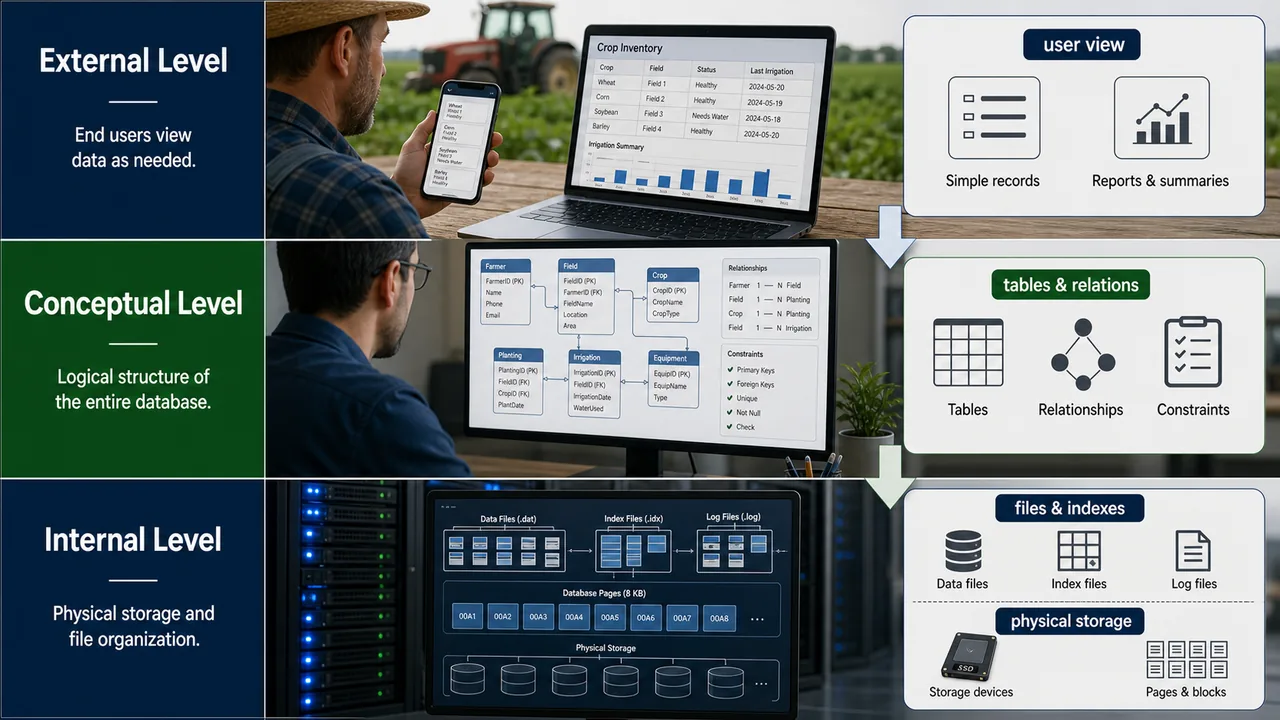
A DBMS organizes data access through three levels, each providing a different view of the data:
| Level | Who Uses It | What They See |
|---|---|---|
| External Level (View) | End users / Applications | Only the data relevant to them (e.g., a farmer sees only their own records) |
| Conceptual Level (Logical) | Database designers / DBAs | The full logical structure — all tables, relationships, constraints |
| Internal Level (Physical) | System / Storage engine | How data is physically stored on disk — files, indexes, blocks |
This separation is called data abstraction — it hides complexity from users while giving full control to administrators.
Key DBMS Components
| Component | Role |
|---|---|
| Query Processor | Translates user queries (SQL) into low-level instructions the database can execute |
| Transaction Manager | Ensures all operations complete fully or not at all (ACID properties) |
| Storage Manager | Handles reading/writing data to physical storage devices |
| Data Dictionary | A system catalog that stores metadata — definitions of all tables, fields, types, constraints |
| Report Writer | Extracts data and presents it in formatted reports |
What is Metadata?
Metadata is "data about data" — it describes the structure, type, and rules of the actual data stored.
| Metadata Type | Example |
|---|---|
| Descriptive | Table name = "Farmers", Column name = "Crop" |
| Structural | FarmerID is INTEGER, Name is VARCHAR(50) |
| Administrative | Created on 28/03/2026, Last modified by Admin |
Keys in Databases
| Key Type | Purpose | Example |
|---|---|---|
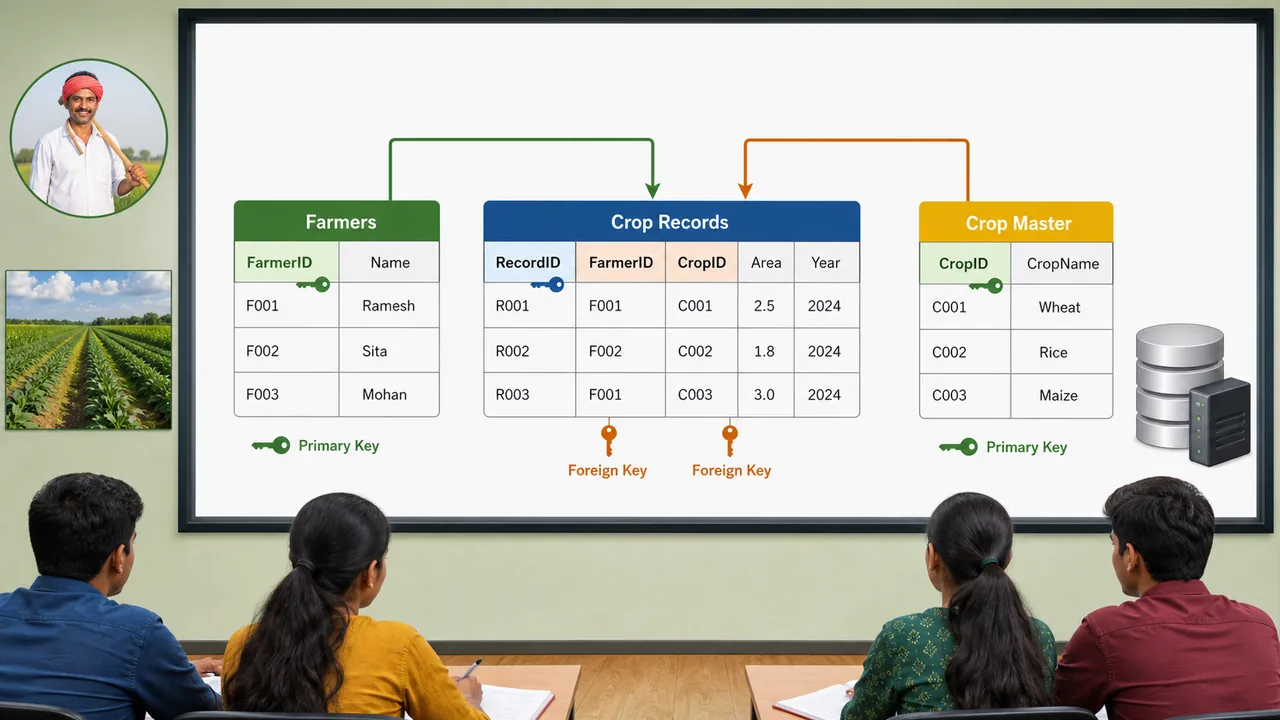
| Primary Key | Uniquely identifies each record — no duplicates, no nulls | FarmerID (101, 102, 103) |
| Foreign Key | Links to primary key of another table — creates relationships | CropID in Farmer table → references Crop table |
| Candidate Key | Any field that could be a primary key | FarmerID, Aadhaar Number |
| Composite Key | Primary key made of two or more fields combined | (StudentID + SubjectID) |
| Unique Key | Like primary key but allows one NULL value | Email address |
SQL — Structured Query Language
SQL (Structured Query Language) is the standard language for communicating with relational databases. It allows you to create, read, update, and delete data.
SQL Command Categories
| Category | Full Form | Purpose | Commands |
|---|---|---|---|
| DDL | Data Definition Language | Define/modify table structure | CREATE, ALTER, DROP, TRUNCATE |
| DML | Data Manipulation Language | Add/modify/delete data | INSERT, UPDATE, DELETE |
| DQL | Data Query Language | Retrieve data | SELECT |
| DCL | Data Control Language | Permissions | GRANT, REVOKE |
| TCL | Transaction Control Language | Transaction management | COMMIT, ROLLBACK |
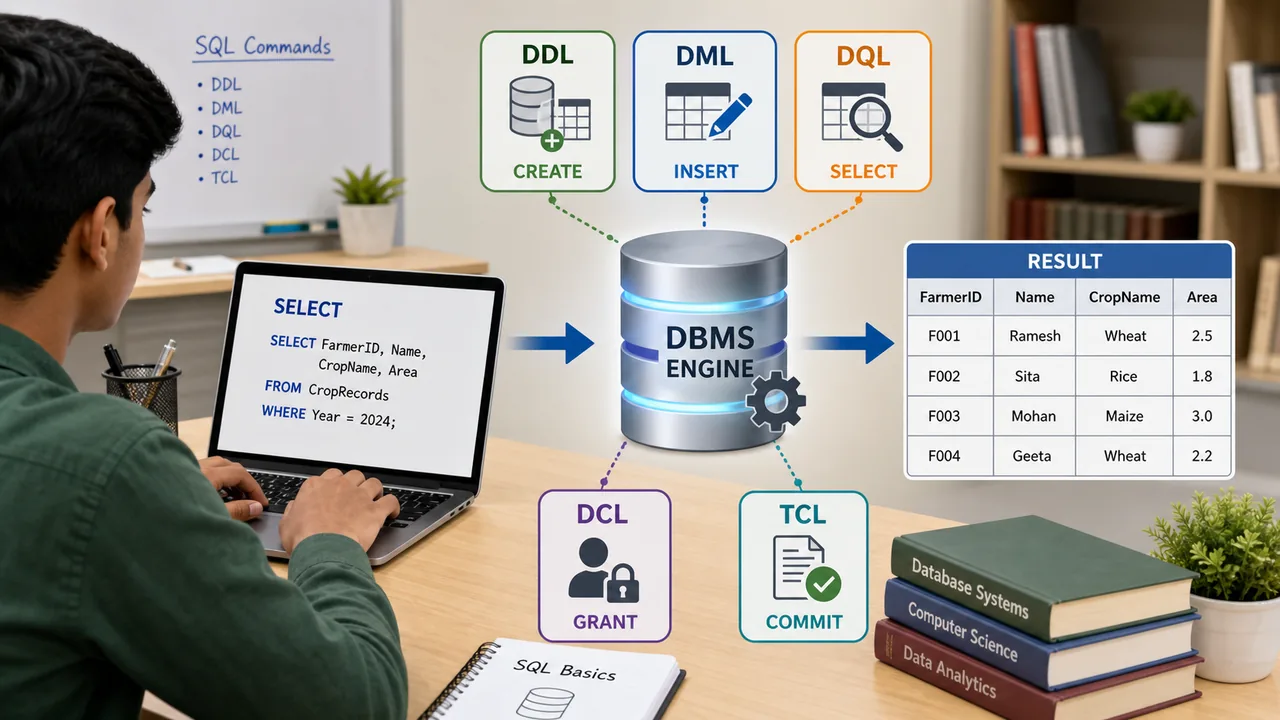
Essential SQL Commands
CREATE TABLE — Creates a new table
CREATE TABLE Farmers (FarmerID INT PRIMARY KEY, Name VARCHAR(50), Crop VARCHAR(30));
INSERT INTO — Adds a new record
INSERT INTO Farmers VALUES (101, 'Ram Singh', 'Wheat');
SELECT — Retrieves data
SELECT * FROM Farmers;                    -- All records
SELECT Name, Crop FROM Farmers;           -- Specific columns
SELECT * FROM Farmers WHERE Crop='Wheat'; -- With condition
UPDATE — Modifies existing data
UPDATE Farmers SET Crop='Rice' WHERE FarmerID=101;
DELETE — Removes records
DELETE FROM Farmers WHERE FarmerID=103;
DROP TABLE — Deletes entire table
DROP TABLE Farmers;
Decision Support Systems (DSS)
A Decision Support System is a computer-based information system that helps managers and decision-makers analyze complex data and make better-informed decisions. Unlike simple databases that just store data, a DSS actively helps you interpret and act on that data.
Types of Decisions
| Decision Type | Clarity | Example | DSS Role |
|---|---|---|---|
| Structured | Clear rules exist | Calculating farmer subsidy based on land size | Automate using checklists and formulas |
| Semi-Structured | Some rules, some judgment | Deciding which crop to recommend for a region | Provide data analysis + human judgment |
| Unstructured | No clear rules | Setting long-term agriculture policy for a state | Provide trends and scenarios for human decision |
Most real-world DSS tools focus on semi-structured decisions — where data helps but human expertise is still needed.
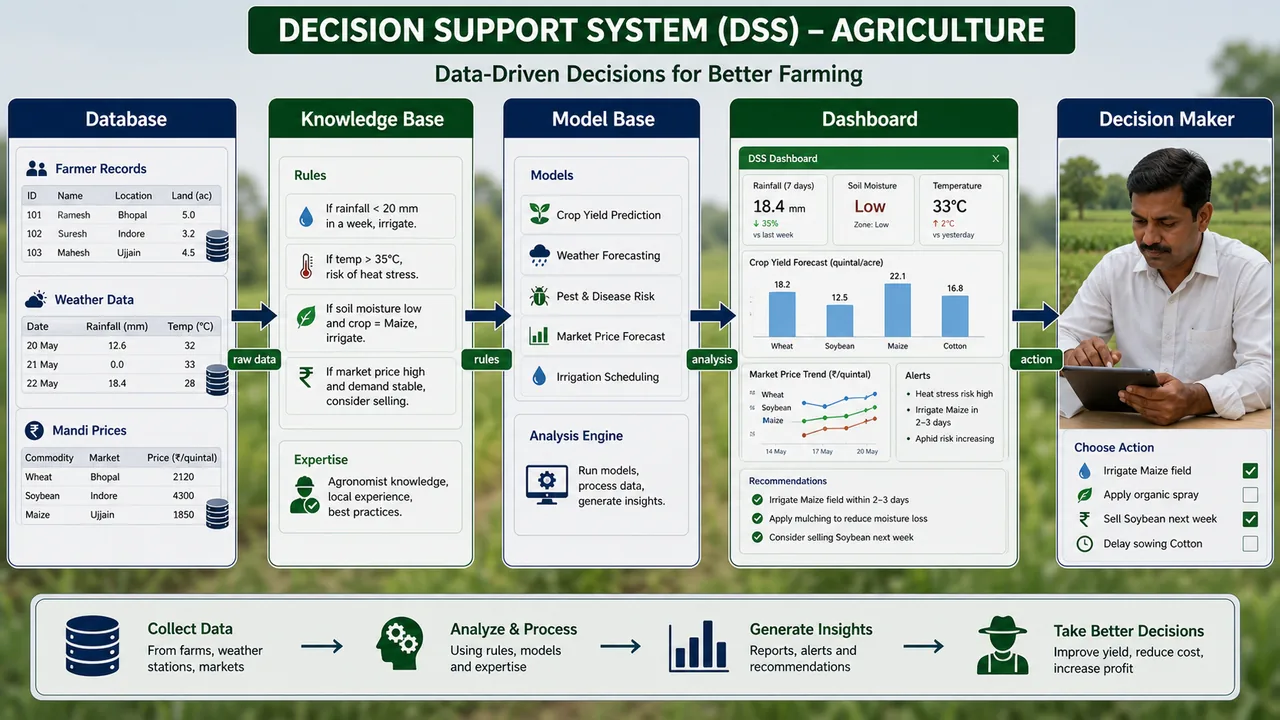
Components of DSS
| Component | What it Does |
|---|---|
| Database | Stores raw data — farmer records, weather history, market prices |
| Model Base | Mathematical and statistical models that analyze the data — forecasting, optimization, simulation |
| User Interface | Dashboard, charts, reports — how the decision-maker interacts with the system |
| Knowledge Base | Rules and expertise stored in the system (optional, used in advanced DSS) |
DSS Limitations
- Data quality — Poor or incomplete data leads to poor decisions (GIGO applies here too)
- Over-reliance — Users may blindly trust DSS output without applying judgment
- Complexity — Advanced models may be difficult for non-technical users to interpret
- Cost — Building and maintaining a DSS requires investment in software, data, and training
- Inappropriate analysis — DSS may run statistical tests on data even when they are not suitable
DSS in Agriculture
| Application | How DSS Helps |
|---|---|
| Crop selection | Analyzes soil type, weather forecast, market prices to recommend the best crop |
| Irrigation scheduling | Combines soil moisture data + weather prediction to decide when and how much to irrigate |
| Pest management | Predicts pest outbreaks based on temperature, humidity, and historical patterns |
| Market intelligence | Tracks mandi prices across regions to suggest the best time and place to sell |
| Fertilizer planning | Recommends fertilizer type and quantity based on soil health card data |
| Disaster response | Analyzes weather alerts and crop insurance data to trigger early warnings |
Summary Points
| Concept | Key Details |
|---|---|
| Database | Organized collection of structured data |
| DBMS | Software to manage databases — MySQL, Oracle, Access |
| RDBMS | Relational — data in tables, most widely used |
| Table | Rows (records/tuples) × Columns (fields/attributes) |
| Primary Key | Unique identifier — no duplicates, no nulls |
| Foreign Key | Links to primary key of another table |
| SQL | Structured Query Language — standard for RDBMS |
| DDL | CREATE, ALTER, DROP — table structure |
| DML | INSERT, UPDATE, DELETE — data manipulation |
| DQL | SELECT — data retrieval |
| SELECT | Retrieves data: SELECT * FROM table WHERE condition |
| INSERT | Adds record: INSERT INTO table VALUES (...) |
| UPDATE | Modifies: UPDATE table SET field=value WHERE condition |
| DELETE | Removes: DELETE FROM table WHERE condition |
| 3 Levels | External (user view), Conceptual (logical), Internal (physical) |
| Data Dictionary | System catalog — stores metadata (table definitions, field types) |
| Metadata | Data about data — Descriptive, Structural, Administrative |
| Query Processor | Converts SQL queries into low-level instructions |
| DSS | Decision Support System — helps analyze data for decisions |
| Structured Decision | Clear rules exist — can be automated |
| Semi-Structured | Some rules + human judgment — main DSS focus |
| Unstructured | No clear rules — requires expertise and experience |
| DSS Components | Database + Model Base + User Interface + Knowledge Base |
| DSS in Agriculture | Crop selection, irrigation, pest management, market prices |
| DSS Limitation | Poor data quality, over-reliance, cost, inappropriate analysis |
Lesson Doubts
Ask questions, get expert answers