🕸️ DNS & Web Development
Domain Name System, domain hierarchy, HTML, CSS, JavaScript basics, web servers, static vs dynamic websites for UPSSSC AGTA.
Domain Name System (DNS)
What is DNS?
DNS (Domain Name System) is often called the "phonebook of the internet." It converts human-readable domain names (like google.com) into machine-readable IP addresses (like 142.250.190.78) so that browsers can load websites.
Without DNS, you would have to memorize long number sequences to visit every website. DNS makes the internet user-friendly.
DNS Hierarchy
The DNS system is organized in a tree-like hierarchy with multiple levels:
| Level | Description | Example |
|---|---|---|
| Root | Top of the DNS tree, represented by a dot (.) | . (invisible in URLs) |
| TLD (Top-Level Domain) | Category of the domain | .com, .org, .in, .gov |
| SLD (Second-Level Domain) | The actual name you register | google, wikipedia |
| Subdomain | Prefix added before the domain | mail.google.com, blog.example.com |
Reading a domain name (right to left): mail.google.com = Root (.) + TLD (.com) + SLD (google) + Subdomain (mail)
Types of TLDs
| TLD Type | Examples | Purpose |
|---|---|---|
| Generic TLDs (gTLD) | .com, .org, .net, .edu, .gov | General categories |
| Country Code TLDs (ccTLD) | .in (India), .uk (UK), .us (USA), .jp (Japan) | Country-specific |
| Sponsored TLDs | .gov.in, .edu.in, .ac.in | Government, education |
| New gTLDs | .app, .tech, .xyz, .shop | Specialized categories |
DNS Records
DNS stores different types of records, each serving a specific purpose:
| Record | Full Form | Function |
|---|---|---|
| A Record | Address | Maps domain to IPv4 address |
| AAAA Record | Quad-A | Maps domain to IPv6 address |
| CNAME | Canonical Name | Creates an alias (blog.site.com points to site.com) |
| MX Record | Mail Exchange | Directs email to the mail server |
| NS Record | Name Server | Specifies the authoritative DNS server |
| TXT Record | Text | Stores text info (used for email verification, SPF) |
DNS Resolution Process
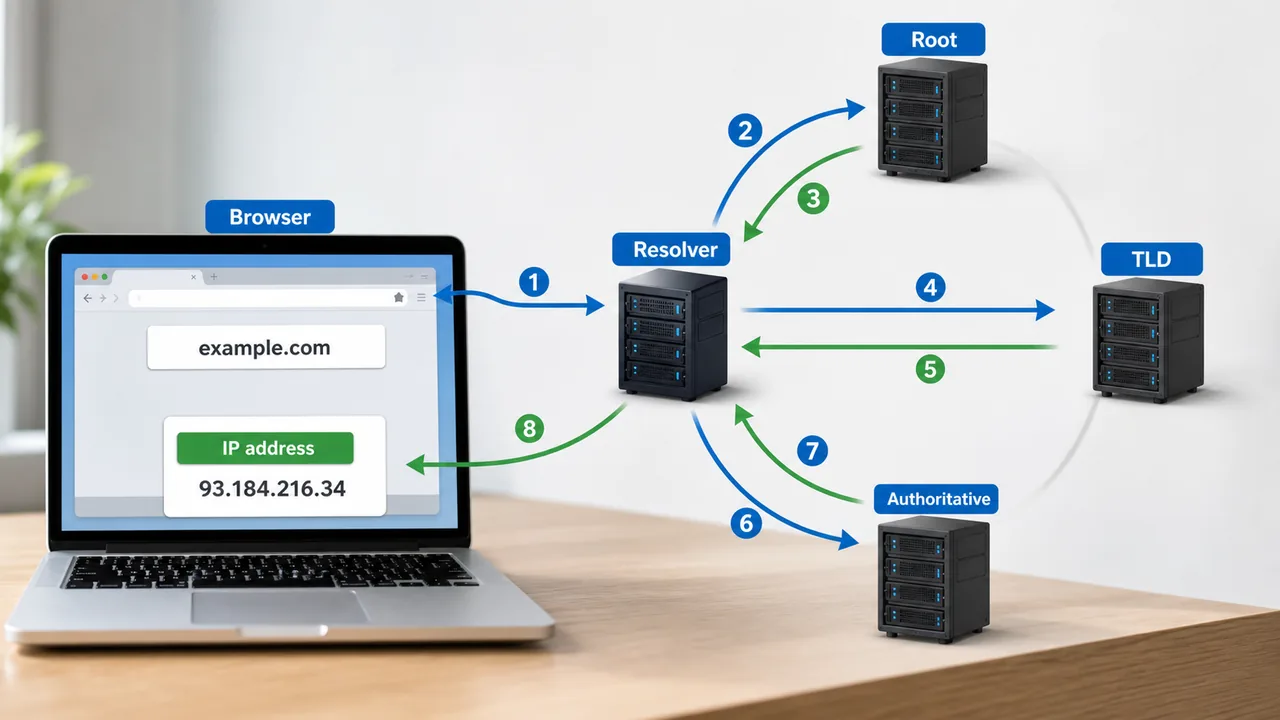
When you type "google.com" in your browser, this happens:
- Browser Cache — checks if IP is already cached locally
- Recursive Resolver — your ISP's DNS server looks up the domain
- Root Server — directs to the correct TLD server (.com)
- TLD Server — directs to the authoritative nameserver for google.com
- Authoritative NS — returns the actual IP address
- Browser — connects to the IP and loads the website
This entire process takes milliseconds.
ICANN
ICANN (Internet Corporation for Assigned Names and Numbers) is the global organization that manages and coordinates the DNS, IP addresses, and domain name registrations.
- Headquartered in Los Angeles, USA
- Ensures every domain name is unique worldwide
- Domain Registrars (authorized by ICANN): GoDaddy, Namecheap, Google Domains
Web Development
Browsers, Blogs, and Private Browsing
A web browser is software used to access and display web pages. Examples include Chrome, Firefox, Edge, and Safari. A blog is a regularly updated website or web page, usually written in a chronological and conversational style.
Modern browsers also provide incognito/private browsing mode, which opens a separate session that does not save the local browsing history in the usual way. In Chrome, the shortcut for a new incognito window is Ctrl+Shift+N.
Another useful browser shortcut is F11, which toggles full-screen mode in many web browsers. In full-screen mode, the browser expands to occupy the screen with minimal interface distraction.
Frontend vs Backend
| Aspect | Frontend | Backend |
|---|---|---|
| What | What users see and interact with | Server-side logic and database |
| Languages | HTML, CSS, JavaScript | Python, PHP, Java, Node.js |
| Focus | Design, layout, user experience | Data processing, security, logic |
| Runs On | Browser (client-side) | Server (server-side) |
HTML (HyperText Markup Language)
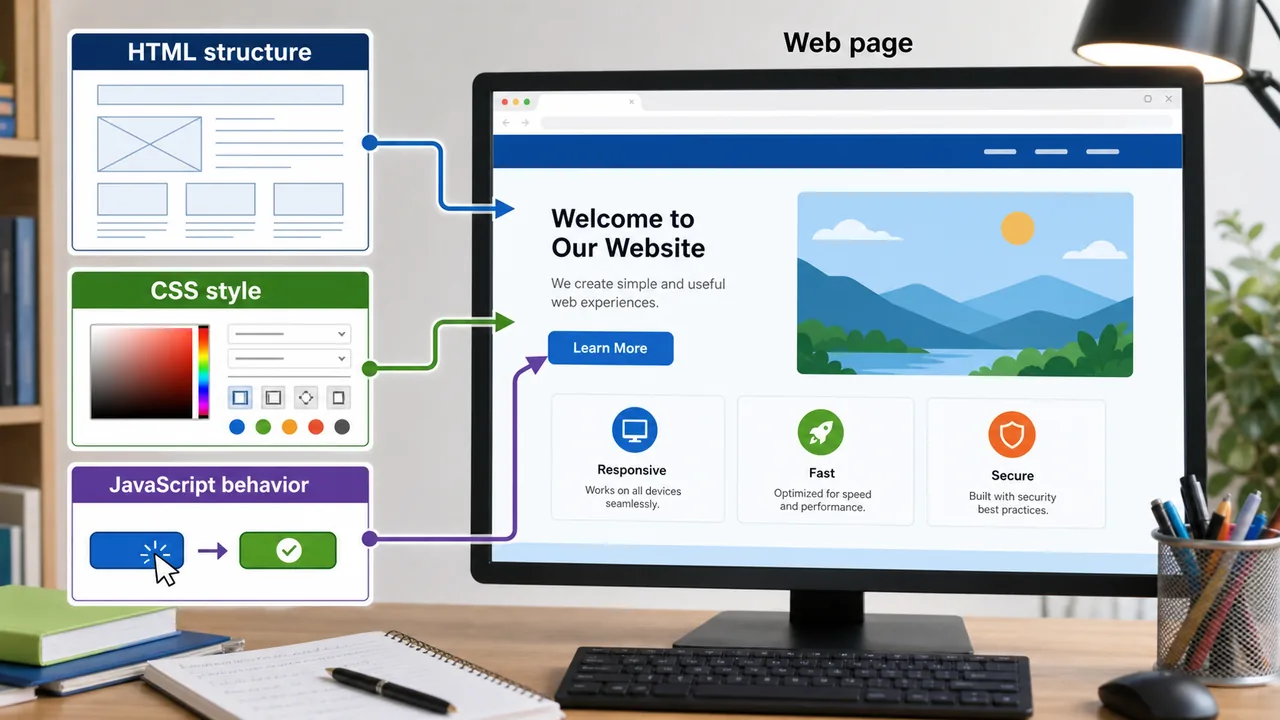
HTML is the standard language for creating the structure of web pages. It uses tags to define elements.
Essential HTML Tags:
| Tag | Purpose |
|---|---|
| <html> | Root element of HTML page |
| <head> | Contains metadata, title, links to CSS |
| <body> | Contains visible page content |
| <h1> to <h6> | Headings (h1 = largest, h6 = smallest) |
| <p> | Paragraph |
| <a href="..."> | Hyperlink |
| <img src="..."> | Image |
| <table>, <tr>, <td> | Table, table row, table data |
| <form> | Input form for user data |
| <ul>, <ol>, <li> | Unordered list, ordered list, list item |
HTML5 New Tags
HTML5 introduced semantic tags that give meaning to content:
| HTML5 Tag | Purpose |
|---|---|
| <header> | Page or section header |
| <nav> | Navigation links |
| <section> | Thematic grouping of content |
| <article> | Independent, self-contained content |
| <footer> | Page or section footer |
| <video> | Embed video without plugins |
| <audio> | Embed audio without plugins |
| <canvas> | Drawing graphics via JavaScript |
CSS (Cascading Style Sheets)
CSS controls the visual presentation of HTML elements — colors, fonts, spacing, layout.
- Selector — targets which HTML element to style
- Property — what to change (color, font-size, margin)
- Value — the setting (red, 16px, 10px)
- Three ways to add CSS: Inline, Internal (in <style> tag), External (.css file)
JavaScript
JavaScript adds interactivity and dynamic behavior to websites — dropdown menus, form validation, animations, real-time updates.
- Client-side scripting language (runs in the browser)
- Can also run on servers using Node.js
- Not related to Java — despite the similar name
Web Development Stacks
A "stack" is a combination of technologies used to build a complete web application.
| Stack | Components |
|---|---|
| LAMP | Linux, Apache, MySQL, PHP |
| MEAN | MongoDB, Express.js, Angular, Node.js |
| MERN | MongoDB, Express.js, React, Node.js |
Static vs Dynamic Websites
| Feature | Static Website | Dynamic Website |
|---|---|---|
| Content | Fixed, same for all users | Changes based on user/request |
| Technology | HTML, CSS only | HTML + server-side language (PHP, Python) |
| Database | Not required | Usually required |
| Speed | Faster (pre-built pages) | Slower (pages generated on request) |
| Example | Company brochure site | Facebook, Amazon, YouTube |
Web Servers
A web server is software that receives HTTP requests from browsers and sends back web pages.
| Web Server | Description |
|---|---|
| Apache | Most popular open-source web server |
| Nginx | Fast, lightweight, used for high-traffic sites |
| IIS | Microsoft's web server for Windows |
Client-Server Architecture
- Client — the browser (Chrome, Firefox) that requests web pages
- Server — the computer that hosts the website and responds to requests
- Communication happens via HTTP/HTTPS protocols
HTTP Methods
| Method | Function |
|---|---|
| GET | Retrieve data from server (loading a page) |
| POST | Send data to server (submitting a form) |
| PUT | Update existing data on server |
| DELETE | Remove data from server |
Cookies and Sessions
| Feature | Cookies | Sessions |
|---|---|---|
| Stored At | Client (browser) | Server |
| Purpose | Remember user preferences, login state | Track user activity during visit |
| Expires | Can persist across visits | Ends when browser closes (usually) |
XML vs JSON
| Feature | XML | JSON |
|---|---|---|
| Full Form | Extensible Markup Language | JavaScript Object Notation |
| Readability | Verbose, uses tags | Lightweight, easy to read |
| Usage | Legacy systems, SOAP APIs | Modern web APIs, REST |
| Example | <name>Ram</name> | {"name": "Ram"} |
API (Application Programming Interface)
An API allows two software applications to communicate with each other. A REST API uses HTTP methods (GET, POST, PUT, DELETE) to exchange data, usually in JSON format.
- Example: A weather app on your phone uses an API to fetch data from a weather server
- APIs power most modern web and mobile applications
Summary Points
| Concept | Key Details |
|---|---|
| DNS | Converts domain names to IP addresses |
| TLD | .com, .org, .net, .in — top of domain hierarchy |
| ccTLD | Country-specific — .in (India), .uk, .us |
| A Record | Maps domain to IPv4 address |
| MX Record | Directs email to mail server |
| CNAME | Creates alias for a domain |
| ICANN | Manages DNS globally, HQ in Los Angeles |
| DNS Resolution | Browser, Recursive resolver, Root, TLD, Authoritative NS |
| HTML | Structure of web pages — tags like h1, p, a, img |
| HTML5 | Semantic tags — header, nav, section, video, audio |
| CSS | Styling — colors, fonts, layout |
| JavaScript | Interactivity — runs in browser, also Node.js |
| LAMP | Linux, Apache, MySQL, PHP |
| MEAN | MongoDB, Express, Angular, Node.js |
| Static Site | Fixed content, HTML/CSS only, faster |
| Dynamic Site | Changes per user, needs database, Facebook/Amazon |
| Apache | Most popular open-source web server |
| GET vs POST | GET retrieves data; POST sends data |
| Cookies | Stored in browser, persist across visits |
| Sessions | Stored on server, end when browser closes |
| JSON | Lightweight data format — {"key": "value"} |
| REST API | Uses HTTP methods, exchanges JSON data |
Lesson Doubts
Ask questions, get expert answers