🔗 Computer Networks
Types of networks (PAN, LAN, MAN, WAN), topologies (Star, Bus, Ring, Mesh), network devices (Hub, Switch, Router), cables, and protocols for UPSSSC AGTA.
What is a Computer Network?
A computer network is a group of two or more computers connected together to share resources like files, printers, internet, and software. When you share a document between your laptop and phone via WiFi, you're using a network.
Definition: A network is a collection of interconnected computers and devices that can communicate and share resources using a common set of rules (protocols).
Types of Networks by Size
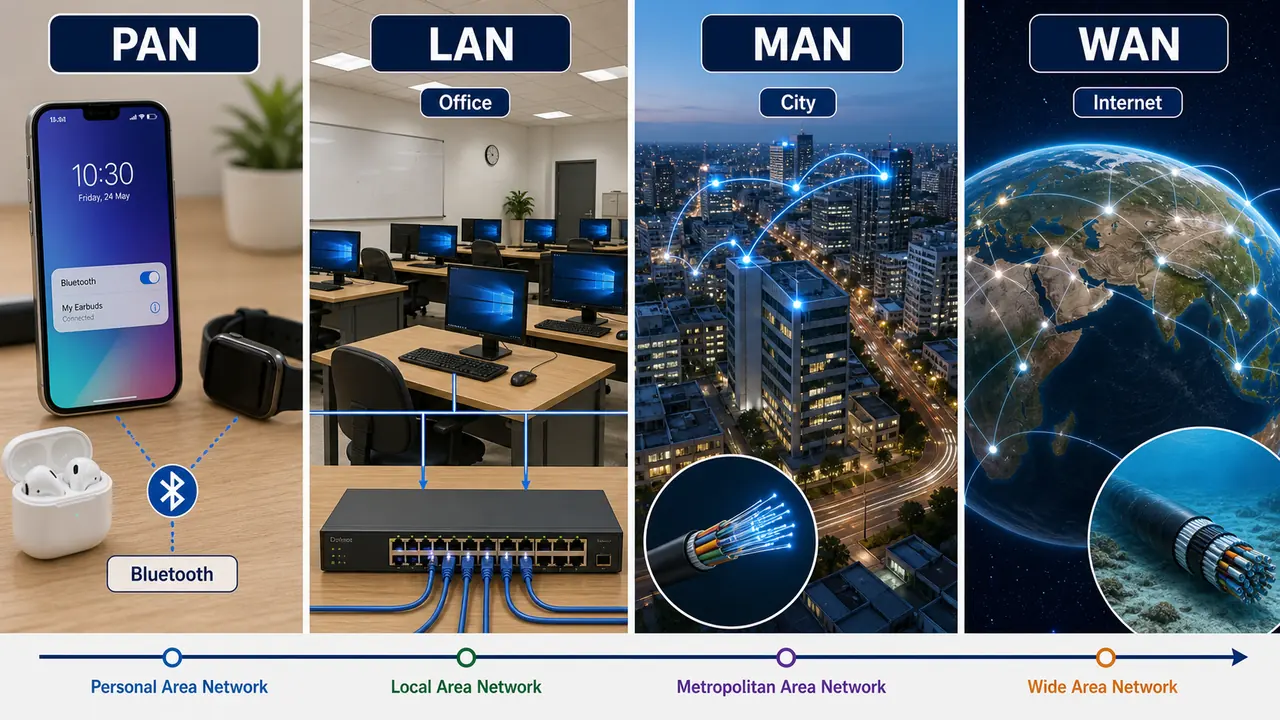
| Network Type | Full Form | Range | Example |
|---|---|---|---|
| PAN | Personal Area Network | ~10 meters | Bluetooth between phone and earbuds |
| LAN | Local Area Network | Within a building/campus | Office network, school computer lab |
| MAN | Metropolitan Area Network | Within a city | Cable TV network, city-wide WiFi |
| WAN | Wide Area Network | Country or worldwide | The Internet itself |
LAN Features
- Covers a small area (single room, building, or campus)
- High data transfer speed (100 Mbps to 10 Gbps)
- Owned by a single organization
- Uses Ethernet cables or WiFi
- Standard PC hardware
WAN Features
- Covers large geographical areas (country, continent, globe)
- Lower speed than LAN (depends on connection)
- Uses telephone lines, fiber optic, satellites
- The Internet is the largest WAN in the world
Network Topologies
Topology is the physical or logical arrangement of computers in a network — how they are connected to each other.
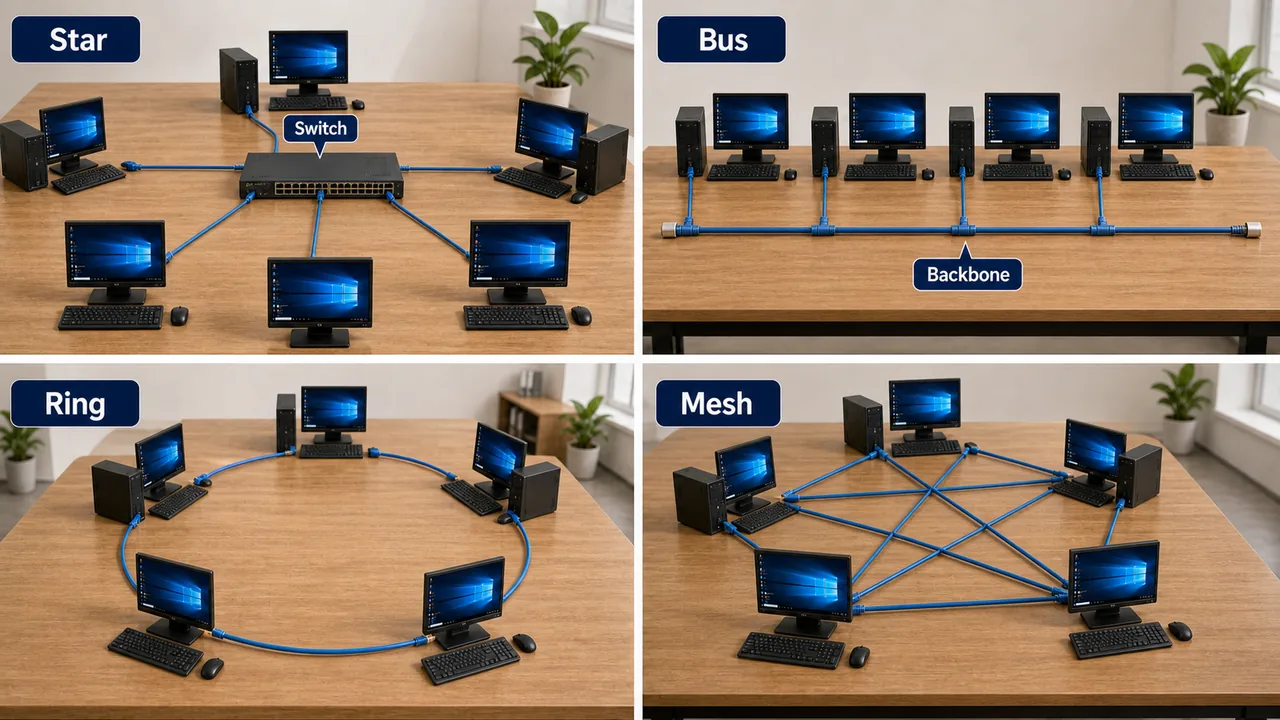
Star Topology
- All computers connect to a central hub or switch
- If one computer fails, others continue working
- If the central hub fails, entire network goes down
- Most commonly used in offices and homes
Bus Topology
- All computers connect to a single backbone cable (bus)
- Data travels in both directions along the cable
- Cheap and easy to install
- If the main cable breaks, entire network fails
- Older technology, rarely used today
Ring Topology
- Each computer connects to exactly two others, forming a circle
- Data travels in one direction around the ring
- If one computer fails, the entire network may be disrupted
- Used in some industrial settings
Mesh Topology
- Every computer connects to every other computer
- Highly reliable — if one connection fails, data takes another path
- Expensive due to many cables
- Used in military and critical systems
Tree (Hierarchical) Topology
- Combination of star and bus topologies
- Computers organized in a hierarchy like branches of a tree
- Used in large organizations with departments
Network Devices
| Device | Function |
|---|---|
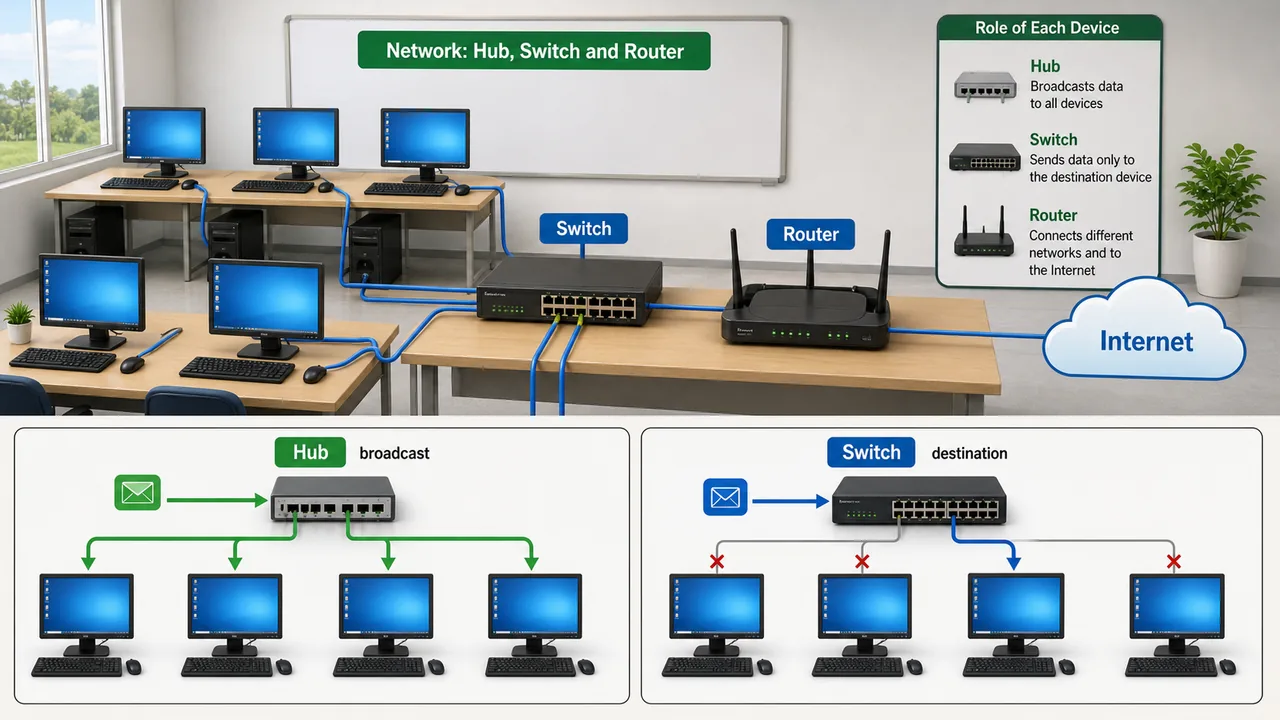
| Hub | Connects multiple devices; sends data to ALL connected devices (not smart) |
| Switch | Like a smart hub — sends data only to the intended device (more efficient) |
| Router | Connects different networks (e.g., your home network to the internet); directs data using IP addresses |
| Bridge | Connects two LANs and filters traffic between them |
| Repeater | Amplifies weak signals to extend network range |
| Gateway | Connects two networks that use different protocols (e.g., LAN to Internet) |
| Modem | Modulator-Demodulator — converts digital signals to analog (and vice versa) for telephone line transmission |
Key difference: Hub sends data to everyone (broadcast); Switch sends only to the destination (unicast). Switch is smarter and more efficient than Hub.
A simple hub is also called a concentrator because it concentrates multiple network connections at one central point.
Transmission Media (Network Cables)
Wired Media
| Cable Type | Description | Speed | Use |
|---|---|---|---|
| Twisted Pair (UTP) | Pairs of copper wires twisted together | 10-1000 Mbps | LAN, telephone |
| Coaxial Cable | Central copper wire with insulation and shielding | 10-100 Mbps | Cable TV, older networks |
| Fiber Optic | Glass/plastic fibers carrying light pulses | Up to 100 Gbps | Internet backbone, high-speed connections |
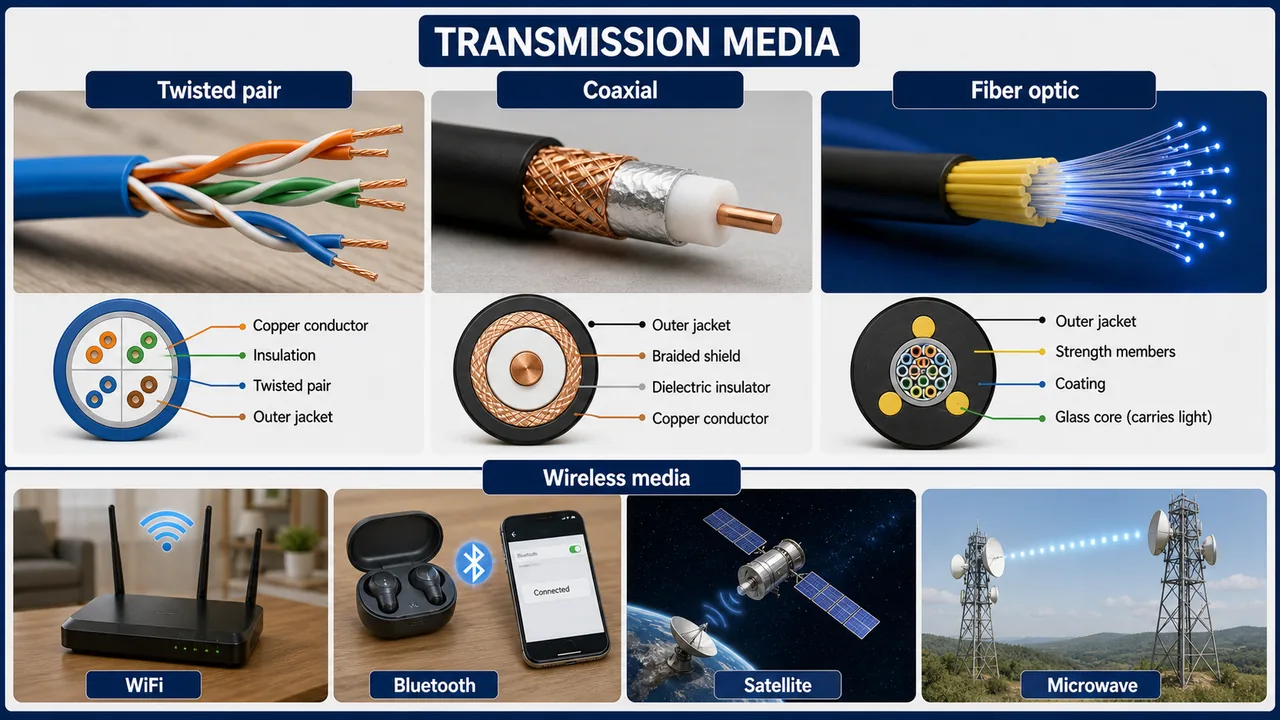
Fiber optic is the fastest — uses light instead of electricity. Immune to electromagnetic interference.
Wireless Media
| Type | Range | Use |
|---|---|---|
| WiFi | ~100 meters | Home/office internet |
| Bluetooth | ~10 meters | Short-range device pairing |
| Infrared | Line-of-sight, short | TV remotes |
| Satellite | Global | GPS, satellite TV, remote areas |
| Microwave | Line-of-sight, long | Point-to-point communication |
Another older but important internet-access term is DSL (Digital Subscriber Line). DSL is a family of technologies used to transmit digital data over ordinary telephone lines.
Network Protocols — Quick Reference
A protocol is a set of rules that governs how data is transmitted between devices on a network. Key protocols used in networking:
| Protocol | Full Form | Purpose |
|---|---|---|
| TCP/IP | Transmission Control Protocol / Internet Protocol | Foundation of the internet |
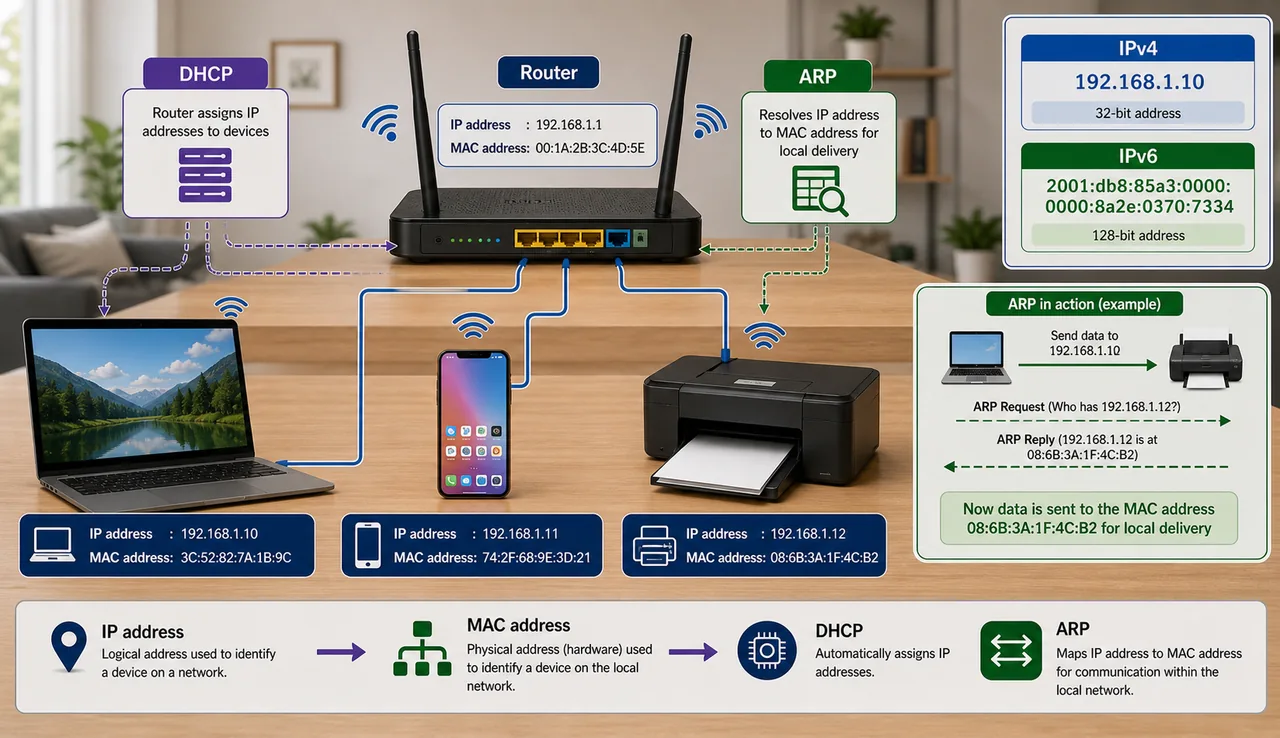
| DHCP | Dynamic Host Configuration Protocol | Auto-assigns IP addresses |
| DNS | Domain Name System | Converts domain names to IP addresses |
| ARP | Address Resolution Protocol | Maps IP address to MAC address |
| ICMP | Internet Control Message Protocol | Error reporting, ping command |
For detailed coverage of HTTP, HTTPS, FTP, SMTP, OSI model, TCP vs UDP, and port numbers — see the Internet & Its Protocols lesson. For email protocols (SMTP, POP3, IMAP) — see the Email & Its Protocols lesson.
In network language, each connected device is often called a node. Data is commonly broken into smaller units called packets before being sent across the network. A broadcast network is one in which a message sent on the shared channel can be received by all connected machines.
When two or more separate networks or network segments are connected together, the process is called internetworking. The resulting connected structure can be described as an internetwork, and the Internet itself is the largest real-world example of this idea.
IP Address
An IP address (Internet Protocol address) is a unique numerical label assigned to every device on a network.
| Version | Format | Example | Addresses |
|---|---|---|---|
| IPv4 | 4 numbers (0-255) separated by dots | 192.168.1.1 | ~4.3 billion |
| IPv6 | 8 groups of hex numbers separated by colons | 2001:0db8:85a3::8a2e | Virtually unlimited |
For IP classes (A-E), NAT, subnet masks, and IPv4 vs IPv6 in depth — see the Internet & Its Protocols lesson.
IPv4 addresses are running out globally, which is why IPv6 was introduced with a much larger address space.
Additional Network Types
| Network Type | Full Form | Description |
|---|---|---|
| CAN | Campus Area Network | Connects multiple LANs within a university campus or corporate campus — larger than LAN but smaller than MAN |
| SAN | Storage Area Network | High-speed network dedicated to data storage devices (disk arrays, tape libraries) — used in data centers |
Networking Standards (IEEE 802)
| Standard | Name | Description |
|---|---|---|
| IEEE 802.3 | Ethernet | Wired LAN standard — defines how data is transmitted over cables |
| IEEE 802.4 | Token Bus | LAN standard where devices share a logical token-passing bus arrangement |
| IEEE 802.5 | Token Ring | LAN standard where a token circulates around a ring to control transmission |
| IEEE 802.11 | WiFi | Wireless LAN standard — 802.11a/b/g/n/ac/ax (WiFi 6) |
| IEEE 802.15 | Bluetooth / WPAN | Wireless Personal Area Network — short-range communication |
IEEE = Institute of Electrical and Electronics Engineers. The 802 family covers all LAN/MAN networking standards.
Another older communication term is ISDN (Integrated Services Digital Network). ISDN was a digital telecommunication standard used to carry voice, data, and signaling over telephone networks. It is not a modern broadband technology, but it remains an important historical networking term.
MAC Address
A MAC (Media Access Control) address is a 48-bit hardware address permanently assigned to each Network Interface Card (NIC).
- Format: AA:BB:CC:DD:EE:FF (6 pairs of hexadecimal digits)
- Unique to every network device in the world
- Works at Layer 2 (Data Link) of OSI model
- Also called physical address or hardware address
- ARP protocol maps IP addresses to MAC addresses
IP address can change (dynamic via DHCP), but MAC address is permanent (burned into hardware). However, MAC spoofing is possible via software.
Client-Server vs Peer-to-Peer Architecture
| Feature | Client-Server | Peer-to-Peer (P2P) |
|---|---|---|
| Structure | Central server serves client requests | All computers are equal (no central server) |
| Control | Centralized | Decentralized |
| Security | Higher (server manages security) | Lower (each peer manages own security) |
| Cost | Expensive (server hardware) | Cheap (no dedicated server) |
| Examples | Website hosting, email servers, banking systems | BitTorrent, blockchain |
| Scalability | Easily scalable with better servers | Difficult to manage at large scale |
Bandwidth Units
| Unit | Full Form | Value |
|---|---|---|
| bps | Bits per second | Base unit |
| Kbps | Kilobits per second | 1,000 bps |
| Mbps | Megabits per second | 1,000 Kbps (home broadband) |
| Gbps | Gigabits per second | 1,000 Mbps (fiber optic) |
| Tbps | Terabits per second | 1,000 Gbps (internet backbone) |
Note: Internet speed is measured in bits per second (Mbps), while file sizes are in bytes (MB). 1 byte = 8 bits. So 100 Mbps speed downloads at ~12.5 MB/s.
Network Topology Comparison
| Topology | Reliability | Cost | Scalability | Cable Failure Impact |
|---|---|---|---|---|
| Star | Good (single node failure OK) | Moderate | Easy to add nodes | Hub failure = total failure |
| Bus | Low | Cheap | Difficult | Main cable break = total failure |
| Ring | Low | Moderate | Difficult | Single break can disrupt entire ring |
| Mesh | Highest | Most expensive | Difficult | Multiple paths — no single point of failure |
| Tree | Moderate | Moderate | Good for hierarchies | Backbone failure = segment failure |
LoRaWAN & Bluetooth Versions
LoRaWAN (Long Range Wide Area Network)
- Designed for IoT (Internet of Things) devices
- Low power consumption — battery can last years
- Long range — up to 15 km in rural areas
- Low data rate (suitable for sensors, not video)
- Used in smart agriculture, smart cities, industrial monitoring
Bluetooth Versions
| Version | Key Feature |
|---|---|
| Bluetooth 4.0 | Introduced BLE (Bluetooth Low Energy) — used in fitness trackers, IoT |
| Bluetooth 5.0 | 2x speed, 4x range compared to 4.2 — better for smart home |
| Bluetooth 5.3 | Latest version — improved energy efficiency, better connection quality |
Summary Points
| Concept | Key Details |
|---|---|
| LAN | Local — within building, fast (Ethernet/WiFi) |
| WAN | Wide — country/global, Internet is biggest WAN |
| MAN | Metropolitan — within a city |
| PAN | Personal — ~10m, Bluetooth |
| CAN | Campus Area Network — multiple LANs within university/corporate campus |
| SAN | Storage Area Network — high-speed dedicated storage network (data centers) |
| Star Topology | All connect to central hub — most common |
| Bus Topology | Single backbone cable — cheap, old, single point of failure |
| Ring Topology | Circle — one node fails can disrupt ring |
| Mesh Topology | All connect to all — most reliable, most expensive |
| Tree Topology | Star + Bus combo — hierarchical, large organizations |
| Hub | Broadcasts to all (dumb) — Layer 1 |
| Switch | Sends to specific device (smart) — Layer 2 |
| Router | Connects different networks, uses IP — Layer 3 |
| Bridge | Connects two LANs, filters traffic |
| Repeater | Amplifies weak signals to extend range |
| Modem | Modulator-Demodulator — analog to digital conversion |
| Gateway | Connects networks with different protocols |
| Fiber Optic | Fastest cable — uses light, up to 100 Gbps, immune to EMI |
| Twisted Pair (UTP) | Common LAN cable, copper, 10-1000 Mbps |
| Coaxial Cable | Central copper wire, shielded — Cable TV, older networks |
| WiFi | ~100m range, home/office |
| Bluetooth | ~10m, short-range device pairing |
| Satellite | Global — GPS, remote areas |
| IEEE 802.3 | Ethernet — wired LAN standard |
| IEEE 802.11 | WiFi — wireless LAN (a/b/g/n/ac/ax = WiFi 6) |
| IEEE 802.15 | Bluetooth / WPAN — short-range wireless |
| MAC Address | 48-bit hardware address — AA:BB:CC:DD:EE:FF — permanent, Layer 2 |
| ARP | Maps IP address → MAC address |
| Client-Server | Centralized — server serves clients (websites, banking) |
| P2P (Peer-to-Peer) | Decentralized — all equal (BitTorrent, blockchain) |
| bps | Bits per second — base bandwidth unit |
| Mbps | Megabits/sec — home broadband speed |
| Gbps | Gigabits/sec — fiber optic speed |
| Tbps | Terabits/sec — internet backbone |
| Speed vs Size | Internet speed in bits (Mbps); files in bytes (MB); 1 byte = 8 bits |
| LoRaWAN | IoT — low power (years on battery), up to 15 km range, low data rate |
| Bluetooth 4.0 | Introduced BLE (Bluetooth Low Energy) — fitness trackers, IoT |
| Bluetooth 5.0 | 2x speed, 4x range vs 4.2 — smart home |
| Bluetooth 5.3 | Latest version — improved energy efficiency |
| TCP/IP | Foundation protocol of Internet |
| DHCP | Auto-assigns IP addresses |
| DNS | Domain name → IP address |
| ICMP | Error reporting, ping command |
| IPv4 | 32-bit, ~4.3 billion addresses (running out) |
| IPv6 | 128-bit, virtually unlimited |
Lesson Doubts
Ask questions, get expert answers