🔒 Cybersecurity & VPN
Zero Trust, DDoS, Ransomware, Phishing, SQL Injection, VPN, firewalls, encryption, and cyber threats for UPSSSC AGTA.
What is Cybersecurity?
Cybersecurity is the practice of protecting computers, networks, programs, and data from unauthorized access, attacks, or damage.
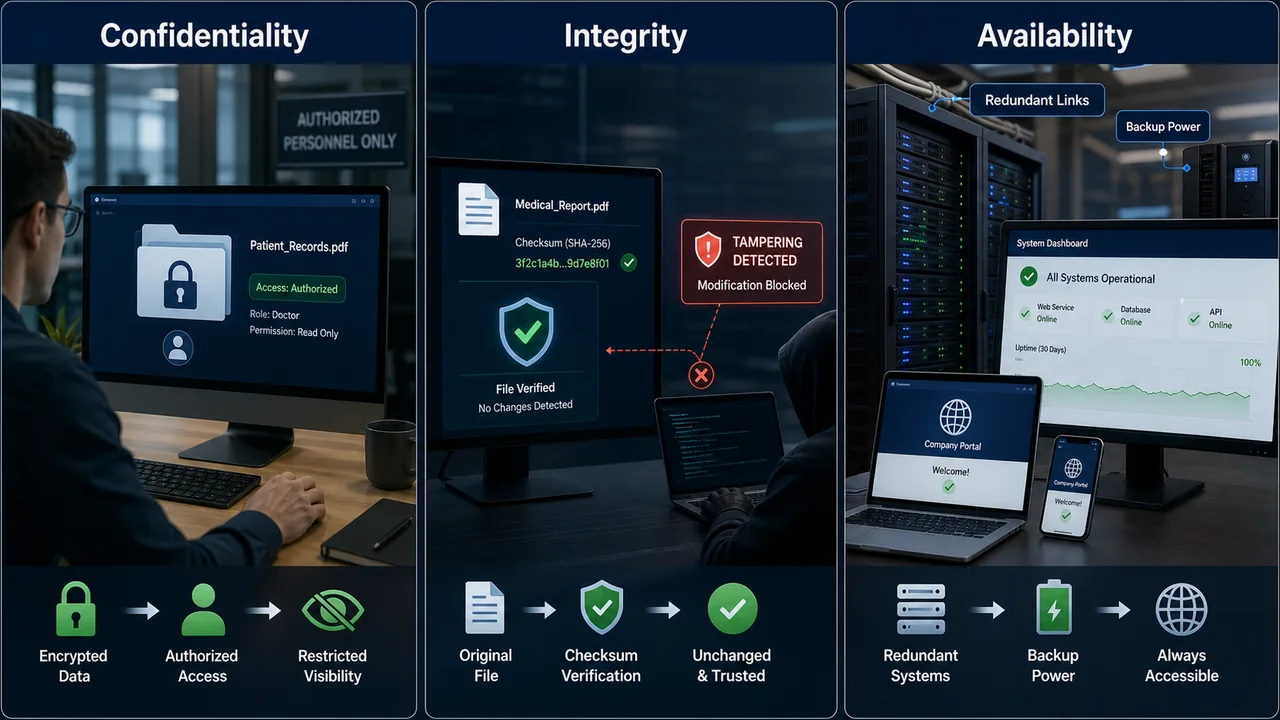
CIA Triad — Foundation of Security
| Principle | Meaning | Example |
|---|---|---|
| Confidentiality | Only authorized users can access data | Encryption, passwords |
| Integrity | Data is not altered without authorization | Hashing, checksums |
| Availability | Systems are accessible when needed | Backups, redundancy |
Types of Cyber Attacks
Social Engineering Attacks
| Attack | Description |
|---|---|
| Phishing | Fake emails/websites to steal credentials |
| Spear Phishing | Targeted phishing aimed at specific individuals |
| Whaling | Phishing targeting senior executives (CEO, CFO) |
| Vishing | Voice phishing (phone calls) |
| Smishing | SMS phishing (text messages) |
| Baiting | Leaving infected USB drives for victims to pick up |
| Pretexting | Creating false scenario to extract information |
Network Attacks
| Attack | Description |
|---|---|
| DDoS | Distributed Denial of Service — floods server with traffic to make it unavailable |
| DoS | Single source overwhelming a server |
| Man-in-the-Middle (MITM) | Attacker intercepts communication between two parties |
| SQL Injection | Inserting malicious SQL code to exploit databases |
| XSS (Cross-Site Scripting) | Injecting malicious scripts into web pages |
| Brute Force | Trying all possible password combinations |
| Spoofing | Faking identity (IP, email, DNS spoofing) |
| Pharming | Redirecting users to a fake website, often by manipulating DNS or host records |
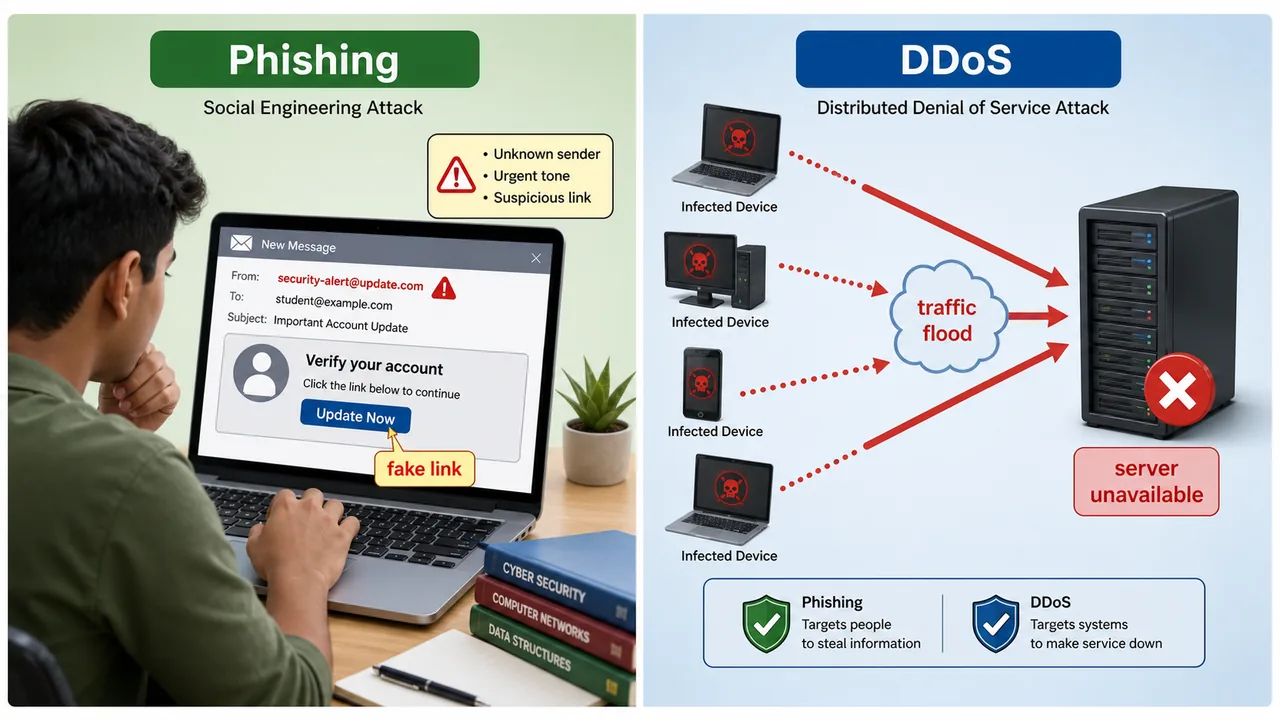
Phishing usually depends on a fake message or link that tricks the user into clicking. Pharming is more deceptive because even entering the correct website name may still send the victim to a fake destination if DNS or local host settings have been tampered with.
Malware Types
Malware (Malicious Software) is any software designed to harm or exploit computers.
| Type | Behavior |
|---|---|
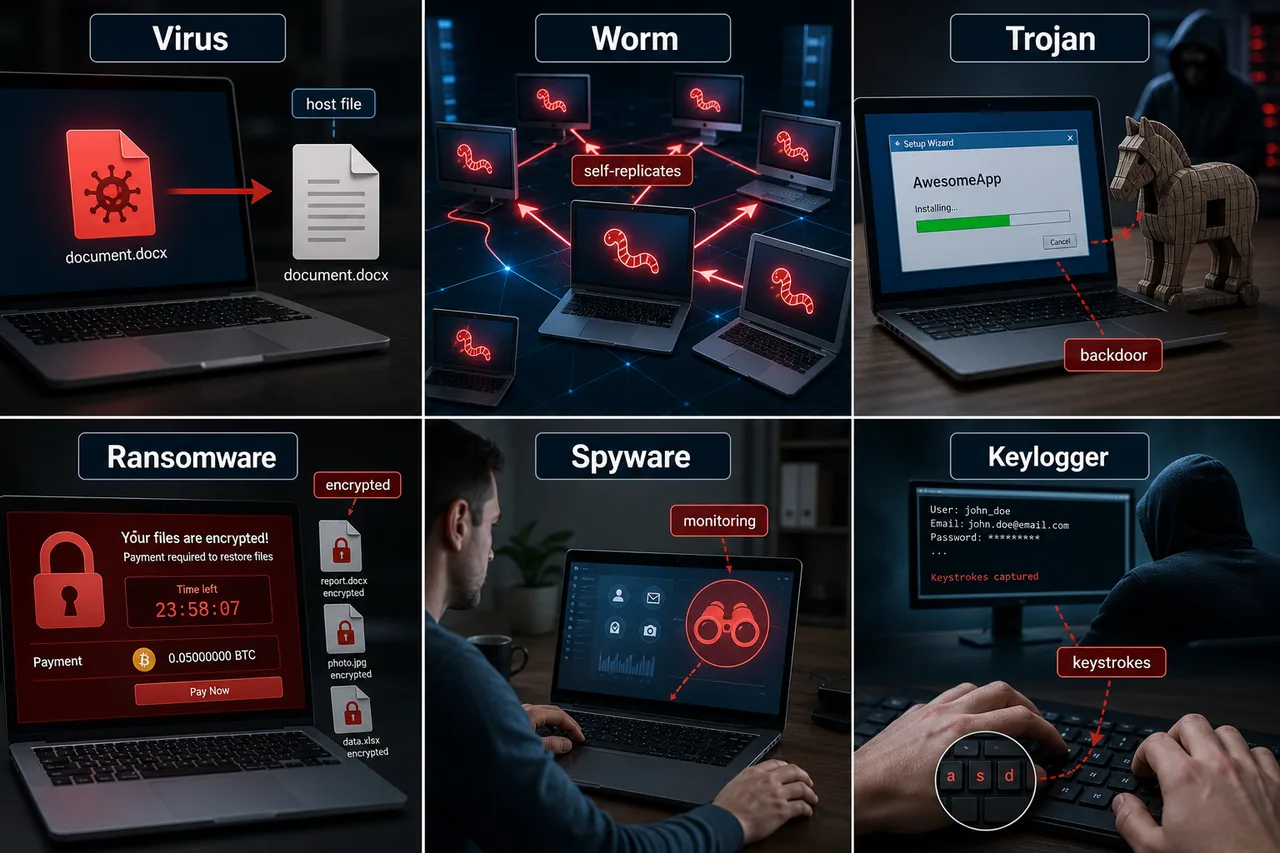
| Virus | Attaches to files, spreads when file is opened, needs host program |
| Worm | Self-replicates across networks without host program |
| Trojan | Disguised as legitimate software, creates backdoor |
| Ransomware | Encrypts victim's files, demands payment to decrypt (e.g., WannaCry) |
| Spyware | Secretly monitors user activity |
| Adware | Displays unwanted advertisements |
| Rootkit | Hides deep in OS, gives attacker root/admin access |
| Keylogger | Records keystrokes to steal passwords |
| Logic Bomb | Activates on a specific condition/date |
| Botnet | Network of infected computers controlled by attacker (for DDoS) |
Key difference: Virus needs a host file; Worm spreads independently. Trojan doesn't replicate — it opens a backdoor.
An infected machine inside a botnet is often called a zombie. The idea is that the computer still belongs to the original user, but it is being remotely controlled by an attacker to send spam, join DDoS attacks, or perform other malicious tasks without the owner's knowledge.
Zero Trust Security Model
Zero Trust = "Never trust, always verify"
- No device or user is trusted by default, even inside the network
- Every access request is authenticated and authorized
- Principle of Least Privilege — give minimum access needed
- Micro-segmentation — divide network into small zones
- Continuously monitors and validates users
Traditional security trusts everything inside the firewall. Zero Trust trusts nothing.
VPN (Virtual Private Network)
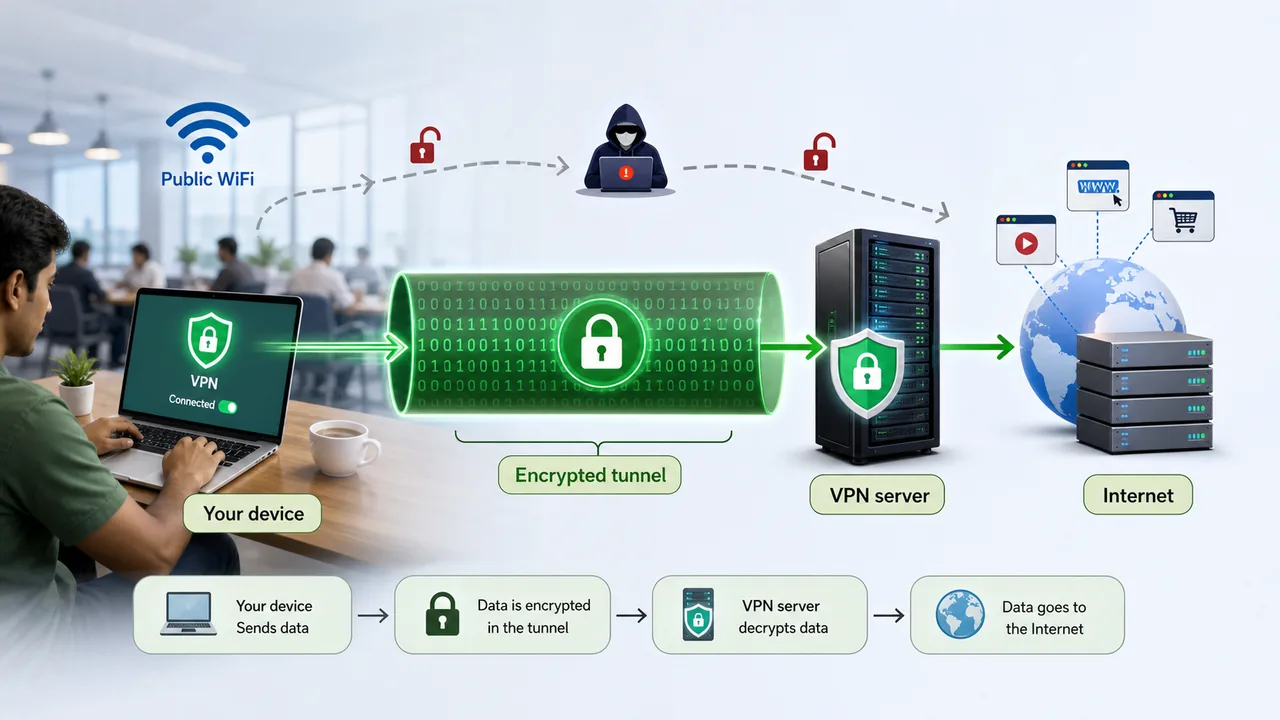
A VPN creates an encrypted tunnel between your device and a remote server, making your internet connection private and secure.
How VPN Works
- Your data is encrypted before leaving your device
- Encrypted data travels through a secure tunnel to the VPN server
- VPN server decrypts and forwards your request to the internet
- Response follows the same encrypted path back
Types of VPN
| Type | Use |
|---|---|
| Remote Access VPN | Individual connects to company network from home |
| Site-to-Site VPN | Connects two office networks permanently |
VPN Tunneling Protocols
| Protocol | Details |
|---|---|
| PPTP | Point-to-Point Tunneling Protocol — fast but weak security |
| L2TP/IPSec | Layer 2 Tunneling + IPSec encryption — more secure |
| OpenVPN | Open-source, strong security, widely used |
| WireGuard | Newest, fastest, simplest code |
Firewalls
A Firewall monitors and controls incoming/outgoing network traffic based on security rules. It acts as a barrier between trusted and untrusted networks.
| Type | Function |
|---|---|
| Packet Filtering | Checks packet headers (IP, port) — basic |
| Stateful Inspection | Tracks active connections — more intelligent |
| Proxy Firewall | Acts as intermediary, hides internal network |
| Next-Gen (NGFW) | Deep packet inspection, application awareness, IPS |
Encryption & Cryptography
Encryption converts readable data (plaintext) into unreadable form (ciphertext) using a key.
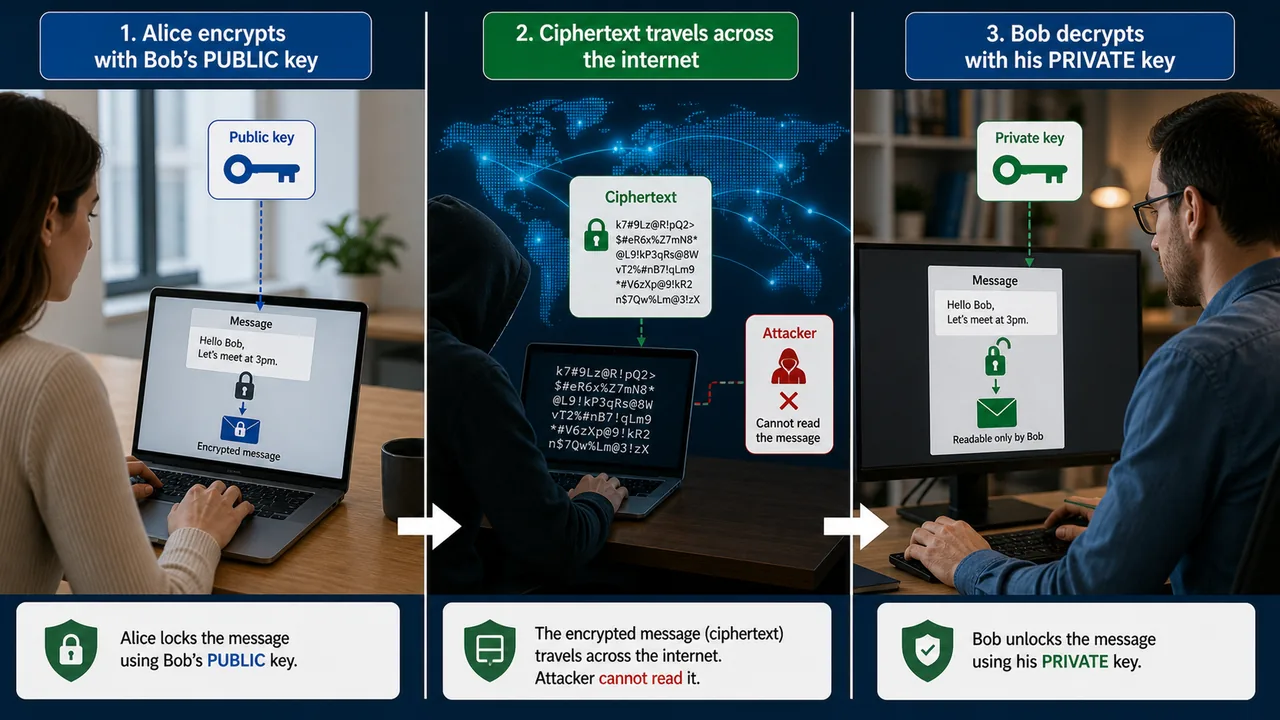
Symmetric vs Asymmetric Encryption
| Feature | Symmetric | Asymmetric |
|---|---|---|
| Keys | Same key for encrypt & decrypt | Two keys (public + private) |
| Speed | Faster | Slower |
| Examples | AES, DES, 3DES, Blowfish | RSA, ECC, Diffie-Hellman |
| Use | Bulk data encryption | Key exchange, digital signatures |
Hashing
Converts data into a fixed-length string. One-way — cannot be reversed.
| Algorithm | Output Length | Use |
|---|---|---|
| MD5 | 128-bit | Checksum (insecure for passwords) |
| SHA-256 | 256-bit | Blockchain, SSL certificates |
| SHA-512 | 512-bit | High-security applications |
Digital Signature & Certificate
- Digital Signature — proves the sender's identity and data integrity (uses sender's private key)
- Digital Certificate — issued by Certificate Authority (CA), verifies website identity (SSL certificate)
- SSL/TLS — encrypts data between browser and server (used in HTTPS)
Authentication Methods
| Method | Description |
|---|---|
| Password | Something you know |
| OTP | One-Time Password sent to phone |
| 2FA (Two-Factor) | Combines two different methods (password + OTP) |
| MFA (Multi-Factor) | Three or more factors |
| Biometric | Fingerprint, face recognition, iris scan |
| CAPTCHA | Proves user is human, not bot |
Three authentication factors: Something you know (password), something you have (phone/token), something you are (biometric).
Authentication checks whether a user or system is really who it claims to be. Authorization decides what that authenticated user is allowed to access or do after identity has been verified.
Indian Cyber Security Framework
| Entity/Law | Role |
|---|---|
| IT Act 2000 | India's primary law for cybercrime and e-commerce |
| IT Amendment Act 2008 | Added sections on cybercrime (66A-removed, 66C, 66D) |
| CERT-In | Computer Emergency Response Team — handles cyber incidents |
| NCIIPC | National Critical Information Infrastructure Protection Centre |
| Cyber Swachhta Kendra | Botnet Cleaning and Malware Analysis Centre |
| National Cyber Security Policy 2013 | Framework for protecting cyberspace |
Famous Ransomware Attacks
| Attack | Year | Details |
|---|---|---|
| WannaCry | 2017 | Exploited Windows SMB vulnerability; affected 150+ countries, 200,000+ computers; demanded Bitcoin ransom |
| Petya / NotPetya | 2017 | Primarily targeted Ukraine; spread globally; disguised as ransomware but was actually a wiper (destroyed data permanently) |
WannaCry was stopped by a security researcher who found a "kill switch" domain. It highlighted the danger of unpatched systems.
Important Sections of Indian IT Act
| Section | Offence | Penalty |
|---|---|---|
| Section 43 | Unauthorized access to computer, data theft, virus introduction | Compensation up to Rs. 1 crore |
| Section 66 | Hacking — dishonestly/fraudulently accessing computer | Up to 3 years imprisonment + fine |
| Section 67 | Publishing obscene content electronically | Up to 5 years + Rs. 10 lakh fine |
| Section 72 | Breach of confidentiality and privacy | Up to 2 years imprisonment + fine |
IT Act 2000 — Key Facts
- India's first cyber law, enacted on 17 October 2000
- Amended in 2008 — added new cybercrime sections (66A-66F, later 66A struck down by Supreme Court in 2015)
- Governs e-commerce, digital signatures, and cybercrime
- Recognizes electronic documents and digital signatures as legally valid
HTTPS, TLS & End-to-End Encryption
| Concept | Details |
|---|---|
| HTTPS Port | 443 |
| TLS | Transport Layer Security — latest version is TLS 1.3 (faster, more secure than TLS 1.2) |
| E2EE (End-to-End Encryption) | Only sender and receiver can read the message; even the service provider cannot access it |
| E2EE Example | WhatsApp uses Signal Protocol for E2EE |
Advanced Security Concepts
| Concept | Description |
|---|---|
| Honeypot | A decoy system designed to attract attackers — used to study attack methods and divert hackers from real systems |
| Zero-day Vulnerability | A security flaw exploited by attackers before the vendor releases a patch — "zero days" of protection |
| Ethical Hacking | Authorized penetration testing to find and fix vulnerabilities before criminals exploit them |
| PKI | Public Key Infrastructure — framework for managing digital certificates and public-key encryption; enables HTTPS, digital signatures |
Types of Hackers
| Type | Description |
|---|---|
| White Hat | Ethical hackers — authorized security testing, work with organizations |
| Black Hat | Criminal hackers — unauthorized access for personal gain or damage |
| Grey Hat | Between white and black — may hack without permission but without malicious intent, often report vulnerabilities |
An antivirus software package is designed to prevent, detect, quarantine, and remove viruses and other malware. In older computer-awareness terminology, a cracker is a malicious intruder who breaks security for misuse or damage, while the word hacker can be used more broadly and may even include ethical security experts depending on context.
CERT-In Mandatory Reporting (2022)
In April 2022, CERT-In issued a directive requiring:
- All organizations must report cybersecurity incidents within 6 hours of detection
- Applies to data breaches, ransomware, DDoS attacks, unauthorized access
- VPN providers must maintain user logs for 5 years
- Cloud and VPN service providers must register user details
This is one of the strictest incident reporting timelines in the world. Non-compliance can lead to penalties under IT Act.
Summary Points
| Concept | Key Details |
|---|---|
| CIA Triad | Confidentiality, Integrity, Availability |
| Phishing | Fake emails to steal credentials |
| Spear Phishing | Targeted phishing at specific individuals |
| Whaling | Phishing targeting senior executives (CEO, CFO) |
| Vishing / Smishing | Voice phishing / SMS phishing |
| DDoS | Distributed Denial of Service — floods server with traffic |
| MITM | Man-in-the-Middle — intercepts communication |
| SQL Injection | Malicious SQL code in database queries |
| XSS | Cross-Site Scripting — injects scripts into web pages |
| Brute Force | Tries all possible password combinations |
| Virus vs Worm | Virus needs host file; Worm self-replicates across networks |
| Trojan | Disguised as legit software, opens backdoor |
| Ransomware | Encrypts files, demands money |
| WannaCry (2017) | Exploited Windows SMB vulnerability; 150+ countries; Bitcoin ransom |
| Petya/NotPetya (2017) | Targeted Ukraine; actually a wiper (destroyed data permanently) |
| Keylogger | Records keystrokes to steal passwords |
| Rootkit | Hides deep in OS, gives root/admin access |
| Logic Bomb | Activates on specific condition/date |
| Botnet | Network of infected computers (used for DDoS) |
| Zero Trust | Never trust, always verify — Least Privilege + Micro-segmentation |
| VPN | Encrypted tunnel for private internet |
| PPTP | Fast but weak VPN security |
| L2TP/IPSec | Secure VPN — Layer 2 + IPSec encryption |
| OpenVPN | Open-source, strong security, widely used |
| WireGuard | Newest, fastest, simplest VPN protocol |
| Packet Filtering FW | Checks packet headers (basic firewall) |
| Stateful FW | Tracks active connections (smarter) |
| NGFW | Deep packet inspection, app awareness, IPS |
| AES / DES / 3DES | Symmetric encryption (same key, fast) |
| RSA / ECC | Asymmetric encryption (2 keys, key exchange) |
| MD5 | 128-bit hash — insecure for passwords |
| SHA-256 | 256-bit hash — blockchain, SSL certificates |
| Digital Signature | Proves sender identity (uses private key) |
| Digital Certificate | Issued by CA — verifies website identity |
| PKI | Public Key Infrastructure — manages certificates & public-key encryption |
| TLS 1.3 | Latest TLS — faster, more secure than TLS 1.2 |
| E2EE | End-to-End Encryption — only sender & receiver can read |
| WhatsApp E2EE | Uses Signal Protocol for E2EE |
| HTTPS Port | 443 |
| Honeypot | Decoy system to attract & study attackers |
| Zero-day | Vulnerability exploited before vendor releases patch |
| Ethical Hacking | Authorized penetration testing |
| White Hat | Ethical hackers — authorized security testing |
| Black Hat | Criminal hackers — unauthorized access |
| Grey Hat | Unauthorized but non-malicious — often report vulnerabilities |
| 2FA / MFA | Two-factor / Multi-factor authentication |
| 3 Auth Factors | Know (password), Have (phone/token), Are (biometric) |
| CAPTCHA | Proves user is human, not bot |
| IT Act 2000 | India's first cyber law — enacted 17 October 2000 |
| IT Act Amendment 2008 | Added sections 66A-66F (66A struck down by SC in 2015) |
| Section 43 | Unauthorized access — compensation up to Rs 1 crore |
| Section 66 | Hacking — up to 3 years imprisonment + fine |
| Section 67 | Obscene content — up to 5 years + Rs 10 lakh fine |
| Section 72 | Privacy breach — up to 2 years imprisonment + fine |
| CERT-In | Computer Emergency Response Team — handles cyber incidents |
| CERT-In 6-hour Rule | April 2022 — mandatory incident reporting within 6 hours |
| VPN Log Mandate | VPN providers must maintain user logs for 5 years (2022) |
| NCIIPC | National Critical Information Infrastructure Protection Centre |
| Cyber Swachhta Kendra | Botnet Cleaning and Malware Analysis Centre |
Lesson Doubts
Ask questions, get expert answers